

In this article, you will learn how to enable or install RDLC Report Designer in Visual Studio 2017.
Visual Studio 2017 does not have RDLC Reporting Tools installed by default in the toolbox. We have to install it by downloading and installing the Extensions Microsoft RDLC Report Designer for the Visual Studio. I have already posted a few articles on,
Visual Studio 2017 does not have RDLC Reporting Tools installed by default in the toolbox. We have to install it by downloading and installing the Extensions Microsoft RDLC Report Designer for the Visual Studio. I have already posted a few articles on,
A few people told me that they were not able to see RDLC Report options in the Visual Studio so, this article will definitely help them in order to enable RDLC Report in Visual Studio 2017.
Let’s begin!
We can install Microsoft RDLC Report for Visual Studio 2017 in two ways,
Let’s begin!
We can install Microsoft RDLC Report for Visual Studio 2017 in two ways,
- Installing from "Extensions and Updates" in Visual Studio 2017. Go to Visual Studio’s Tools Menu > Extensions and Update > Select Microsoft RDLC Report Designer and Reporting Services Project for the Visual Studio.
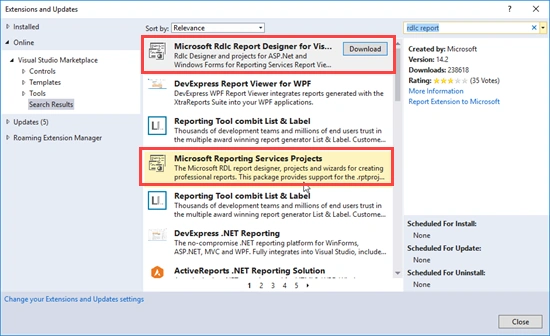
After installing, you have to restart the Visual Studio.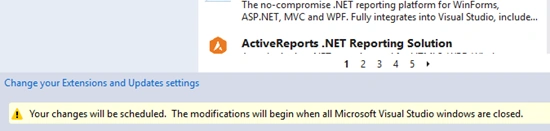
- Downloading and installing from Visual Studio MarketPlace. (Search for Microsoft RDLC Report in the search bar and you will easily find the link).
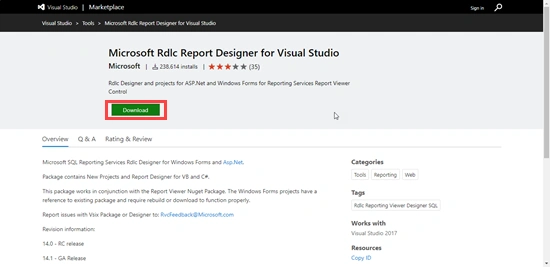
Once the installation completes, you have to close/ restart all the instances of the Visual Studio.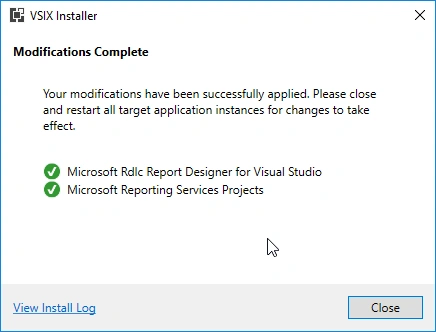
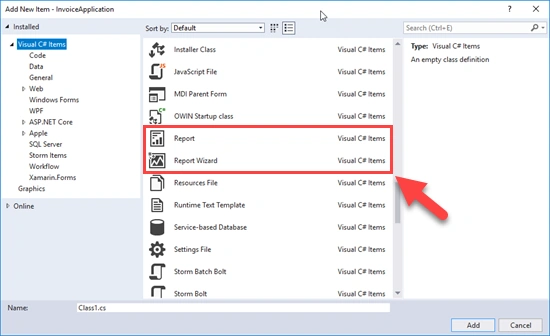
Now let’s add RDLC Report Viewer in the toolbox. As I am working on a Windows form application, I need report viewer control in the toolbox so that I can Drag and Drop it easily on the forms where I want to use it.
Open NuGet Package Manager and search for Microsoft Report Viewer.
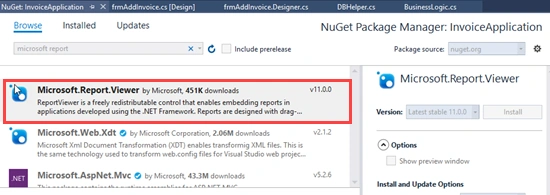
You can also run the below commands in NuGet Package Console in order to download the Report Viewer.
For WebForms use,
"Install-Package Microsoft.ReportingServices.ReportViewerControl.WebForms"
For WindowsForm use,
"Install-Package Microsoft.ReportingServices.ReportViewerControl.WinForms"
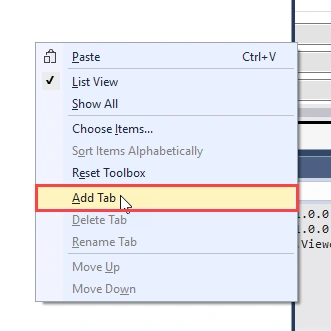
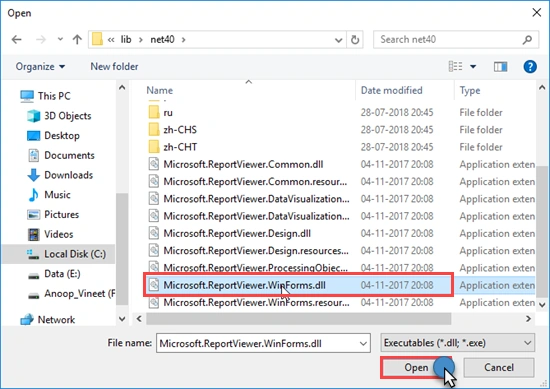
Now, right-click on the Toolbox in order to add a new tab and give it a name (Reporting Services).
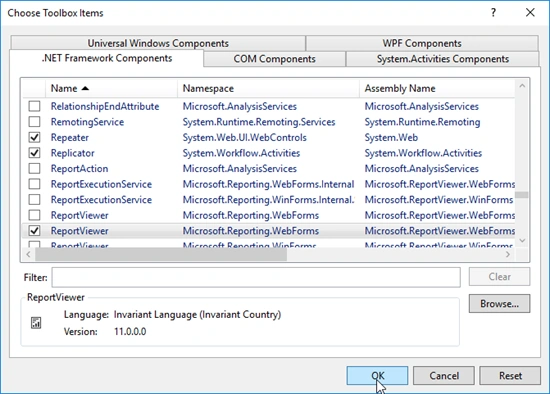
Right-click on the newly added tab and click on "Choose items...".
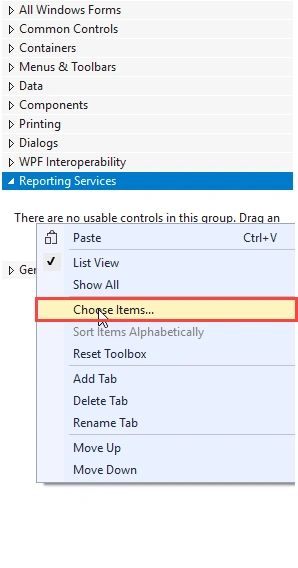
Click on Ok button.
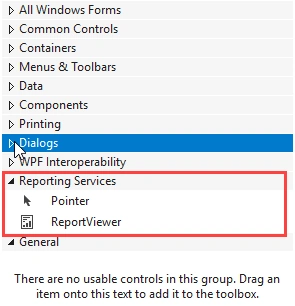
Report Viewer control added successfully to the toolbox.
I hope this will help you. For more details related to using the Report Viewer in ASP.NET WebForm application, check the below Microsoft Article.
Mauro CandidoPosted Feb 3, 2021, 8:09 PM
Another patel
ShahnawazPosted Apr 10, 2020, 8:49 AM
RDLC report is possible in ASP.Net Core?
vivek chaturvediPosted Feb 26, 2020, 6:38 AM
It is possible to work .net core application with above DLL
imran_zetaPosted Nov 28, 2019, 4:58 AM
Https://marketplace.visualstudio.com/items?itemName=ProBITools.MicrosoftRdlcReportDesignerforVisualStudio-18001You have to add extention
Phill AramPosted Jul 26, 2019, 7:56 AM
Adem?s de los pasos descritos se debe agregar en la referencia del proyecto las dem?s DLL, de lo contrario el control gr?fico de ReportViewer no va a funcionar. Lo que no logro hacer es mostrar el reporte en ejecuci?n.
Laura JonsdottirPosted Jun 26, 2019, 5:23 PM
Hi, I did everything from the instructions and the only thing I got was an icon below (where the data sources are shown) with the name 'ReportViewer1', but nothing in the design of the form... Do you have any idea why is that? Many thanks in advance and keep up the good work!
shital khalanePosted May 24, 2019, 1:14 AM
In visual studio 2017
shital khalanePosted May 24, 2019, 1:14 AM
Hiii anoop i am facing issue regarding crystal i can see my designer of crystal report plzz give me solution on that
venu gopal RayapatiPosted Mar 16, 2019, 9:03 AM
ReportViewer viewer = new ReportViewer(); viewer.ProcessingMode = ProcessingMode.Local; viewer.LocalReport.ReportPath = "AckEmlReport.rdlc";
venu gopal RayapatiPosted Mar 16, 2019, 9:00 AM
HI Anoop, I have a Console APplications where we are getting data from Service and converted to Dataset and created rdlc also, its acts as a job.. my work is get the data and create the rdlc report and send the report to email.. but the thing I am not able to create the report, cpould you please help me..?
Muharrem ErgoktasPosted Mar 14, 2019, 2:28 AM
First of all, thanks for sharing such a knowledge.With Win 10 Enterprise, and VS 2017 Community edition on my laptop, I made the both installations successfully from the vsix files. But I still don't get the report item when I want to add new item to my project. Any help will be appriciated.
Hadshana KamalanathanPosted Aug 16, 2018, 12:58 AM
Thanks for sharing