

This article will show you some features of the Windows Installer XML, such as: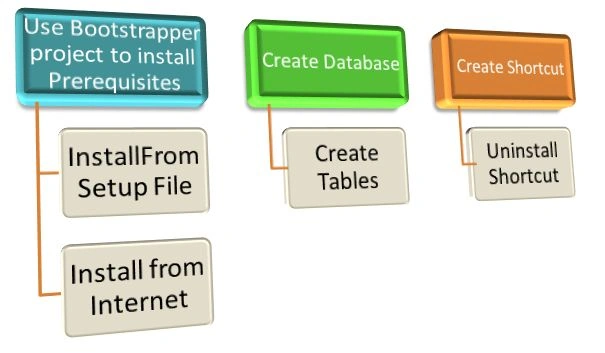
NOTE: If you are new to Windows Installer XML than please refer to my article Getting Started with WIX; here is the link: http://www.c-sharpcorner.com/UploadFile/cb88b2/getting-started-with-wix-windows-installer-xml-in-vs2012/.
USING A WIX BOOTSTRAPPER PROJECT TO INSTALL PREREQUISITES
Why use a WIX Bootstrapper project?
In our project there are so many things that we need to install before our software will be installed. At that time we can use this to bundle the prerequisites (like .Net Framework, SQL etc.) of Software or Website. Using this we can put all the necessary things into a single package so it is easy to manage.
How to add a prerequisites to the project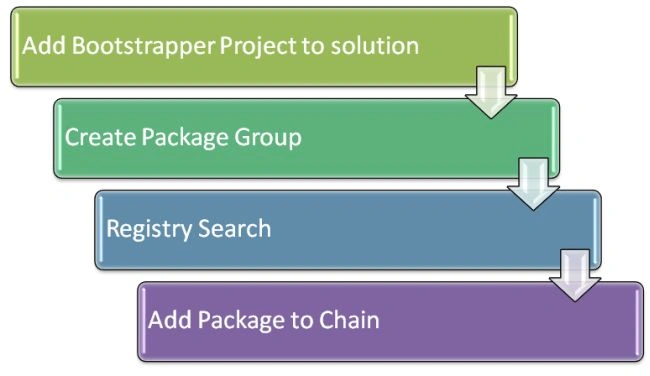
Add Bootstrapper Project to Solution
To add a new Bootstrapper project to Visual Studio 2012:

Figure 1: Add Bootstrapper Project
Create Package Group
Here we have two options that :
- We can install prerequisites from our setup file
We can download from internet than install file
Install Prerequisites from our setup file
Note: In the "WixDemoWPFAppVS2012.rar" file I have not added "dotNetFx40_Full_x86_x64.exe". Since it is greater than 10 MB in size and I cannot upload the file. Please download it and add that into you project as I have explained in the article.
In this example we will install the .Net Framework 4.0 Full as a prerequisite. You can download that from the link: http://www.microsoft.com/en-in/download/details.aspx?id=17718.
After downloading we need to add that "dotNetFx40_Full_x86_x64.exe" to our Bootstrapper project.
Copy the downloaded file, do the right-click on the bootstrapper project and just paste it.
Figure 2: Copy and Paste the File
Now create a <packageGroup> in the <Fragment> and now in the package Group we have an <Exepackage> element. To understand all the properties please refer to this link: http://wix.sourceforge.net/manual-wix3/wix_xsd_exepackage.htm.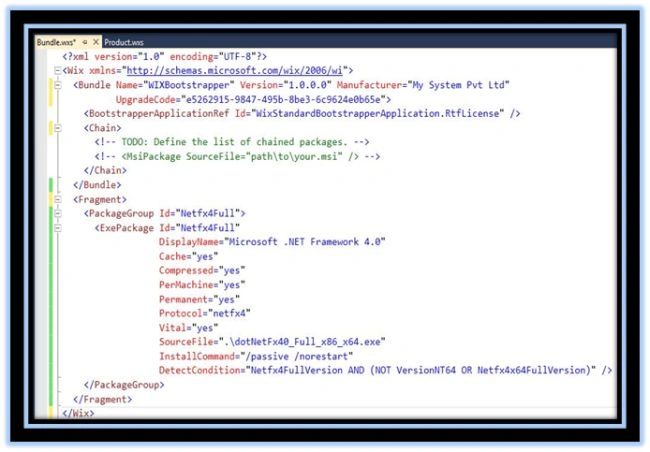
Figure 3: ExePackage Element
SourceFile: Location of the package to add to the bundle. The default value is the Name attribute, if provided. At a minimum, the SourceFile or Name attribute must be specified.
Compressed: Whether the package payload should be embedded in a container or left as an external payload.
This will add our .Net Framework 4.0 exe to the setup file.
Search Registry
Before installing .Net Framework 4.0 we will determine whether it is already installed; if it is not then we will install it.
To do that we need to search the Registry Values and to do that we need to do add a reference of WixUtilExtention.dll to our project.
Figure 4 Add WixUtilExtension.dll
Add that file to the <WIX> element: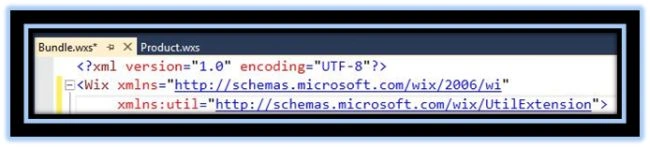
Figure 5: Add UtilExtension to Wix element
Now search the Registry values:
Figure 6: Search Registry
Add the package to the chain.
Now we have added that package to the Chain.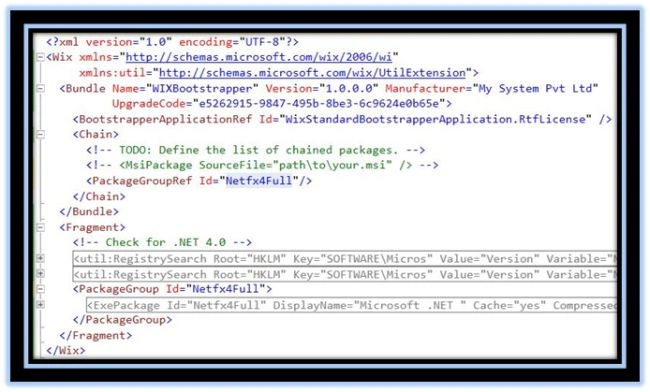
Figure 7: Add Package to Chain
We can download from the internet then install the file.
Note: Though we are downloading the file from the internet while setup is running but at the time of the build the project we need to add that file to the solution.
To download it from the internet we need to add a property DownloadURL and Compressed.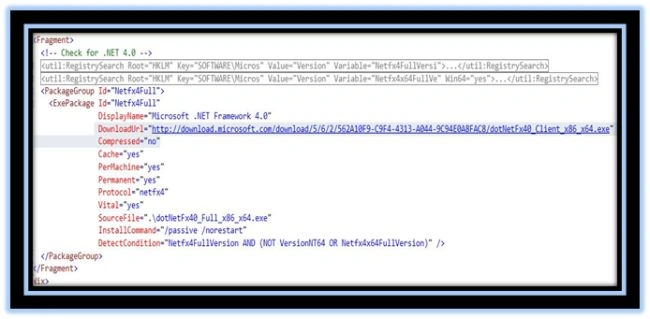
Figure 8: add DownloadUrl Property
It will not add a source file to the setup file but when installation is running and it will not find .Net Framework 4.0 in the system then it will download it from the given link.
In both ways you can specify ExePackage, then all the steps are same. We can use this for installing any .exe file.
Note: Add your *.msi file to the Bootstrapper project and add the reference of the setup project to the Bootstrapper project.
Add a reference of the setup project to the Bootstrapper project.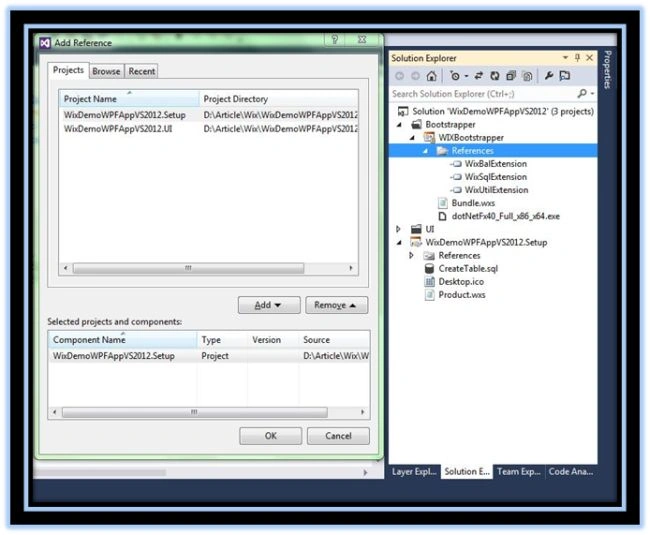
Figure 9: Add setup project to the Bootstrapper project
Add WixDemoWPFAppVS2012.Setup.msi file to the Bootstrapper project:
Figure 10: Add WixDemoWPFAppvs2012.setup..msi file to project
Now just build your Bootstrapper project and open the bin folder and run the setup.
Creating Database
Note: We will add these things to our product.wxs (see the Figure 11). I have explained about that file in my previous article. The database will not be added to the Bootstrapper (bundle.wxs) project.
You can get Product.wxs from the link: http://www.c-sharpcorner.com/UploadFile/cb88b2/getting-started-with-wix-windows-installer-xml-in-vs2012/.
Or you can get that file in the .rar file of this article.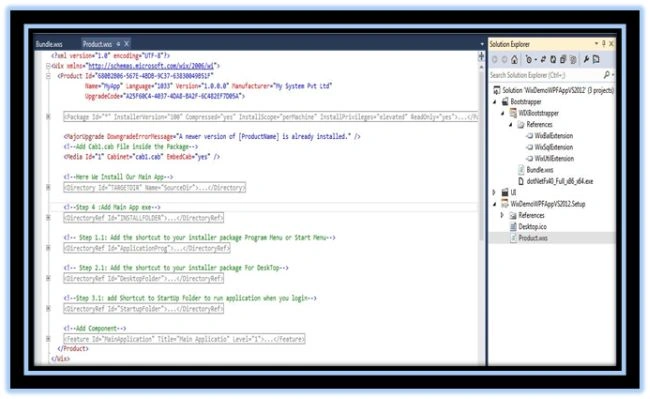
Figure 11: Product.wxs file
To create a database in SQL we can use this procedure:
- Add the reference of the two files in our
solution:
- WixUtilExtension.dll
-
WixSqlExtension.dll
- Create a database user
- Add the *.sql file to create the database
Add a reference of the two files in our solution: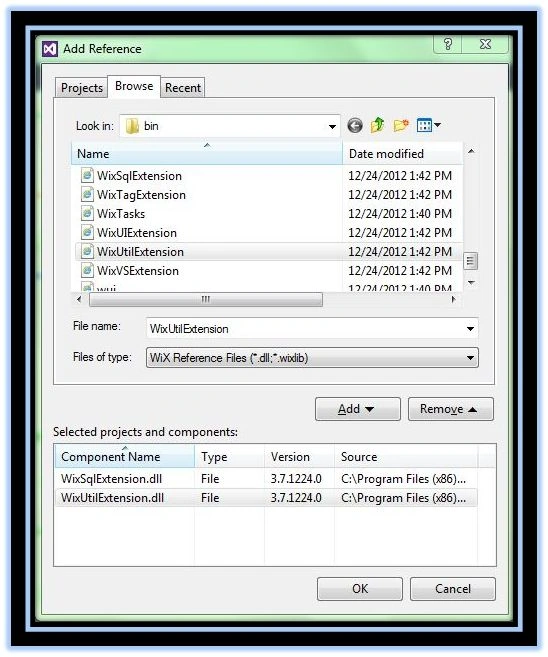
Figure 12: Add SQL and Util Extension DLL Files
Add that DLL file to the Product.wxs file: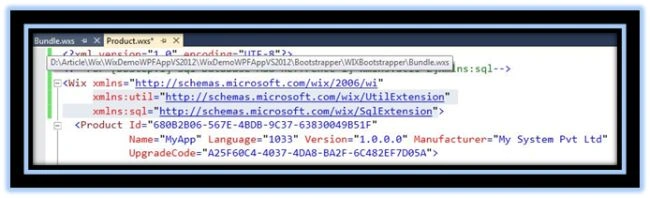
Figure 13: Add the DLL files to the Product.wxs File
Create a database user and add a *.sql file: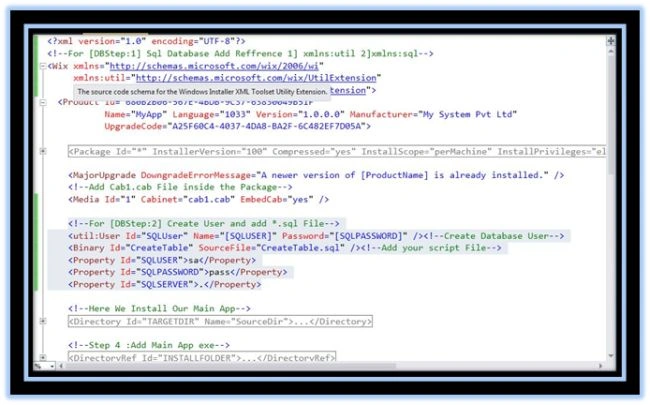
Figure 14: Create Database User
We need to provide the CreateTable.sql file in the solution. To do that just copy that file and paste it to the solution.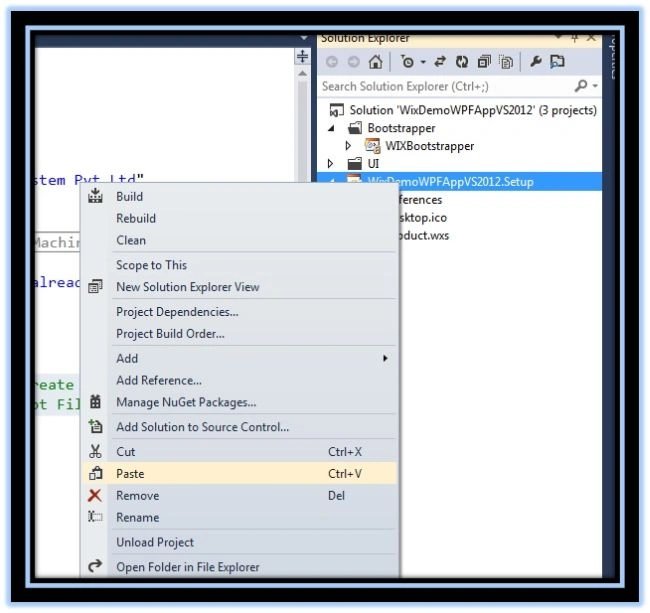
Figure 15: Add CreateTable.sql
Add a new component for the database: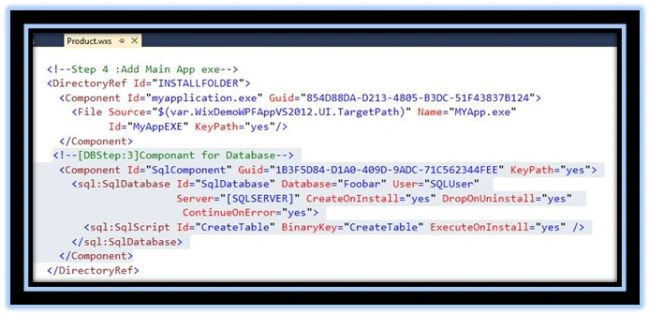
Figure 16: Add New Database component
Add that component to the features.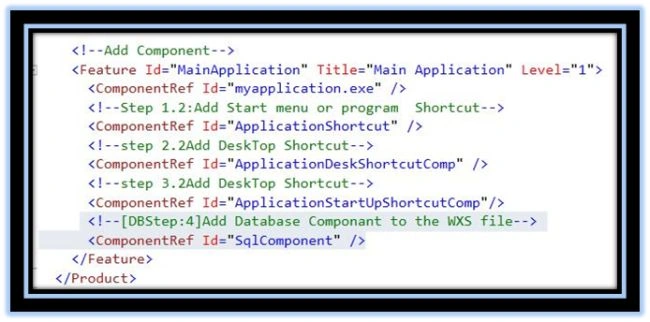
Figure 17: Add Component to the Feature
Now just build you project and run the setup file; it will create a database with a table.
Creating Uninstall Shortcut
This shortcut is used to uninstall the application and its data it will be created in the Program Menu Folder.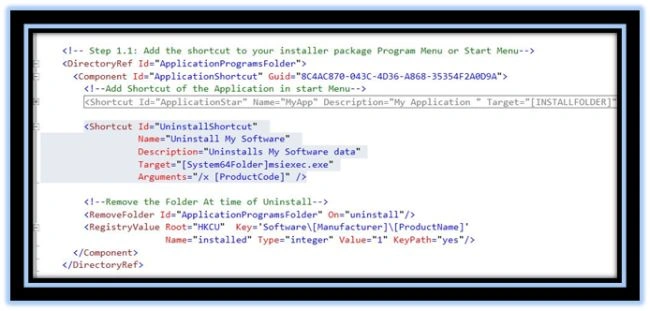
Conclusion: we can use WIX to install perquisites and create databases; we can do that very easily using WIX.
If this article helps you than please let me know by your comments.
kamal vPosted Aug 25, 2022, 9:20 AM
HI..I looking for adding prerequisites dialog in bootstrapper msi. like user want to select the prerequisites components based on registry .. if there any way to add that dialog in Wix bootstrapper? please... thanks in advance.
luis perezPosted Sep 28, 2020, 2:41 PM
Hi dude, this is the only post that I read that explain realy well how to achieve the boostraping of a prerequisite, my doubt is if in the same bundle project can I add an SQL express installation only adding PackageGroup tag with sql server express arguments? how can I get one file with setup project and prerequisite run by the end user? and the last one is posible to add msi file like you are adding an exe file? thanks in advance
Satish DPosted Mar 13, 2020, 3:18 AM
Hi sir.. I am trying to install Visual Studio Code (https://code.visualstudio.com/docs/?dv=win64user), from this link automatically via Wix setup file [checkbox if checked]. I am not able to achieve the task.. Please help me.
MichaelPosted Nov 9, 2016, 4:36 AM
Hi is there a way to customize what the user can check to install on the target machine, for instance, we have a web project and a services project but in some cases we will only want to install the web project on the server and vice versa, is there a way to do this without creating extra setup projects?
Mohan ChandraPosted Oct 6, 2016, 1:14 AM
Skype Id - manojkandpal192
Mohan ChandraPosted Oct 6, 2016, 1:14 AM
Can you join me in skype sir please?
Mohan ChandraPosted Oct 4, 2016, 5:34 AM
Can I debug Custom Action code? in our product its actually creating database and tables by custom action but i am not able to debug with break point because its not going in custom action page
Hema MPosted Aug 1, 2016, 1:38 PM
Its working fine on windows 7
Hema MPosted Aug 1, 2016, 1:38 PM
I am not able to installed sql express 2012 o windows 10 pro OS machine through the wix bootstrapper
Vineet MorePosted Jan 6, 2016, 7:04 AM
Hello, Nice Artice. I have a small query where i am not able to provide the MSI path in my bundle.wxs as mentioned in your article. If i use the same varibale as mentioned above i am getting an error as undefined variable when building the project. Please let me know where am i wrong.
eternaldeniedchris .Posted Sep 15, 2015, 7:11 AM
Nice Article! any links for custom Bootstrapper Application (installation based on user inputs through checkbox) ?
Maydelis NodarsePosted Jan 27, 2015, 8:33 PM
Hello, your article it's very good, you explain very well. I follow the steps in my bootstrap project and I have some problems: 1 - when I execute my setup there is dialog asking for agreement, how can I avoid it and start directly with .Net framework installation? 2 - although my app is installed (setup finish well), it has a dialog for user license entry and it never shows up, what could happen? Maybe I'm missing something. Also, I need to install mySql Server (and create a database) as part of my app installation, I've tried with custom actions, command actions, .bat file and nothing works to me. Could you give me a hint, a good way to get it. Help, please.
alireza ramezaniPosted Dec 27, 2014, 10:46 PM
it's very good article,very power full, thank you a milioin
fdfsdfds dfsdsdfPosted Oct 10, 2013, 9:40 AM
Thanks! Great work.
Jay ParekhPosted Aug 2, 2013, 2:55 AM
@Bruce Zhao,Hi Yes you are right,that Project was missing there but i have added ,please check it and if you find any problem than please let me know,thanks a lot for informing me.
Bruce ZhaoPosted Jul 31, 2013, 11:55 PM
Hey Jay, i do not find the Bootstrapper Project in the WixDemoWPFAppVS2012.rar, can you add it?
Jay ParekhPosted Jun 20, 2013, 6:02 AM
Thanks Hiren Bhai, I have already done that thing , i will definitely write article on that .
Bharadwa HirenPosted Jun 20, 2013, 5:56 AM
Hey Jay can you do a wix installation with custom dialog using WPF Techology. If you can do that it would be a good and helpful artical
Bharadwa HirenPosted Jun 20, 2013, 5:54 AM
good work. keep it up Jay......