

Introduction
In this tutorial we will try to understand how we can use interfaces and factory pattern to create a truly decoupled architecture framework. In this sample we will take up a simple three tier architecture and apply interfaces and factory pattern to see how we can transform the three tier in to a truly decoupled architecture.
Everyone's favorite the three tier architecture
Ok, everyone know what's a three tier architecture is. I will talk a bit about it and then we will get down to the issues related to three tier architecture. So basically as we all know in three tier architecture the UI code is in the client section, business object are nothing but business classes which has the business validation and the data access layer does all the database operations. Till here everything is good and nice.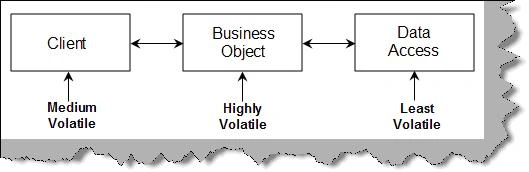
If we analyze these three sections one of the important points to be noted is that business validations are highly volatile. Business rules change as the way of business changes with changing times.
The second volatile section is the client. People would like to have support for multiple clients depending on user interfaces. This is not so volatile as compared to business objects changes. Even if the customer wants to change its not on urgent basis. Business validations needs to be changed instantly.
Data access is the least volatile of all. At least in my whole project career I have still to come across project who wants to migrate from one database to other database frequently. There are times when there is a need but that's not urgent and is treated as a migration project.
So the conclusion business sections are the most volatile and when there is a change it needs to be changed instantly as compared to UI and back end databases.
Controlling change ripples
Below is a business class called as "clsInvoiceHeader". You can see in the code snippet the user interface is setting the value of the business object. So the user interface is directly consuming the class.
clsInvoiceDetail objInvoiceDetail = new clsInvoiceDetail();
objInvoiceDetail.CustomerName = txtCustomerName.Text; objInvoiceDetail.CustomerAddress = txtCustomerAddress.Text;
objInvoiceDetail.InvoiceComments = txtComments.Text;
objInvoiceDetail.InvoiceDate = Convert.ToDateTime(txtInvoiceDate.Text);
At the other end when the businesses object connects with the data access layer it's sending the values in a normal .NET data type. You can see how the "InsertInvoiceDetails" of the DAL component had normal .NET data types passed.
public class clsInvoiceDetail
{
public void Insert(int _InvoiceReference)
{
clsInvoiceDB objInvoiceDB = new clsInvoiceDB();
objInvoiceDB.InsertInvoiceDetails(_Id, _InvoiceReference, _ProductId, _Qty);
}
}
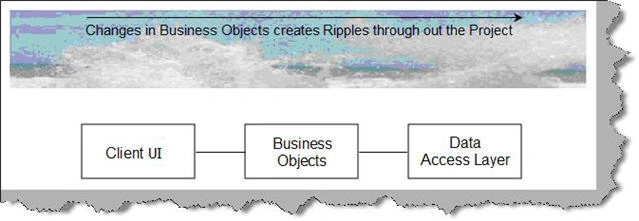
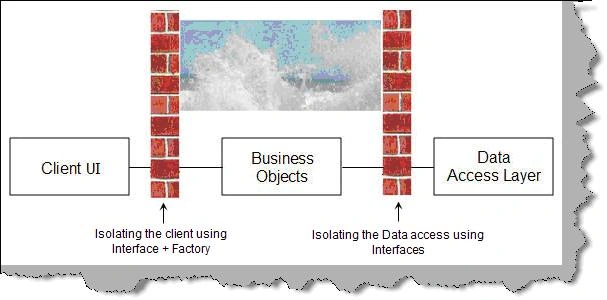
So what will happen if the business objects change?. It will just ripple changes across all the three layers. That means you need compile the whole project.
Roshan NaralkarPosted Jan 28, 2013, 2:13 AM
please attach invoice.mdf
manjerekar_77editedPosted Feb 15, 2010, 4:22 AMEdited Feb 15, 2010, 4:23 AM
hi shivprasad, can u attach the Invoicing.mdf
sudheer muvvaeditedPosted Mar 24, 2009, 9:03 AMEdited Mar 24, 2009, 9:05 AM
hi i am getting errors due to the missing of INVOICE.mdf file in zip file ..pls add that one to zip file...