Collection Interfaces
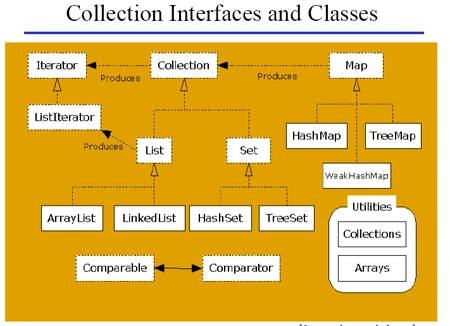
A simple collection of interface and class hierarchies is given below.
Interfaces
There are two groups of interfaces.
- Collections
- Maps
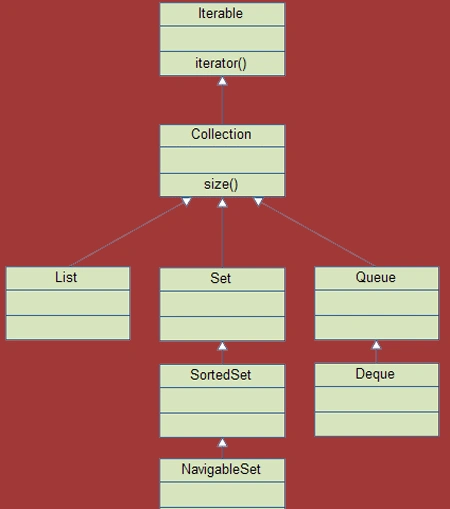
Here is the graphical representation of
Collection's interfaces
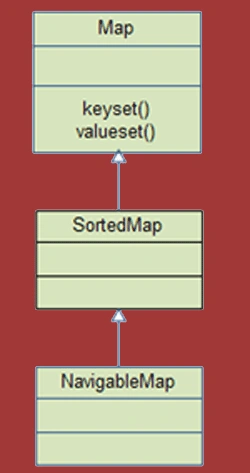
Here is the graphical representation of Map's
interfaces
Iterable Interface
In Java 5 there is now an iterable interface (java.lang.Iterable). It is the root interface of the Java collection Classes. The collection interface
extends iterable, so all subtypes of Collection also implement the iterable interface.
The Syntax of the Iterable interface is given below
- public interface Iterable<T>
A collection provide an iterator which allows a sequential access to the element of collection. An iterator can be obtained by calling the following method of collection interface:
- public Iterator iterator()
or
- public interface Iterable<T> {
- public Iterator<T> iterator();
- }
Methods of Iterator
- public boolean hasNext()
- public Object next()
- public Object remove()
ListIterator Interface
This is the subinterface of iterator.which allows the programmer to travel in the list in either direction and make modifications to the underlying list.
Methods of ListIterator
- public boolean hasNext()
- public boolean hasPrevious()
- public Object next()
- public Object previous()
- public Int nextIndex()
- public Int previousIndex()
- public void remove()
- public void add(Object o)
- public void set(Object o)
Collection Interface
The Collection interface (java.util.Collection)
is one of the root interfaces of the Java collection classes. Though you do not
instantiate a collection directly, but rather a subtype of collection, you may
often treat these subtypes uniformly as a collection.
Collection myCollection = new HashSet();
The Collection interface can be a generic
like this:
Collection <String> myCollection = new HashSet<String>();
An example of collection interface is given
below:
- import java.util.Collection;
- import java.util.Iterator;
- public class MyCollection
- {
- public static void doSomething(Collection collection)
- {
- Iterator iterator = collection.iterator();
- while(iterator.hasNext())
- {
- Object object = iterator.next();
-
- }
- }
- }
Collection Subtypes
The following interfaces (collection types)
extends the collection interface:
-
List
-
Set
-
SortedSet
-
NavigableSet
-
Queue
- Deque
A description of these interfaces is given below.
The collection interface is a group of objects, with duplicates allowed.
Set extends Collection but forbids duplicates.
List extends Collection and also allows duplicates and introduces positional
indexing.
Map extends neither Set nor Collection
| Interfaces
|
Description |
Concrete Classes |
| Collection |
A basic interface that defines the normal operation that allows a
collection of objects to be maintained or handle as single elements.
|
|
| Set (Unique Element no order)
|
A set of unique elements . |
HashSet
LinkedHashSet |
|
SortedSet (Unique element but in sorted order)
|
A set in which the elements are stored in some order. |
TreeSet |
| List (Duplicate elements but in insertion order) |
A sequence of elements that need not be unique. |
Vector
ArrayList
LinkedList |
| Map (Unique Keys) |
A basic interface that defines operation for maintaining mapping of
keys to values. |
HashMap
LinkedHashMap
HashTable |
| SortedMap (Unique keys but in sorted order) |
This interface maintaining mapping in sorted in key order. |
TreeMap |
Queue
A Queue is a collection for holding elements prior to processing. Besides
basic Collection
operations, queues provide additional insertion, removal, and inspection
operations.
- public interface Queue<E> extends Collection<E>
- {
- E element();
- boolean offer(E e);
- E peek();
- E poll();
- E remove();
- }
Deque
The Deque interface is a subtype of the Queue interface. It represents a queue where you can insert and remove elements from both ends of the queue.
Thus, "Deque" is short for "Double Ended Queue" and is pronounced "deck",like a deck of cards.
NavigableSet
The NavigableSet interface is a subtype of the SortedSet interface. It behaves like a SortedSet with the exception you have navigation methods available in addition to the sorting mechanisms of the SortedSet.
Map interfaces
The Map interface
represents a mapping between a key and a value. the Map interface is not a
subtype of the collection
interface.
Therefore it behaves a bit different from the rest of the collection
types.
Example of Map Interface
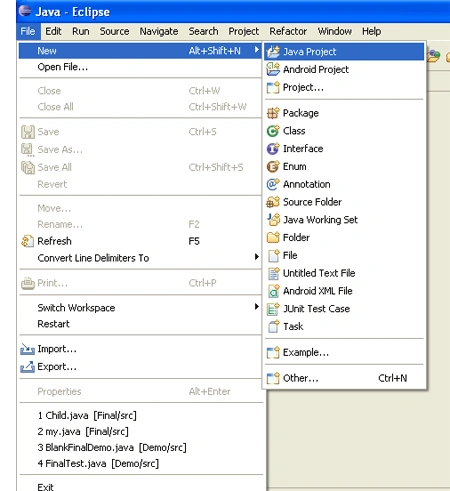
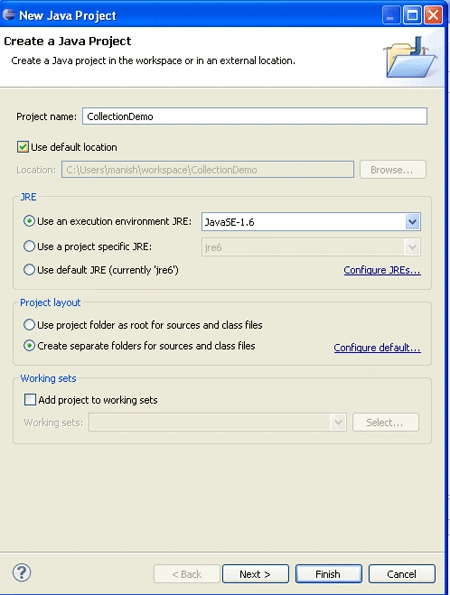
Step 1 - Create a Java project and give the name
Step 2 - Here the name is Collection Demo.
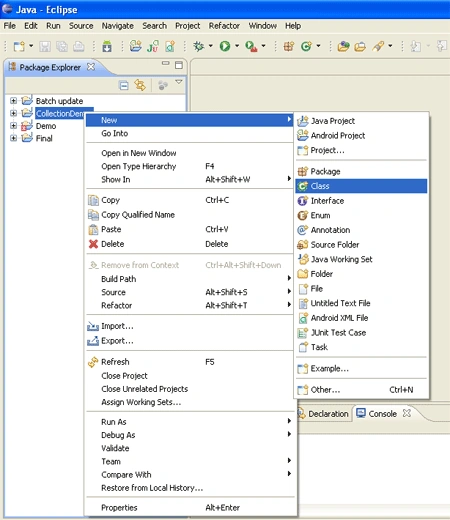
Step 3 - Create the Class by clicking class,a new window
is opened, and give the name of the class.
Step 4 - Here the name of the class is DemoMap. In this
program we insert some values in to the HashMap by using put() method. The syntax of put() method is defined below.
Object put (Object key, Object value)
We also use size()method in this program. This
method find out the size of the HAshMap. Here we also use iterator.
- import java.util.*;
- import java.util.Map.Entry;
- public class DemoMap {
- public static void main(String args[]) {
- HashMap dm = new HashMap();
- System.out.println(dm.size());
- dm.put("1001", "aa");
- dm.put("1002", "bb");
- dm.put("1003", "cc");
- dm.put("1004", "dd");
- dm.put("1005", "ee");
- Set s = dm.entrySet();
- Iterator en = s.iterator();
- while (en.hasNext()) {
- Map.Entry e = (Map.Entry) en.next();
- String k = (String) e.getKey();
- String v = (String) e.getValue();
- System.out.println(k + "=" + v);
- }
- System.out.println(dm.size());
- }
- }
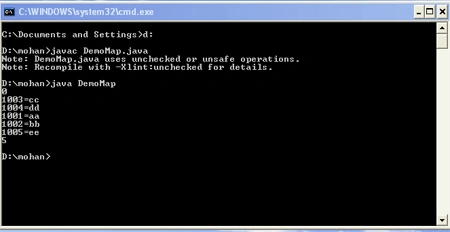
Step 5 - Compile and run the program. The output of the program is given below.

Join the conversation! Your thoughts help the community grow.