Introduction
Visual Studio LightSwitch is a new member of
the Visual Studio family. It is a stand alone application. According to Microsoft, Visual Studio LightSwitch as "the simplest way to create business applications
for the desktop or the cloud". Visual Studio LightSwitch is a rapid application
development (RAD) tool which is used to help write data-centric line of
business (LOB) applications.
Unlike previous Visual Studio products, LightSwitch
emphasizes minimizing the amount of code that must be explicitly written in
order to develop an application. Using LightSwitch one can easy-to-use GUI
Designers to design data structures and the user interface for working with the
data. Instead of writing a huge amount of code, you can use the graphical
Designers that LightSwitch provides to define the data you intend to work with,
and to create the UI that interacts with the data.
Visual Studio LightSwitch may be deemed a much more powerful product due to its
capability of creating applications by drawing upon the full power of the .NET
Programming technology.
Visual Studio LightSwitch in its release version will be a full-service
Integrated Development Environment (IDE), well suited to develop
line-of-business applications using Microsoft's latest .NET Framework 4.0
technology.Microsoft LightSwitch Version 1.0 is expected to be released by the end of 2011.
When you create Line Of Business applications, their
everyday activities can be separated into two groups:
- Activities focused on writing business
code, such as
the checkout process in an e-commerce site.
- Activities to create the plumbing code.
The plumbing code includes the
creation of interfaces that the layers use to communicate, the handling of
transactions, and so on.
In many Line Of Business development projects,
increase the the amount of time spent on creating plumbing codes. Visual Studio LightSwitch decreases the amount
of time spent on creating plumbing code. Actually, LightSwitch users
do not have to deal with plumbing code at all; rather, they can focus on
delivering business functionality. You to be more productive
when developing business functions in the LightSwitch.
In terms of LightSwitch applicability, the
following three groups, or zones, describe the degree to which this new member
of the Visual Studio family applies to a LOB project:
There are three zone in the LightSwitch, which
describe the degree to which this new member of the Visual Studio family applies
to a Line of Business project:
- White zone : LightSwitch would be a good
tool for these kinds of projects. White Your business application is
implemented as a set of Excel worksheets.
- Black zone : LightSwitch cannot be used as
the main tool for projects in this zone. Black Your project handles a
massive amount of data (millions of entries).
- Grey zone : Certain parts (or phases) of
your line of business project can be implemented with LightSwitch, but you
certainly
need other tools to complete it. Grey Your application handles a large
amount of data, but the structure is simple, and the number of users is
relatively small.
Basic architecture of a Visual Studio
LightSwitch application
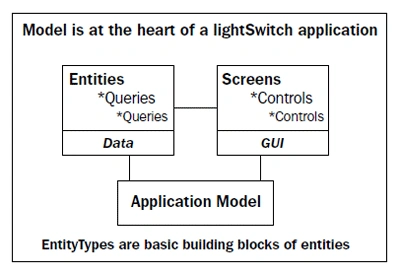
The application model is at the heart of a Microsoft LightSwitch
application. The application model is built using the application blocks.
Entities are
built from EntityTypes and queries is built using the entities.
The built-in designers use these blocks to create the application; picking
entities
and binding them with the desired screens.
Microsoft LightSwitch screens
There are five types of data screens in the
LightSwitch Application. Which are as follows
- New Data Screen
- Search Data Screen
- Details Screen
- Editable Grid Screen
- List and Details Screen
At runtime, the screen is displayed in the browser and if there is no
screen created at design time, the browser displays a blank screen .
New Data Screen
This screen is used when you may want to add fresh data to an empty
table, or add data to an existing table.
Search Data Screen
Search is one of the primary activities of any business. Search data screen is
used for the search any records in the table or you can say this screen is used
for search any data in the entities. This screen is very useful for searching
the data.
Details screen
The Details screen shows a single entity and
its children. Make sure "Use as Default Details Screen" is checked. It means
that this detail screen will be used as the
detail screen for all records by default. If
you forget to set it as the default details screen you can set the property of
the table (in table designer).
Editable Grid screen
Editable grid screen is used for edit and add
data into the table. Using this screen you can edit data at run time and you can
also add new data into the table.
List and Details screen
The Details screen shows a single entity and its children, if any.The List and Details screen displays a list and for the chosen item in the list
displays its details.
Summary
So Visual Studio LightSwitch is very useful for
build the business application. It is the product of Microsoft and it is the
member of the Visual Studio family.

Vineet Kumar SainiPosted Jan 2, 2012, 12:52 AM
Very Good article For LightSwitch beginner...
Vikas MishraeditedPosted Dec 12, 2011, 12:19 PMEdited Dec 12, 2011, 12:23 PM
Hi Michel you explained it in a very nice way.......Thanks for sharing.....
Mike StewardPosted Dec 12, 2011, 12:17 PM
nice introductory part of light switch
Michell JohnsonPosted Dec 12, 2011, 11:41 AM
It's a great effort keep it up.