

Introduction
The DOM represents a document as a tree. The tree is made up of parent-child relationships, a parent can have one or many child nodes.
When a web page is loaded, the browser creates a Document Object Model of the page.
The HTML DOM is a standard for getting, changing, adding, or deleting HTML elements.
Consider the following HTML:
- <html>
- <head>
- <title>Good Morning</title>
- </head>
- <body>
- Hello
- </body>
- </html>
The DOM will look like:
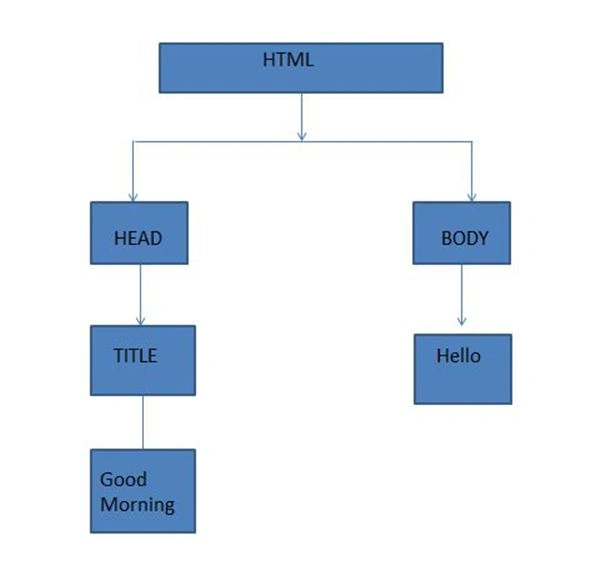 At the top level, there is an HTML node, with two children: head and body, among which only the head tag has a child tag, title.
The idea of the DOM is that every node is an object. We can get a node and change its properties.
Example
At the top level, there is an HTML node, with two children: head and body, among which only the head tag has a child tag, title.
The idea of the DOM is that every node is an object. We can get a node and change its properties.
Example
- <html>
- <head>
- <title>ABHIJEET</title>
- </head>
- <body>
- <div>HELLO</div>
- <ul>
- <li>WOW</li>
- <li></li>
- </ul>
- <div>GREAT</div>
- </body>
- </html>
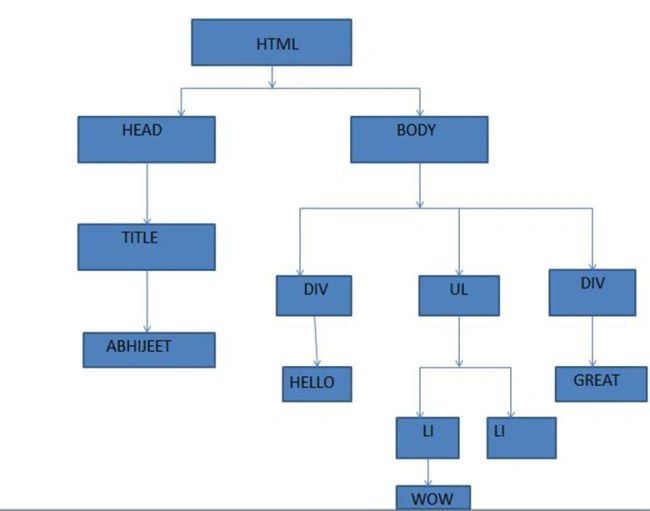
- JavaScript can change or remove all the HTML elements.
- JavaScript can change or remove all the HTML attributes.
- JavaScript can change all the CSS styles.
- JavaScript can add new HTML elements and attributes.
Join the conversation! Your thoughts help the community grow.