
This is the first part of C# Tutorial and all the concepts would be explained with examples as we move forward. I would be using Visual Studio 2013 with .NET Framework 4.5 to demonstrate this tutorial.
Let us start the tutorial with a simple Console application.
So what is a Console application ? --> A console application is a program designed to be interacted through a text only computer interface like Command prompt.
So we are going to write a program using Visual studio which displays its output in the Command prompt.
Open Visual Studio, Go to File --> New --> Project .
Now you would see the below window. I have highlighted the important areas to be observed.
Image 1 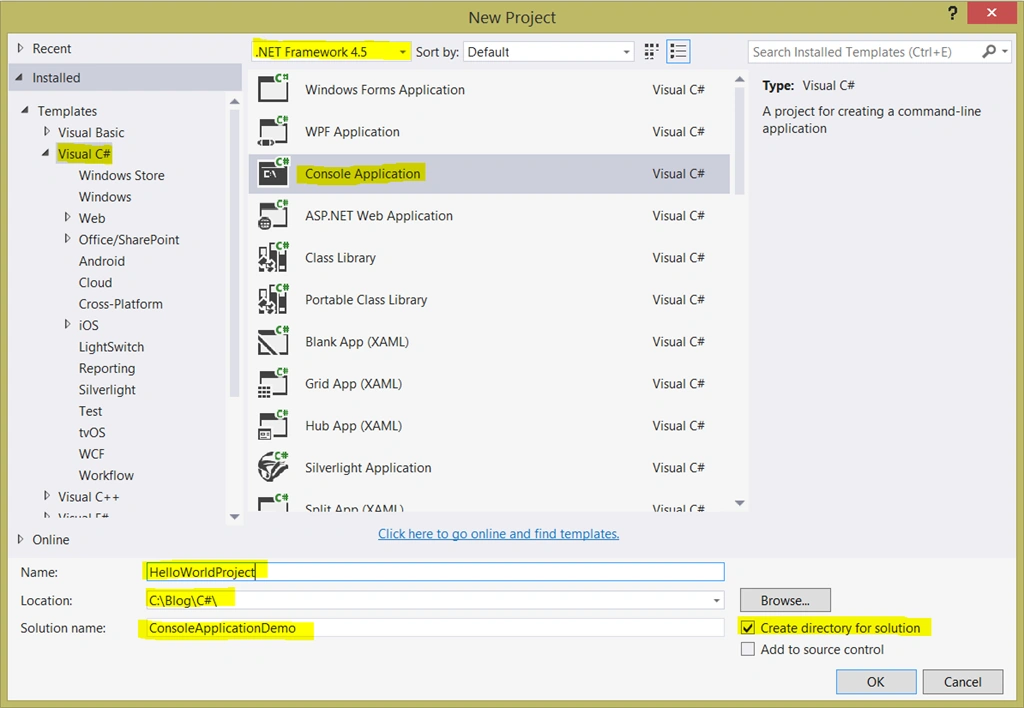
In Image 1, you will find list of installed templates on the left. Select 'Visual C#' and you will see the different types of C# applications listed. Select 'Console Application'.
The .NET Framework Version (.NET Framework 4.5) is also displayed on the top. You can select other low versions from the dropdown and develop the applications as per your requirement.
There are different text boxes at the bottom of the window which are explained below
Name : This is the project name. Please enter "HelloWorldProject"
Location : You can browse and select a desired folder on your computer where you would like to save your project / solution.
Solution name : This is the Solution name. Please enter "ConsoleApplicationDemo"
You would also find a checkbox "Create directory for solution" which I want you to leave it checked.
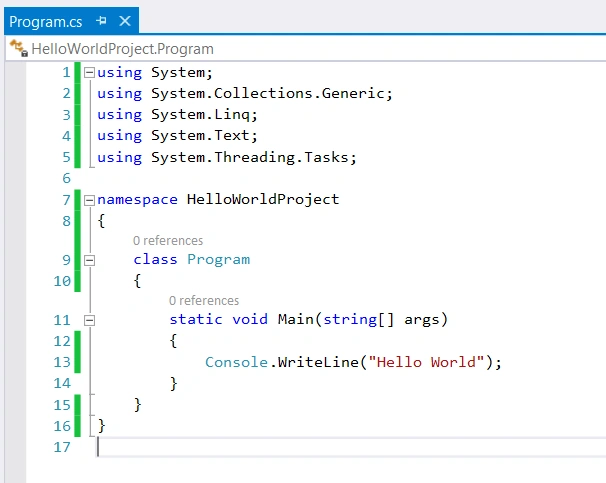
Click 'OK' after entering the Name, Location and Solution name. You will now see auto-generated code in your Visual studio. Before jumping into the code, let us try to understand Solution and Project.
What is a Project ?
A Project is a collection of source code files, resources, configuration files etc.
And What is a Solution?
A Solution is a collection of projects. One solution can contain multiple projects and every project can be of same or a different language.
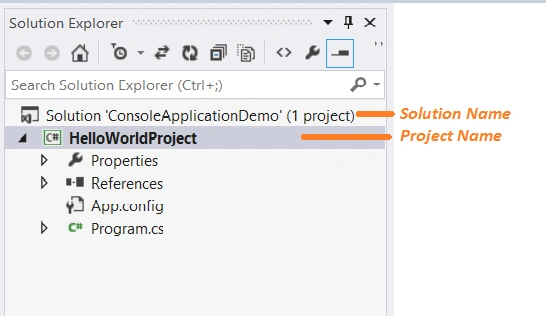
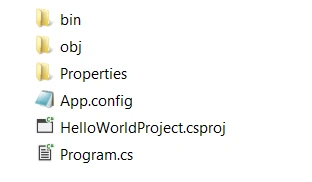
The entire structure of the Application can be found in Solution Explorer to the right of the Code editor. In case you don’t see it Go to View --> Solution Explorer .

Sam HobbseditedPosted Feb 6, 2013, 8:24 AMEdited Feb 6, 2013, 8:25 AM
Java is more open now than it was originally. Perhaps some day it will be standardized the way that C++ is. Yes, Mahesh, we do not know what will happen in the future. Currently, Java is still standadized by Sun and C# and the CLI (the design of .Net) are standardized by ECMA. We do know that very recently Sun atempted to sue Google for using Java in Android without permission. Sun lost but at least that shows they intend to maintain control of Java.
Mahesh ChandPosted Feb 5, 2013, 6:27 PM
Sun (Java) was acquired by Oracle and who know what Oracle will do with Java. Oracle also bought MySQL database and founders are having some issues with Oracle.
Sam HobbsPosted Feb 5, 2013, 4:42 PM
I think the Mono web site is confusing, since it says that Mono is an implementation of Microsoft's .NET Framework. However in the Mono home page, click on "Common Language Runtime" and that takes you to a page saying that the Mono runtime implements the ECMA Common Language Infrastructure (CLI).
Sam HobbseditedPosted Feb 5, 2013, 4:23 PMEdited Feb 5, 2013, 4:24 PM
A significant disadvantage of Java is that it is proprietary to Sun. Sun will not allow anyone to modify the design of Java without their permission and they will sue if anyone does. They sued Microsoft and that is why Microsoft designed the Common Language Infrastructure (CLI). Note that .Net is the Wndows implementation of the CLI, so of course .Net does not work in other operating systems. The CLI however was designed to be portable like Java. The standard defining CLI is ECMA standard 335. Note that the standard defining C# is ECMA standard 334. Standard ECMA-335 is at: http://www.ecma-international.org/publications/standards/Ecma-335.htm
Sam HobbsPosted Feb 5, 2013, 4:14 PM
What IDE is part of .Net? I have seen nothing about that. Please share what you know.