

Introduction
In this article, we will discuss Web API and its return types. Here is the agenda of this article:
- What is Web API.
- What are the advantages of Web API(against WCF).
- Demo Web API with CRUD operation.
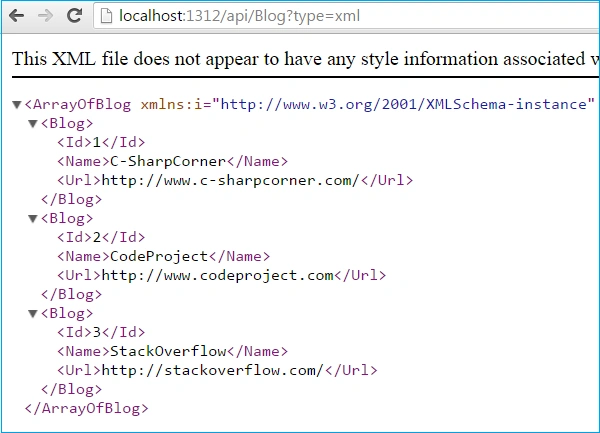
- Send result in different formats like XML, Json.
What is Web API
ASP.NET Web API is a framework which is used to make it easy to build HTTP services that reach a broad range of clients, including browsers and mobile devices. ASP.NET Web API is an ideal platform for building RESTful applications on the .NET Framework.
Moreover Web API is open source and an ideal platform for building REST-ful services over the .NET framework. It uses HTTP methods mainly GET, POST, PUT, DELETE to communicate with client. Unlike WCF Rest service, it use the complete features of HTTP (like URIs, request/response headers, caching, versioning, various content formats) and you don't need to define any extra config settings for different devices unlike WCF Rest service.
We already have WCF, then why Web API?
If there is a requirement to develop a web service and it is not related to transaction, SOAP based, TCP, NamedPipe, MSMQ protocol and two-way communication (duplex) then Web API is best.
It doesn't have complex and tedious configuration in WCF REST service. It is only based on HTTP and easy to define, expose and consume in a REST-ful way. It is light weight architecture and good for latest devices which have limited bandwidth like smart phones, tablets etc. It is open source.
It has automatic support for OData. Hence by placing the new [Queryable] attribute on a controller method that returns IQueryable, clients can use the method for OData query composition. It can be hosted within the application or on IIS.
It also supports the MVC features such as routing, controllers, action results, filter, model binders, IOC container or dependency injection that makes it more simple and robust.
Web API Demo with CRUD operation
In this section, we will go through couple of steps how to create Web API and perform CRUD operation.
Step 1
Open Visual Studio - Go to File Menu, Select Add, then choose "New Project". After choosing new project the following(Figure1) popup box appears. It shows different types of projects like Web, Windows, Console or MVC, you need to choose "ASP.NET MVC 4 Web Application" .
Open Visual Studio - Go to File Menu, Select Add, then choose "New Project". After choosing new project the following(Figure1) popup box appears. It shows different types of projects like Web, Windows, Console or MVC, you need to choose "ASP.NET MVC 4 Web Application" .

Figure 1: Add New MVC project
Step 2
Once you choose MVC project, you need to select MVC project type. So, select Web API project.
Once you choose MVC project, you need to select MVC project type. So, select Web API project.
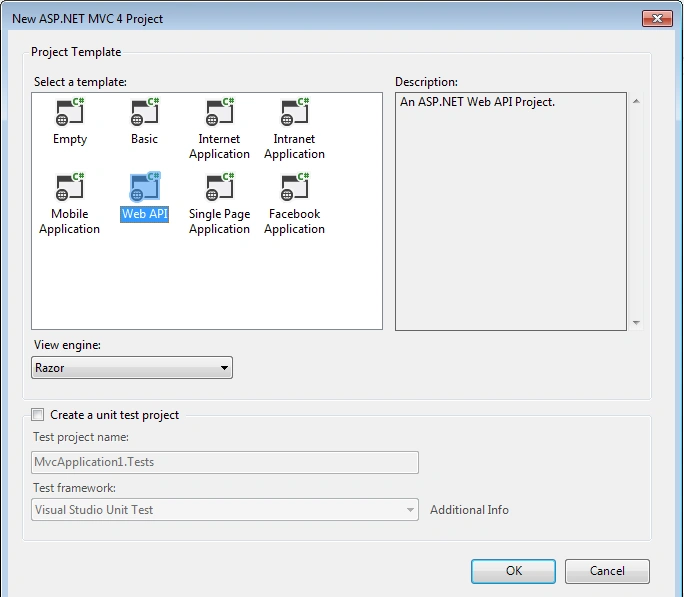
Figure 2: Choose Web API project
Step 3(Model)
Add Blog class to Models folder. Blog class contains 3 properties Id, Name and Url. Before starting coding I want to discuss what we are going to do. Web API will contain blog information and client will send AJAX request to API to get information about blog.
Add Blog class to Models folder. Blog class contains 3 properties Id, Name and Url. Before starting coding I want to discuss what we are going to do. Web API will contain blog information and client will send AJAX request to API to get information about blog.
- public class Blog
- {
- public int Id { get; set; }
- public string Name { get; set; }
- public string Url { get; set; }
- }
After adding Web API project, you need to add one controller. Just right click on Controllers folder and Add Controller (See figure 3).

Figure 3: Add New Controller

Figure 4: Choose proper template for Controller
Here BlogController class is inherited from ApiController. It contains methods Get() to get all records, Post() to add record, Get(int id) to search record, put() to update record and delete record. Those methods will be called from Client application through AJAX request. It is using a demo blogList(static variable) which contains couple of Blog Object but in real-life you will use EntityFramework or ADO.NET. Here is the complete code for controller:
- public class BlogController : ApiController
- {
- public static List<Blog> blogList = new List<Blog>()
- {
- new Blog { Id = 1, Name="C-SharpCorner", Url="http://www.c-sharpcorner.com/"},
- new Blog { Id = 2, Name="CodeProject", Url="http://www.codeproject.com"},
- new Blog { Id = 3, Name="StackOverflow", Url="http://stackoverflow.com/"},
- };
- // GET api/default1
- public List<Blog> Get()
- {
- return blogList;
- }
- // GET api/blog/5
- public Blog Get(int id)
- {
- Blog blogObject = (from blog in blogList
- where blog.Id == id
- select blog).SingleOrDefault();
- return blogObject;
- }
- // POST api/blog
- public List<Blog> Post(Blog blogObj)
- {
- blogList.Add(blogObj);
- return blogList;
- }
- // PUT api/blog/5
- public void Put(Blog blogObj)
- {
- Blog blogOrignalObject = (from blog in blogList
- where blog.Id == blogObj.Id
- select blog).SingleOrDefault();
- blogOrignalObject.Name = blogObj.Name;
- blogOrignalObject.Url = blogObj.Url;
- }
- // DELETE api/blog/5
- public void Delete(int id)
- {
- blogList.RemoveAll(temp => temp.Id == id);
- }
- }
Step 5(View)
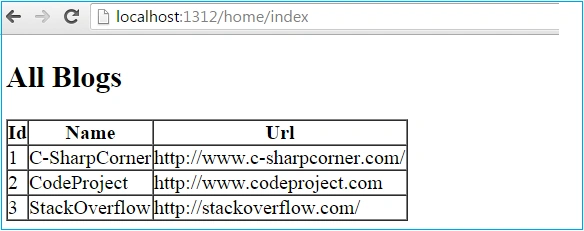
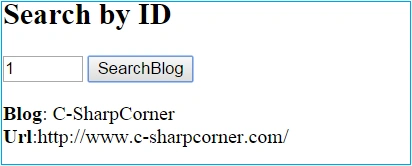
We will design view page where we will call Web API and display data returns by API. Here we will perform CRUD (Create, Read, Update, Delete) operations.
We will design view page where we will call Web API and display data returns by API. Here we will perform CRUD (Create, Read, Update, Delete) operations.

Taner HaciogluPosted Sep 6, 2019, 6:50 AM
XML date and tables in a table with foreign key in relational databases? type = xml is giving an error. <ExceptionMessage>The 'ObjectContent`1' type failed to serialize the response body for content type 'application/xml; charset=utf-8'.</ExceptionMessage><ExceptionType>System.InvalidOperationException</ExceptionType> ?type=json perfect ?type=xml error :(
Sreejith KizhakkedathPosted Jul 25, 2019, 2:04 AM
Very helpful!!!!!
Sanwar RanwaPosted Jan 26, 2018, 10:53 PM
Helpfull..............
Hemanth DJPosted Dec 15, 2017, 8:16 AM
Please tell how to get result in simple Text Format. ,O'm already getting the XML from DB done By FOR XML AUTO , So now i just need the raw text which is XML from DB
Sundaram SubramanianPosted Oct 16, 2017, 5:08 AM
Which one best, XML or JSON ?.
Benmakhlouf SaadPosted Oct 18, 2016, 6:49 AM
'Blog' is a namespace but is used like a 'type'
Pradeep SahooPosted May 18, 2016, 1:01 PM
Good share..........
Manoj YadavPosted Apr 14, 2016, 6:01 AM
thanks a lot ...
Asfend YarPosted Mar 6, 2016, 2:04 PM
nice
Muhammad Aqib ShehzadPosted Jan 5, 2016, 7:38 AM
nice dear
Gowtham KPosted Jan 3, 2016, 10:50 AM
Good One, Thanks for sharing
Humayun Kabir MamunPosted Jan 3, 2016, 12:23 AM
Nice...
Santhakumar MunuswamyPosted Jan 2, 2016, 2:33 AM
Thanks for nice article
Ranjit PowarPosted Jan 1, 2016, 9:31 PM
Helpful to start learning web api
Ankur MistryPosted Jan 1, 2016, 7:19 PM
Helpful article, thanks for sharing