In this article, we will look intoa SQL Server feature, called CDC, used for tracking/auditing database changes at table level. This feature will help us to track database changes like INSERT, UPDATE and DELETE on tables.
It even tracks old and new values for an update operation. CDC uses SQL Server transaction logs for capturing all inserts, updates, and deletes on a table. This feature is available on 2008 or higher versions and part of enterprise editions. Let’s open management studio and enable CDC on EmployeeDB to track the changes by following the below steps:
Enable CDC on a database by running the following command, it needs sysadmin privileges.
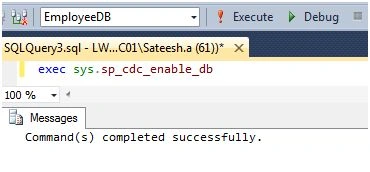
Create a role to which we will give access to CDC tables (which will hold all data changes) using the following command:
We need to select tables on which tracking should be enabled by running the following command:
- EXECsys.sp_cdc_enable_table
- @source_schema='dbo',
- @source_name='employees',
- @role_name=N'cdc_role'
This will start SQL jobs to track changes done to employees table. If you expand
Tables node and go to
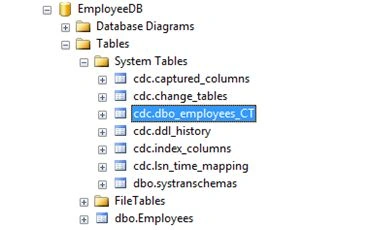
System Tables in Object Explorer, there will be a table employees_CT with exact schema of employees to hold data changes:
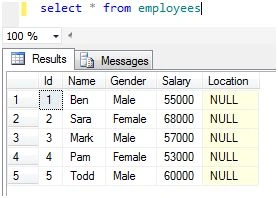
Let’s test CDC by doing some changes to employees table:
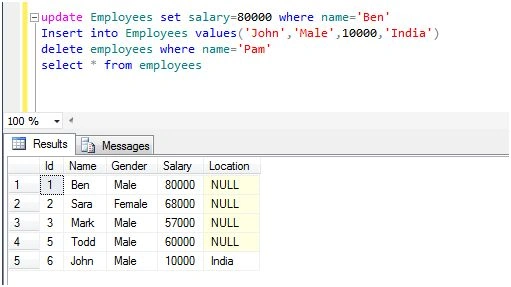
Let’s query our tracking table [
dbo_employees_CT]:
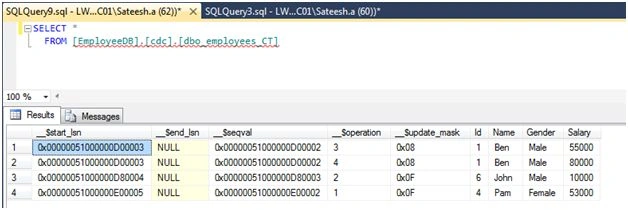
If column
_$operation is 1 it means it’s a DELETE operation; 2 means INSERT; 3 means Value before UPDATE; and 4 means Values after UPDATE. We will write the following query to get results more meaningfully:
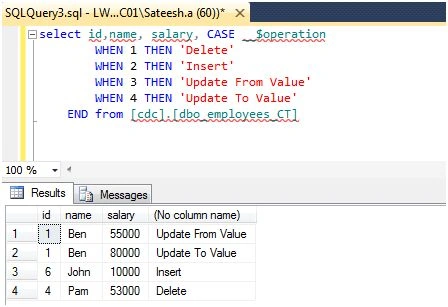
Apart from
dbo_employees_CT table, we have other tables created by CDC under System Tables to store metadata for its tracking purpose. Let’s understand purpose of each:
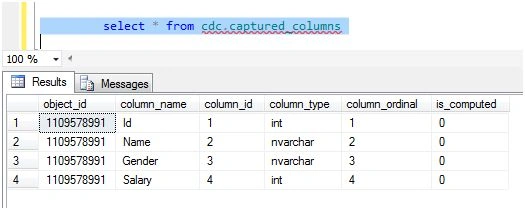
Captured_columns: It has all column’s details on which CDC is enabled:
 Change_tables:
 It contains capture details like table name, role name etc along start and end lsn. Any change on a table is uniquely identified by LSN (log sequence number).
 ddl_history:
 It contains information on any schema changes on the tracking table [employees] like adding\removing a column. Here, I added a new column location.
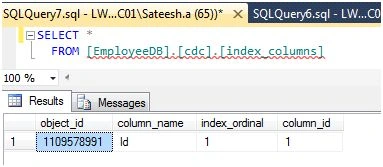
 index_columns:
 It contains index details of tables on which tracking is enabled.
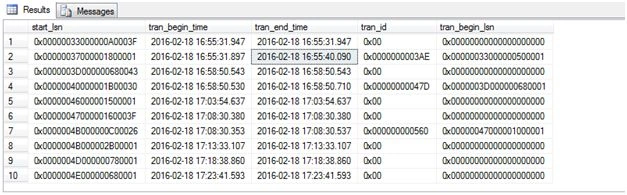
 lsn_time_mapping:
 It contains mapping details of table change’s LSN and its time of occurrence:
I am ending things here. In next article, we will drill down more on CDC. I hope this article will be helpful for all.
Read more articles on SQL Server:


Rajeev PunhaniPosted Mar 2, 2016, 10:23 PM
Nice feature thanks for sharing.
Ammar ShaukatPosted Mar 2, 2016, 10:05 AM
Can we enable this feature using C# code
Humayun Kabir MamunPosted Feb 21, 2016, 11:07 PM
Nice...
Saineshwar BageriPosted Feb 21, 2016, 11:06 PM
Nice one
Shubham KumarPosted Feb 20, 2016, 2:00 AM
nice to know
Sibeesh VenuPosted Feb 20, 2016, 1:41 AM
Nice Share
Mohammed IbrahimPosted Feb 19, 2016, 2:48 PM
nice
Debasis SahaPosted Feb 19, 2016, 1:00 PM
Thanks for nice article..
Gowtham KPosted Feb 19, 2016, 12:40 PM
Good one, Informative
Yashwant VishwakarmaPosted Feb 19, 2016, 12:07 AM
Nice information, thanks for sharing !!
pankaj kumarPosted Feb 19, 2016, 12:00 AM
Good feature, I recently implemented it. Sql cdc cleanup job clears the captured data after three day so we need to extend its limit.
BinhPosted Feb 18, 2016, 8:53 PM
Good article. I don't know there is this feature in SQL Server. Thanks a lot!
Kumaresh RajalingamPosted Feb 18, 2016, 8:20 PM
Nice share
Pankaj Kumar ChoudharyPosted Feb 18, 2016, 7:10 PM
Nice Information Sir.........