

When working on a Flutter application, managing state becomes challenging as the app grows in size and complexity. Handling UI updates, business logic, and data flow in a clean and structured way can quickly turn messy.
This is where Flutter BLoC comes into the picture.
Flutter BLoC helps us manage state efficiently by separating business logic from the UI, making applications more scalable, testable, and maintainable.
In this article, we will discuss the following topics:
What is BLoC?
Why do we need BLoC?
Benefits of BLoC
Basic concepts of BLoC
Conclusion
BLoC – What Is It?
BLoC stands for Business Logic Component.
It is a state management pattern introduced by Google to help Flutter developers write clean, predictable, and well-tested code.
In simple terms, BLoC:
Takes events as input
Processes them using business logic
Outputs states that the UI listens to and reacts upon
The UI does not handle any business logic directly. It only responds to state changes emitted by the BLoC.
Why Do We Need BLoC?
In small applications, using setState() might be sufficient. However, as applications grow:
Multiple screens start sharing data
Business logic becomes tightly coupled with UI
Debugging and testing become difficult
BLoC solves these problems by:
Separating UI from business logic
Providing a single source of truth for state
Making state changes predictable and easy to track
This results in a clean architecture and better long-term maintainability.
Benefits of BLoC
Some key benefits of using BLoC are:
Separation of Concerns: UI and business logic are completely separated.
Scalability: BLoC works very well for medium to large applications.
Testability: Business logic can be tested independently without UI involvement.
Reusability: The same BLoC can be reused across multiple screens or even different projects.
Predictable State Management: All state changes happen in a controlled and transparent manner.
Basic Concepts of BLoC (Based on the Architecture)
The BLoC architecture follows a unidirectional data flow between the UI, BLoC, and Data layers.
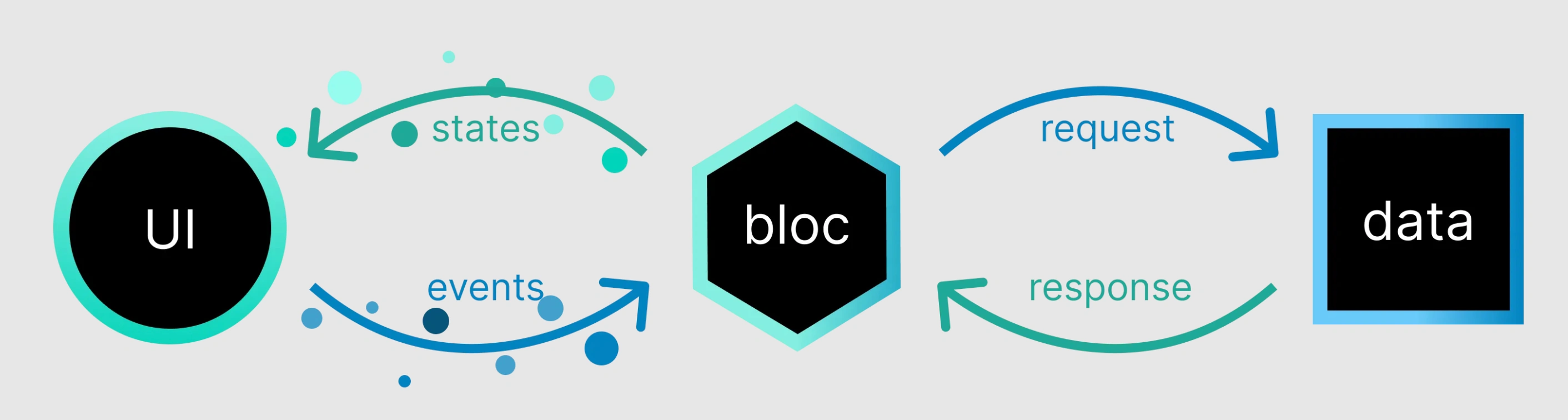
| Steps | Component | Responsibility | Examples |
|---|---|---|---|
| 1 | UI (User Interface) | Displays data and captures user actions | Button click, Screen load, Pull-to-refresh |
| 2 | Event | Represents user or system action | FetchDataEvent, ButtonTappedEvent |
| 3 | BLoC | Handles business logic and decision-making | Validations, rules, data selection |
| 4 | Request | Requests data from data layer | API call, DB query, Local storage |
| 5 | Data Layer | Fetches and manages data | REST API, Database, Cache |
| 6 | Response | Returns data to BLoC | Success data / Error |
| 7 | State | Represents UI state | LoadingState, SuccessState, ErrorState |
| 8 | UI Update | Updates UI based on state | Show loader, show data, show error |
Conclusion
Flutter BLoC is a powerful and structured approach to state management. It enforces a clear separation between UI and business logic, helping developers build clean, scalable, and maintainable applications.
Although BLoC
may seem complex at first, once you understand the flow, it significantly improves code quality and developer confidence.
In the next article, we will build a small Flutter application and understand these BLoC concepts with a hands-on example.
Join the conversation! Your thoughts help the community grow.