

Purpose
Sometimes, it is required to invoke a web service dynamically. The standard way is to add a web reference to the service from the project and then use the generated proxy client to call the web service. But, it you do not know the web service at the time of creating the project then this cannot be done. Imagine if you have to invoke a web service whose method signature is known to you but the service does not exist. The Url of the web service is available to your program at runtime and it is required to invoke the method. In this situation, you would need to invoke the web service dynamically. This article explains how to invoke the web service dynamically.
Implementation
A web service can be invoked by using HttpWebRequest and HttpWebResponse from the System.Net namespace. We will use these classes to build a dynamic client. All types of web services (.NET (asmx, WCF), Java, PHP) can be called using these two classes. This article will demonstrate how to build a client for ASMX and WCF Services.
We are going to build a client (shown below) which communicates with the web service using SOAP and these classes.
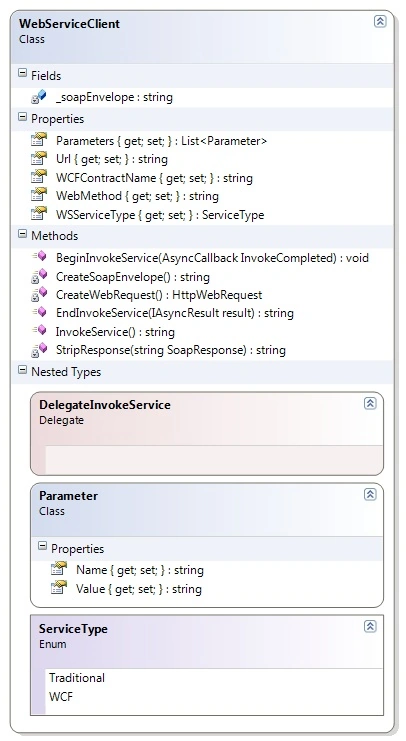
Web Services communicate by using SOAP. So the first thing to be done is create the SOAP envelope which will be used by HttpWebRequest to invoke the service method.
For this, we start with an empty SOAP envelope.
string _soapEnvelope =
@"<soap:Envelope
xmlns:xsi='http://www.w3.org/2001/XMLSchema-instance'
xmlns:xsd='http://www.w3.org/2001/XMLSchema'
xmlns:soap='http://schemas.xmlsoap.org/soap/envelope/'>
<soap:Body></soap:Body></soap:Envelope>";
Then, we add information to the envelope regarding the method we want to call and the parameters. Note : You can encode the param.Value using HttpUtility.HtmlEncode if you want to send XML as a parameter.
private string CreateSoapEnvelope()
{
string MethodCall = "<" + this.WebMethod + @" xmlns=""http://tempuri.org/"">";
string StrParameters = string.Empty;
foreach (Parameter param in this.Parameters)
{
StrParameters = StrParameters + "<" + param.Name + ">" + param.Value + "</" + param.Name + ">";
}
MethodCall = MethodCall + StrParameters + "</" + this.WebMethod + ">";
StringBuilder sb = new StringBuilder(_soapEnvelope);
sb.Insert(sb.ToString().IndexOf("</soap:Body>"), MethodCall);
return sb.ToString();
}
After adding the information like the method and parameter values, the SOAP envelope is like below.
<soap:Envelope\r\n xmlns:xsi='http://www.w3.org/2001/XMLSchema-instance'\r\n xmlns:xsd='http://www.w3.org/2001/XMLSchema'\r\n xmlns:soap='http://schemas.xmlsoap.org/soap/envelope/'>\r\n
<soap:Body>
<GetCustomer xmlns=\"http://tempuri.org/\">
<CustomerId>ABC123</CustomerId>
</GetCustomer>
</soap:Body>
</soap:Envelope>
Then, we create the HttpWebRequest as shown below. To the header, we add the SOAPAction which is the name of the method we want to invoke. The RequestMethod is set to POST.
private HttpWebRequest CreateWebRequest()
{
HttpWebRequest webRequest = (HttpWebRequest)WebRequest.Create(this.Url);
if (this.WSServiceType == WebServiceClient.ServiceType.WCF)
webRequest.Headers.Add("SOAPAction", "\"http://tempuri.org/" + this.WCFContractName + "/" + this.WebMethod + "\"");
else
webRequest.Headers.Add("SOAPAction", "\"http://tempuri.org/" + this.WebMethod + "\"");
webRequest.Headers.Add("To", this.Url);
webRequest.ContentType = "text/xml;charset=\"utf-8\"";
webRequest.Accept = "text/xml";
webRequest.Method = "POST";
return webRequest;
}
Then, we call the web service using HttpWebRequest/HttpWebResponse with the SOAP envelope as shown below. We write the envelope to the request stream. Note : You do not have to do the HttpUtility.HtmlDecode if you are receiving XML as a return from the Web Service.
public string InvokeService()
{
WebResponse response = null;
string strResponse = "";
//Create the request
HttpWebRequest req = this.CreateWebRequest();
//write the soap envelope to request stream
using (Stream stm = req.GetRequestStream())
Joe SweeneyPosted Dec 4, 2019, 8:35 AM
I am also getting the Internal Server Error 500. I read your one reply and I think you need to rethink your answer. I created the simple "Hello World" web service. I was able to invoke it without difficulty on the the web service page. I created a service reference and it worked. When I use your code, it fails. The SOAP envelope created is identical to the one on the web service web page. Your code is not much different from examples I found on other websites. Therefore, it can't be an error in the server-side code. I suspect it's a permission/credentials issue. Any other suggestions would be greatly appreciated.
Matthew PAISLEYPosted May 13, 2019, 10:30 AM
Shantanu, Thanks for a very nice tool. I need to invoike a Web Service that requires authentication. Can you explain necessary modifications that are required to include a login id and password? Thanks again for your efforts and willingness to share.
Vivek AgrawalPosted Feb 10, 2017, 8:33 AM
Really good article. Appreciate it.
keyur soniPosted Dec 15, 2015, 6:51 AM
Good Artical , Really Appreciate...
UmeshPosted Sep 27, 2015, 10:19 PM
How to pass xml parameter values inside soap request? e.g. <param1> some xml </param1>. I have tried encoding the xml before sending (used CDATA and also used encoding) but it did not work
Néstor Dávila MuñozPosted Aug 6, 2015, 5:46 PM
I have a problem how to get response in async mode?
javad taghizadPosted Jan 3, 2015, 4:22 AM
i using this library when i call a function with bool parameter, bellow error is occured: The remote server returned an error: (500) Internal Server Error.
Radha krishnanPosted Aug 26, 2014, 3:19 AM
public string MakeWebServiceCall(string methodName, string requestXmlString,string url) { WebRequest webRequest = WebRequest.Create(url); HttpWebRequest httpRequest = (HttpWebRequest)webRequest; httpRequest.Method = "POST"; httpRequest.ContentType = "text/xml"; httpRequest.Headers.Add("SOAPAction: " + url + methodName); Stream requestStream = httpRequest.GetRequestStream(); //Create Stream and Complete Request StreamWriter streamWriter = new StreamWriter(requestStream); streamWriter.Write(String.Format(this.GetSoapString(), requestXmlString)); streamWriter.Close(); //Get the Response WebResponse webResponse = httpRequest.GetResponse(); Stream responseStream = webResponse.GetResponseStream(); StreamReader streamReader = new StreamReader(responseStream); //Read the response into an xml document System.Xml.XmlDocument soapResonseXMLDocument = new System.Xml.XmlDocument(); soapResonseXMLDocument.LoadXml(streamReader.ReadToEnd()); //return only the xml representing the response details (inner request) return soapResonseXMLDocument.GetElementsByTagName(methodName + "Result")[0].InnerXml; } private string GetSoapString() { StringBuilder soapRequest = new StringBuilder("<soap:Envelope xmlns:xsi=\"http://www.w3.org/2001/XMLSchema-instance\""); soapRequest.Append(" xmlns:xsd=\"http://www.w3.org/2001/XMLSchema\" "); soapRequest.Append("xmlns:soap=\"http://schemas.xmlsoap.org/soap/envelope/\"><soap:Body>"); soapRequest.Append("{0}"); soapRequest.Append("</soap:Body></soap:Envelope>"); return soapRequest.ToString(); }
Radha krishnanPosted Aug 26, 2014, 3:18 AM
Please anybody reply me soon
Radha krishnanPosted Aug 26, 2014, 3:17 AM
How can i call Php webservice in c# without adding reference
Gil AssuncaoPosted Feb 7, 2014, 5:46 AM
I'm also getting error 500 on either ASMX and WCF. Any ideas ?
anto reeganPosted Nov 21, 2013, 12:43 AM
Searching best way for weeks finally i got it...thanks a lot dude..u saved my life...
Joakim HanssonPosted Jul 2, 2013, 12:36 AM
Perfect. Thank You!
Murillo BragaPosted Sep 13, 2012, 7:29 PM
Hi guys I was wondering if you could help me with an issue. I want to create a webservice that invokes another one. If I try to invoke a webservice, like a simple one we create through visual studio, it will load everything ok, the messages, the result, etc. But if I pass this webservice for it, it doesn’t work: http://200.170.84.174:12001/Cejam/services/WPD?wsdl I hope you can help me tks
Daniel PadronPosted Aug 8, 2012, 6:31 PM
Que bárbaro ehh, eres un éxito... Funciona perfecto! Gracias. Saludos.
Lance RudolphPosted May 10, 2012, 2:17 PM
I am also getting the error(500). I could call a simpe wcf web service just fine, but I am struggling with getting past the 500 erorr on my ssl encrypted web service.
jitendra mishraeditedPosted Apr 4, 2012, 11:20 AMEdited Apr 4, 2012, 11:22 AM
I was looking for this kind of post , Thanks! Your code is working fine but in my case when I call a webservice I am getting The remote server returned an error: (500) Internal Server Error. I am using the client code as described in your post. Any idea why we get 500 error ?
L MLPosted Feb 20, 2012, 12:12 PM
Hi! Thx for your help.....how can I do the same but with certificate, the service is https, I have to connect to it with a certificate
Blocked AccountPosted Mar 9, 2011, 11:43 PM
Keep it up!