

Introduction
Modern JavaScript supports ES Modules, which allow you to split your code into multiple files and reuse logic. This improves scalability.
Export: Sharing Code Between Files
You can export constants, functions, or even entire classes from one file to use them in another.
1. Named Exports
You can export multiple values by name.
// config.js
export const API_KEY = "12345";
export const API_URL = "https://example.com";
2. Exporting a let Value (via function)
If a value needs to change (e.g., a counter), use let inside a function.
let visitCount = 0;

export function incrementVisit() {
  visitCount++;
  return visitCount;
}
3. Default Export
A file can also export one default value:
export default "default-secret-token";
Import: Bringing Code Into a File
1.Named Imports
//app.js
import { API_KEY, API_URL } from "./config.js";
2. Default Import
import defaultToken from "./config.js";
3. Rename Imports
import { API_URL as url } from "./config.js";
4. Import Everything as an Object
import * as config from "./config.js";
console.log(config.API_KEY);
Config.js & app.js
So, now your config.js looks like this.
Config.js
// config.js

// Named exports
export const API_KEY = "12345";
export const API_URL = "https://example.com";

// A let variable for an updatable value
let visitCount = 0;
export function incrementVisit() {
  visitCount++;
  return visitCount;
}

// Default export
export default "default-secret-token";
App.js
// app.js

// Importing named exports
import { API_KEY, API_URL, incrementVisit } from "./config.js";

// Importing default export
import defaultToken from "./config.js";

// Importing everything as a namespace
import * as config from "./config.js";

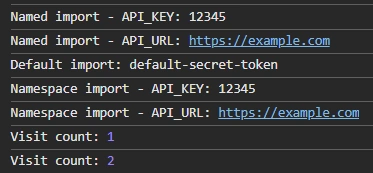
console.log("Named import - API_KEY:", API_KEY);
console.log("Named import - API_URL:", API_URL);
console.log("Default import:", defaultToken);

console.log("Namespace import - API_KEY:", config.API_KEY);
console.log("Namespace import - API_URL:", config.API_URL);

// Using the let-based function
console.log("Visit count:", incrementVisit());
console.log("Visit count:", incrementVisit());
This is how the console looks.
Bonus: Dynamic Import
You can load a module only when it's needed.
if (userLoggedIn) {
  const auth = await import("./auth.js");
  auth.login();
}
Index.html
To use import/export in your JavaScript files, the browser needs to know you're using ES Modules. You must include.
<script type="module" src="app.js"></script>
This does 3 important things.
- Enables import/export syntax
- Automatically delays script execution until HTML is loaded (like defer)
- Keeps all variables scoped to the file (not global)
Without type="module", you’ll get.
Uncaught SyntaxError: Cannot use import statement outside a module
Join the conversation! Your thoughts help the community grow.