

Purpose
jFluent is a light-weight validation framework for client-side validation. It is a jQuery plugin that can be used in ASP .NET MVC. It can also be used in standard (or mobile) HTML websites (see section explaining use).
The source code is a free download. You can extend/modify the framework if needed.
JSFiddle demo of plugin:
Implementation
jFluent is implemented as a jQuery plugin with the following rules:
| Rule | Input type | Parameters |
| CreditCard | text | errorMessage : The error message |
| text | errorMessage : The error message | |
| ISOCurrencyCode | text | errorMessage : The error message |
| NotNullOrEmpty | text | errorMessage : The error message |
| IsAlpha | text | errorMessage : The error message alphaUnicodeRange : The alphaUnicode range (a-zA-Z if null) |
| IsNumeric | text | errorMessage : The error message numericUnicodeRange : The numeric Unicode range (0-9 if null) |
| IsAlphaNumeric | text | errorMessage : The error message alphaUnicodeRange : The alphaUnicode range (a-zA-Z if null) numericUnicodeRange : The numeric Unicode range (0-9 if null) |
| NotNull | text | errorMessage : The error message |
| Length | text | length : The length (number) errorMessage : The error message |
| LengthGreaterThan | text | length : The length (number) errorMessage : The error message |
| LengthLessThan | text | length : The length (number) errorMessage : The error message |
| LengthBetween | text | lowerLimit : The lower limit oflength (number) upperLimit : The upper limit oflength (number) exclusive : Not including thelimits (boolean) errorMessage : The error message |
| Equal | text | item : The item to compare the equality to errorMessage : The error message |
| NotEqual | item : The item to compare the inequality to errorMessage : The error message | |
| GreaterThan | text | item : The compare item (number) orEqual : Inclusive of item(boolean) errorMessage : The error message |
| LessThan | text | item : The compare item (number) orEqual : Inclusive of item(boolean) errorMessage : The error message |
| Between | text | lowerLimit : The lower limit(number) upperLimit : The upper limit(number) exclusive : Not including the limits (boolean) errorMessage : The error message |
| Matches | text | regExp : The regular expression pattern to match errorMessage : The error message |
| SelectRequired | radio, checkbox | func : The validation function * that receives the selected value (null if no selection) errorMessage : The error message |
| Required | text, select | func : The validation function * that receives the (selected) value errorMessage : The error message |
* - The validation function should return true or false.
Screen shot
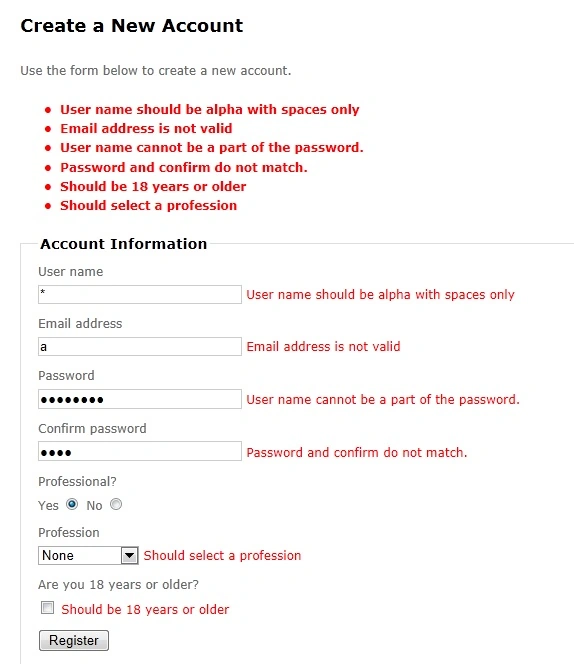
Standard (or mobile) HTML website
<span class="field-validation-valid" data-valmsg-for="Email" data-valmsg-replace="true"></span>
for input element
<input type="text" id="Email" />
These span elements will contain the validation error messages for that input element.
If you want a common single error message for an input field, you can place the message inside the span e.g.:
<span class="field-validation-valid" data-valmsg-for="Email" data-valmsg-replace="true">Common single error message here</span>
Add below CSS styles to a style sheet in your site and reference that style sheet in your page.
.field-validation-error {
color: #ff0000;
.field-validation-valid {
display: none;
color: #e80c4d;font-weight: bold;font-size: 1.1em;
display: none;
The plugin can be used in ASP .NET MVC as shown below.
The Register Model:
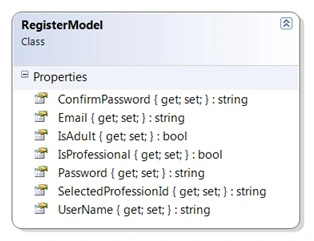
In the Register.cshtml page:
@model MvcApplication1.Models.RegisterModel
@{
ViewBag.Title = "Register";
}
<h2>Create a New Account</h2>
<p>
Use the form below to create a new account.
</p>
@*Include jQuery*@
<script src="@Url.Content("~/Scripts/jquery-1.4.4.min.js")" type="text/javascript"></script>
@*Include jFluent*@
<script src="@Url.Content("~/Scripts/jFluent.js")" type="text/javascript"></script>
<script type="text/javascript">
//Fluent Rules for the Register page
function RegisterRules() {
$("#UserName").NotNullOrEmpty("User name cannot be null or empty")
.Matches("^([A-z]+\\s*)+$", "User name should be alpha with spaces only");
$("#Email").NotNullOrEmpty("Email cannot be null or empty")
.Email("Email address is not valid");
$("#Password").NotNullOrEmpty("Password cannot be null or empty")
.LengthGreaterThan(8, false, "Password should be more than 8 char long")
.Required(function (password) {
var userName = $("#UserName").val();
return userName != '' ? password.indexOf(userName) == -1 : true;
}, "User name cannot be a part of the password.");
$("#ConfirmPassword").NotNullOrEmpty("Confirm password cannot be null or empty")
.Required(function (confirmPassword) {
return confirmPassword == $("#Password").val();
}, "Password and confirm do not match.");
$("#IsProfessional").SelectRequired(function (isPro) {
return isPro == "True";
}, "Should be a professional");
$("#IsAdult").SelectRequired(function (isAdult) {
return isAdult == "true";
}, "Should be 18 years or older");
$("#SelectedProfessionId").Required(function (profession) {
var selectedIsPro = $("input:radio[name=IsProfessional]:checked").val();
if (selectedIsPro == "True") {
return profession != "-1";
}
return true;
}, "Should select a profession");
}
$(document).ready(function () {
//Add the Rules to jFluent
$.jFluentRules(RegisterRules);
$(document).submit(function (e) {
//Call jFluent validation
if (!$.jFluentValidate()) {
Gowtham RajamanickamPosted Apr 25, 2015, 6:12 AM
good
Anil KumarPosted Nov 15, 2012, 4:17 AM
good one :)
Deepak MiddhaPosted Nov 2, 2012, 12:14 AM
Nice article Shantanu.Thanks for sharing with us.
Nishant RoyPosted Nov 1, 2012, 11:28 PM
Nice article. Thanks for sharing.
ShantanuPosted Oct 24, 2012, 12:38 AM
Thanks Max. Glad you liked the plugin.
Max CampsellPosted Oct 23, 2012, 4:42 PM
Please ignore my previous request for sample code for the selectlist. I have sorted it out and all works fine. Very nice code, and very practical. congratulations Max
Max CampsellPosted Oct 23, 2012, 3:58 PM
Can you provide a sample of how you build; (List<SelectListItem>) ViewBag.Professions). Also is SelectedProfessionId in the Register class public Int32 SelectedProfessionId {get; set; } ? If not can you also provide a sample? Thanks Max