

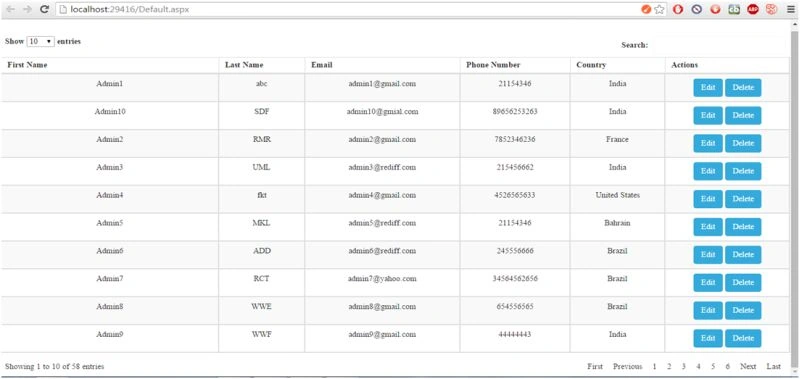
Nowadays, jQuery Data Table is the best way to represent data in tabular format because it supports client side searching, sorting and pagination (client/server side) through ajax/html request.
This is a nice alternative if you want to display tabular information but you want to use something different than a repeater or a GridView or other commercial (and usually expensive) .NET server components.
In these articles I am going to explain an easy way to integrate JQuery DataTable in our ASP.NET application and enable or disable some features of it.
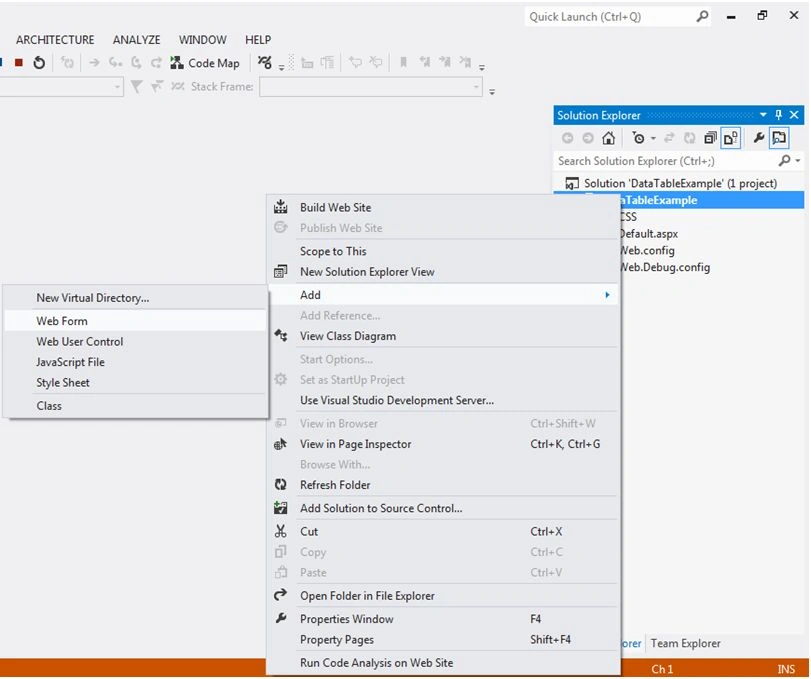
Step 1: Firstly, we have to create a New Project in Visual Studio and Add a Web Form with any name like here my page name is Default.aspx
Step 2: Step Two is little bit simple. In this we have to include some Js and Css for DataTable in our project.
Note: You can download these from the following link also or you can download it from source code of this demo.
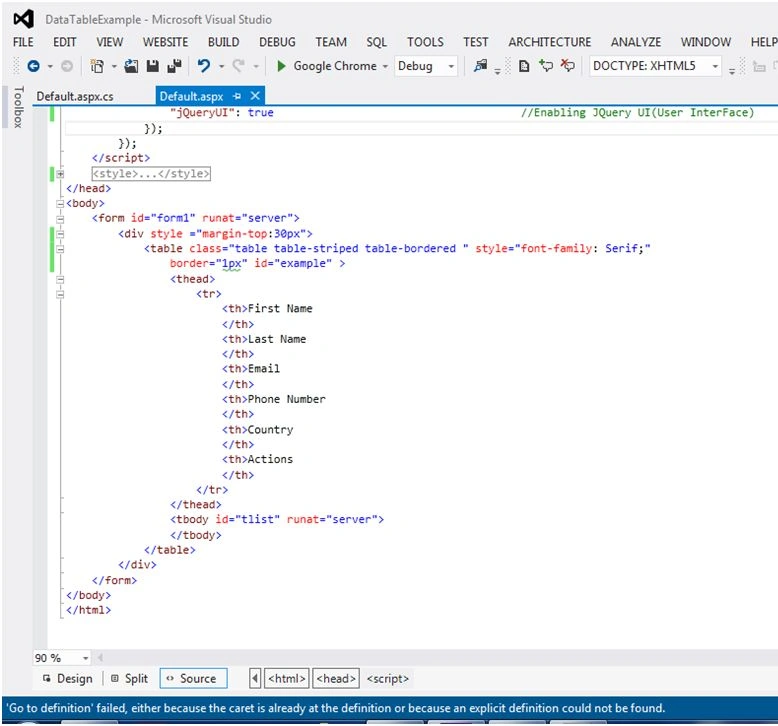
Step 3: Now design part start. Here we have to design a Table with id as example as shown below.
Step 4: Now we are going to bind HTML Table dynamically from code behind just like we bind grid view in ASP.NET. Here is code to bind Html Table from code behind on page load event as shown below.

Step 5: Now we are going to enable JQuery Data Table in-built features by writing some few lines of script. Here is the script to enable JQUuery Html Data Table Features as shown below.
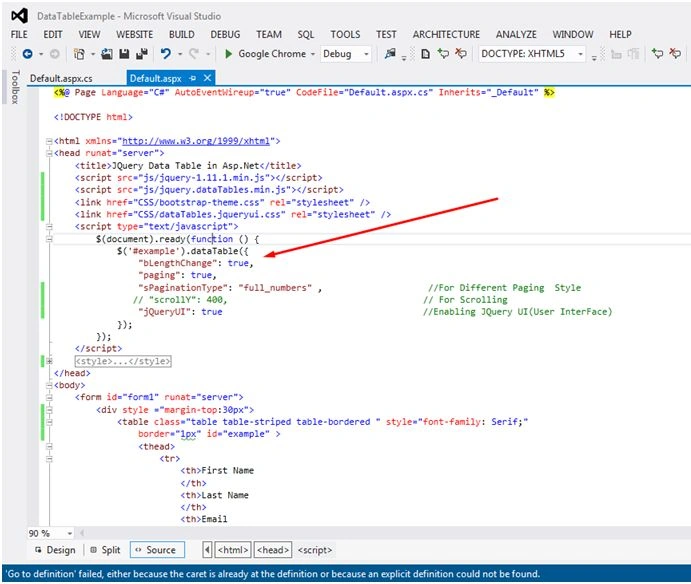
Note: There are a lot of built-in features of jQuery DataTable. My advice is to you all just go on its official website and explore some really great features of it.
Here I am providing some basics of how to bind JQuery DataTable from code behind in ASP.NET and enable some features of it just like GridView. I have also attached the demo of this project including Database script. Just run the script and change connection string and enjoy the features of Html Data Table.
Hope this article will help the beginners to understands the basics of JQuery Data Table in ASP.NET.
sushmita shiraliPosted Jun 26, 2018, 5:03 AM
Im getting an error in jquery.DataTables.min.js i.e if(c.mData===a) ....mData is undefined...how to resolve it ?pls help.Thanks in advance
Atish AdakmolPosted May 18, 2018, 2:09 AM
Nice Article Sir Very helful thanks for sharing ur knnowledge....
blum cashPosted Nov 16, 2017, 9:43 PM
<a class=></a> how do I link a modal?
Aquib IqbalPosted Jul 8, 2017, 7:24 AM
For delete can we use code behind function aslo right instead of creating new page for that. Is it possible or not? If yes means can you give example, how to achieve it. Thanks in advance
SuRaj DedhiaPosted Apr 17, 2017, 2:04 PM
Can we also implement it using Listview control. In my application I have table which has status column. If status is sctive then it make entrire row green. I have use ItemDatbond event though it make page too much slow. How can Implement same?
Praveen Kulal NPosted Jan 22, 2017, 2:44 AM
Nice programm working very well
Bala AravindPosted Nov 18, 2016, 1:17 AM
Good One Bro...Keep it up....
Meghraj KanherePosted May 17, 2016, 3:46 AM
Hey ! great example. How can i extend it to add row details. Like to expand a row to show more details
SaravananPosted Mar 9, 2016, 10:05 AM
very good article..
Humayun Kabir MamunPosted Feb 27, 2016, 10:45 PM
Nice...
Gaurav KumarPosted Jan 28, 2016, 5:54 AM
How to bind data to the table?
Humayun Kabir MamunPosted Jan 25, 2016, 10:52 PM
Nice...
Gowtham KPosted Jan 25, 2016, 9:06 PM
Good One
Shubham KumarPosted Jan 25, 2016, 3:53 AM
nice one
Debasis SahaPosted Jan 25, 2016, 3:28 AM
Nice..
Pankaj Kumar ChoudharyPosted Jan 25, 2016, 2:30 AM
Nice Explain........