

Kindly visit the first part of the jQuery interview questions and answers.

jQuery Interview Question and Answers With Practices: Part 1
 What are selectors in jQuery?
 jQuery is one of the main features of jQuery. Because until we won't fetch elements from the DOM we are unable to perform further actions.
- jQuery Selectors are used to select one or a group of HTML elements from your web page.
- jQuery selectors always start with a dollar sign and parentheses: $()
There are some ways to select the elements in a web document.
1. Select elements by tag name
Example: $(div)
It will select all the div elements in the document.
2. Select elements by ID
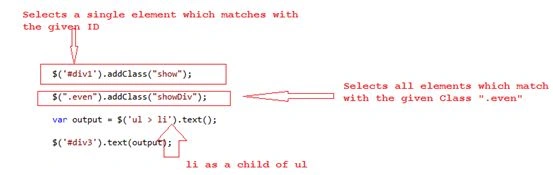
Example: $(“#div1”)
It will select a single element that has an ID of div1.
3. Select elements by class
Example: $(“.even”)
It will select all the elements having a class even as shown in sample applications also.
An example of basic selectors are as shown in the following image:
There are some more selectors that are listed below and very useful from a jQuery perspective.
- $('*'): This selector selects all elements in the document.
- $("p > *"): This selector selects all elements that are children of a paragraph element.
- $("li:not(.myclass)"): Selects all elements matched by <li> that do not have class="myclass".
- $("ul li:first"): This selector gets only the first <li> element of the <ul>.
- $(":empty"): Selects all elements that have no children.
- $("p:empty"): Selects all elements matched by <p> that have no children.
- $("div[p]"): Selects all elements matched by <div> that contain an element matched by <p>.
- $("p[.myclass]"): Selects all elements matched by <p> that contain an element with a class of myclass.
- [attr] has attributes like type, value, href and id.
- [attr=val] has attribute with value val.
- [attr!=val] does not have attribute with value val.
- [attr^=val] attribute begins with val.
- [attr$=val] attribute ends with val.
- [attr*=val] attribute includes val.
- [attr~=val] attribute includes val as a word.
- [attr|=val] attribute begins with val and optional hyphen.
What is jQuery.holdReady() function?
By using the jQuery.holdReady() function we can hold or release the execution of jQuery's ready event. This method should be called before we run the ready event. To delay the ready event, we need to call jQuery.holdReady(true);
When we want to release the ready event then we need to call jQuery.holdReady(false);
This function is helpful when we want to load any jQuery plugins before the execution of the ready event or want to perform certain events/functions before document.ready() loads. For example some information also.
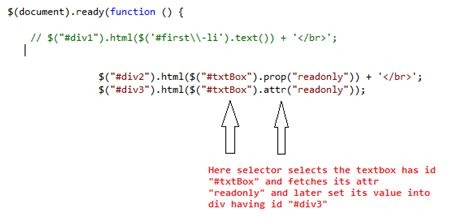
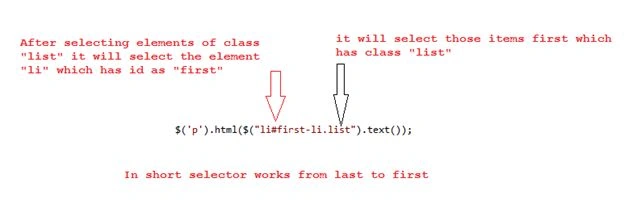
For example:

What is chaining in jQuery?
Ibrahim SiddiquePosted Jun 9, 2017, 8:16 AM
Nice article and helpful also
Anil SinghPosted Jan 18, 2016, 5:08 AM
nice one. http://www.code-sample.com/
Upendra Pratap ShahiPosted Jun 23, 2015, 5:23 AM
good one...
Gowtham RajamanickamPosted Apr 25, 2015, 6:12 AM
this is great
Gowtham RajamanickamPosted Apr 25, 2015, 6:12 AM
good
Stephen LockPosted Apr 23, 2015, 7:46 AM
Good information.
Sachin KaliaPosted May 23, 2014, 1:25 AM
Thanks Nagaraj :)
Nagaraj SPosted May 22, 2014, 3:21 AM
Awesome work. Very attractive presentation. Please continue your good work.