
Introduction
This article shows how to use a JSON result in a controller in MVC.
Step 1
Create a MVC project from the "Empty" template.
Right-click on "Controllers" and select "Add" >> "Controller...".
Step 2
Select "MVC 5 Controller - Empty" to add an empty controller.
Click on the "Add" button.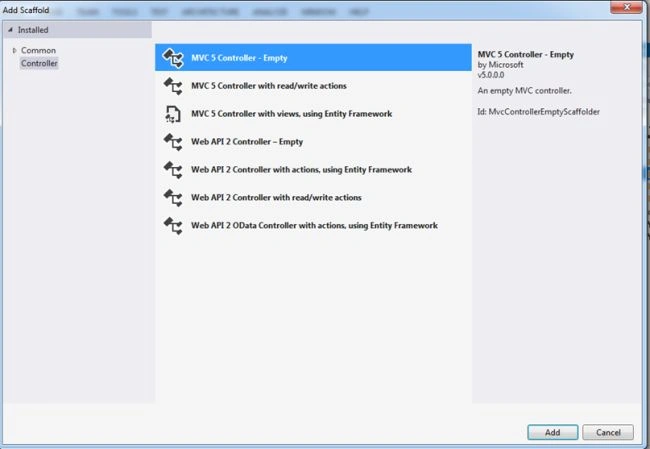
Step 3
Name the controller as in the following:
And it will add an action result method to the controller.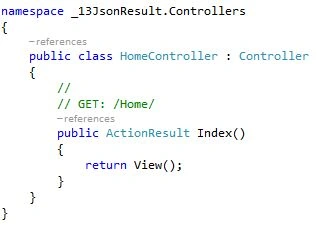
Step 4
Now we need to create a view.
Right-click on "Index" and select "Add View...".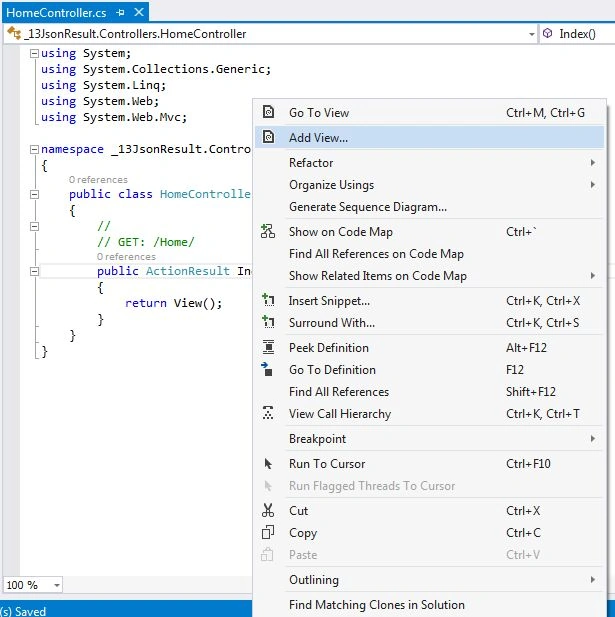
Step 5
Name the view and select "Empty (without model)" as the template.
Click on the "Add" button.
Step 6
Add a title in the index page.
Step 7
JsonResult is used to send JSON formatted content to the response. Create an object of employee inside the jsonresult method and return a jsonresult object. Commented code represents another way to create a jsonresult object. 
Step 8
Create a link to call the "jsonResult" method in index.cshtml.
Step 9
Run the project, click on the "JsonResult" link and you can see the JSON data rendered on the browser.

JSON Result in Controller Sample in MVC: Day 13
Join the conversation! Your thoughts help the community grow.
Sign in to leave a comment
It is the same account you read, post and publish with — and you will come straight back to this page.
shekhar dhumalPosted Jun 13, 2018, 1:28 AM
How to create header in json format using mvc 5
phoo htooPosted Apr 23, 2018, 10:57 PM
I wonder how to get JSon object back