Introduction
This article uses the Windows API's to kill the application running under windows environment. So here we will see how to import a function from unmanaged library to managed application. To simplify the process of using platform invoke in our program, we will create a class called Win32, Which will have all native declarations in it.
With C# we can use the Microsoft Windows API SendMessage function to close any active window that has a system menu with the Close option. Below Figure 1 displays the System Menu of Calculator application.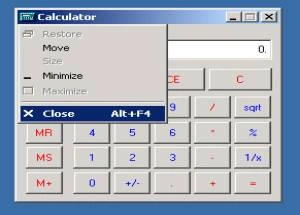
Figure 1. Displaying System Menu.
In our sample Kill application we will use SendMessage function to post a message to any window in the environment provided the handle to the window is known. To know the handle we can use FindWindow function. Which will determine the handle associated with the window the user, wants to close.
In order to use FindWindow, you must know either the Class Name or the Caption (if any) of that window. One can get the information about the Class Name or the Caption using Microsoft Spy++ tool available in Visual Studio .Net Tools. Below Figure 2 shows the working of Spy++ tool.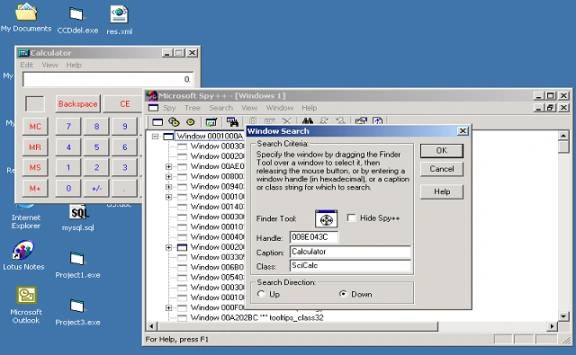

Kill an Application with System Menu using C#
Join the conversation! Your thoughts help the community grow.
Sign in to leave a comment
It is the same account you read, post and publish with — and you will come straight back to this page.
rubel rahmanPosted Sep 23, 2012, 3:13 PM
very helpful for me. thank u.
sha shaPosted Aug 23, 2010, 3:24 PM
This is a great article i was searching the same from 2days but no help.This gave me clear idea. Also if there are 3rd party software like xmanager of exceed where i want to send some text then how will be i able to do the same
YousefPosted Apr 17, 2007, 6:25 AM
A better alternative to kill another window without loading unmanaged code, is to use GetProcessByName then call the CloseMainWindow on the returned process. Here is an article that decribes this: http://www.mycsharpcorner.com/Post.aspx?postID=32