

Pre-requisite to understand this
Containers: Lightweight units that package an application and its dependencies
Container Runtime (Docker): Software that runs and manages containers
Orchestration Platform ( Kubernetes): System that automates deployment and management of containers
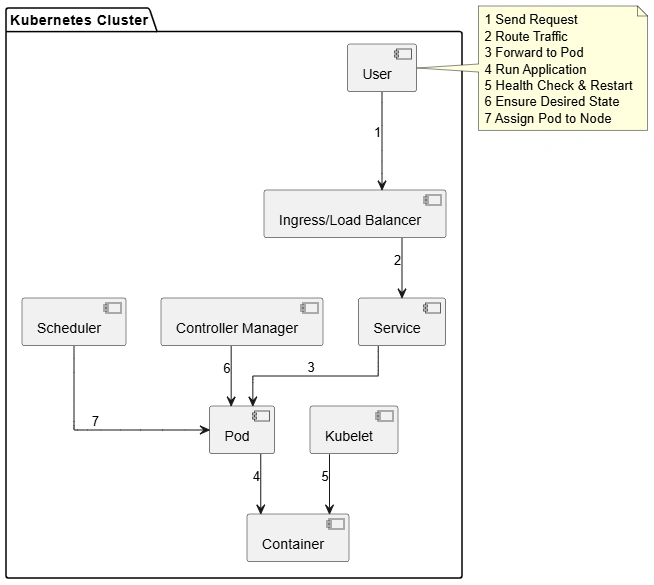
Pod : Smallest deployable unit, can contain one or more containers
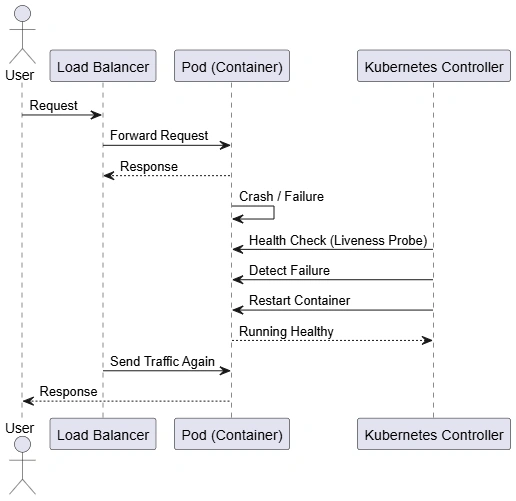
Health Checks : Mechanisms to detect if an app is running correctly
Node: A machine where containers are executed
Controller: Ensures desired state (number of replicas, etc.) is maintained
Introduction
A self-healing mechanism in containerized environments refers to the system’s ability to automatically detect failures and recover from them without human intervention. Platforms like Kubernetes continuously monitor the health of containers and take corrective actions, such as restarting failed containers, rescheduling them to healthy nodes, or replacing them entirely. This ensures applications remain available and resilient even in the face of failures like crashes, resource exhaustion, or node outages.
What problem we can solve with this?
Modern distributed applications are highly dynamic and prone to failures due to multiple dependencies, infrastructure issues, and unpredictable workloads. Without automation, engineers would need to manually detect and fix issues, leading to downtime and operational overhead. A self-healing mechanism eliminates the need for constant manual monitoring and intervention, ensuring systems can recover quickly and maintain service continuity. It also improves reliability and user experience by minimizing disruptions.
Prevents application downtime due to crashes
Eliminates manual intervention for restarts
Handles node failures automatically
Ensures desired state consistency
Improves system resilience and availability
Reduces operational overhead for DevOps teams
How to implement/use this?
Self-healing is typically implemented using orchestration tools like Kubernetes. You define the desired state (e.g., number of replicas) using objects like Deployments. Kubernetes continuously compares the current state with the desired state and takes action if discrepancies are found. Health checks (liveness and readiness probes) help detect failures early. If a container fails or becomes unresponsive, Kubernetes restarts it automatically. If a node fails, workloads are rescheduled to other nodes. This declarative approach ensures that the system always converges back to the intended state.
Define Deployment: Specify replicas and container configuration
Set Liveness Probe: Detect if container is unhealthy
Set Readiness Probe: Ensure traffic goes only to healthy containers
Use ReplicaSets: Maintain required number of instances
Enable Restart Policy: Automatically restart failed containers
Node Monitoring: Detect node failures and reschedule workloads
Join the conversation! Your thoughts help the community grow.