

Introduction
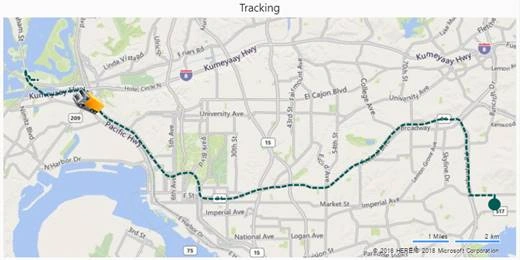
- Power BI Route Map Visual is used to define the track of traveling objects on a map.
- We can achieve this visualization by connecting the data containing fields like date time, latitude and longitude of the route, start and destination location and route sequence.
- Using this feature, we can also define the status of traveling objects like truck or car, its completed route, and pending route as well.
Where to use Route Map Visual in Power BI Report
- If you are designing an analytical report for traveling, delivery, or transportation kinds of subjects, you will have to consider the following points for insights.
- How many orders are delivered successfully?
- What is the status of dispatched or On-the-way orders?
- Where are delivery vehicles right now?
This kind of insights we can show on the map in a user-friendly way using the Route Map Visual.
- This visual can be useful in explaining the route using animation as well.
Example
Connect Data to visualYou will need the data in the following format.
| Latitude | Longitude | Status | TrackID | DateTime |
| 32.71094 | -117.00174 | Completed | 1 | 01/17/2018 10:00:00 |
| 32.71165 | -117.00172 | Completed | 2 | 01/17/2018 10:00:05 |
| 32.71192 | -117.00171 | Completed | 3 | 01/17/2018 10:00:10 |
| 32.71241 | -117.0017 | Completed | 4 | 01/17/2018 10:00:15 |
| 32.7135 | -117.00166 | Completed | 5 | 01/17/2018 10:00:20 |
| 32.71484 | -117.00162 | Completed | 6 | 01/17/2018 10:00:25 |
| 32.71484 | -117.00162 | Completed | 7 | 01/17/2018 10:00:30 |
| 32.71484 | -117.00225 | Completed | 8 | 01/17/2018 10:00:35 |
| 32.71484 | -117.00265 | Completed | 9 | 01/17/2018 10:00:40 |
| 32.71481 | -117.00522 | Completed | 10 | 01/17/2018 10:00:45 |
| 32.71481 | -117.00565 | Completed | 11 | 01/17/2018 10:00:50 |
| 32.7148 | -117.00592 | Completed | 12 | 01/17/2018 10:00:55 |
| 32.7148 | -117.0064 | Completed | 13 | 01/17/2018 10:01:00 |
| 32.7148 | -117.00743 | Completed | 14 | 01/17/2018 10:01:05 |
| 32.7148 | -117.00761 | Completed | 15 | 01/17/2018 10:01:10 |
| 32.71479 | -117.00806 | Completed | 16 | 01/17/2018 10:01:15 |
| 32.7148 | -117.00896 | Pending | 17 | 01/17/2018 10:01:20 |
| 32.71479 | -117.00954 | Pending | 18 | 01/17/2018 10:01:25 |
| 32.71478 | -117.01013 | Pending | 19 | 01/17/2018 10:01:30 |
| 32.71478 | -117.01066 | Pending | 21 | 01/17/2018 10:01:40 |
Poma SamPosted Nov 2, 2020, 3:23 PM
I can not see all the colores and routes on my version of the map :(
Poma SamPosted Nov 2, 2020, 3:15 PM
Which version of rout map are you using?
Vinod AbrahamPosted May 20, 2018, 9:43 AM
Nice Article & very explanative
Suraj KumarPosted Jan 24, 2018, 11:47 PM
Very good writeup...
Sagar Pandurang KapPosted Jan 24, 2018, 11:42 PM
Great article.Well explainedd....