

Introduction
This article demonstrates how to use SQL Helper Class in Web API using Visual Studio 2017.
What is SQL Helper?
SQL Helper class is used in Data Access Layer which interacts with database with the help of connection string provided and it contains several methods like below. And, it improves the performance for Business Layer & Data Access Layer.
- ExecuteNonQuery
- ExecuteDataset,
- ExecuteDataTable
- ExecuteReader,
- ExcuteScalar & more
ASP.NET Web API
ASP.NET Web API is a Framework for building Web API’s on the top on the .NET framework, which makes it easy to build HTTP services for a range of clients, including mobile devices, all browsers, & desktop application.
Web API is similar to ASP.NET MVC so it contains all MVC features.
- Model
- Controller
- Routing
- Model binding
- Filter
- Dependency injections
Create Web API
Open Visual Studio 2017.

Go to New menu and create a new project.
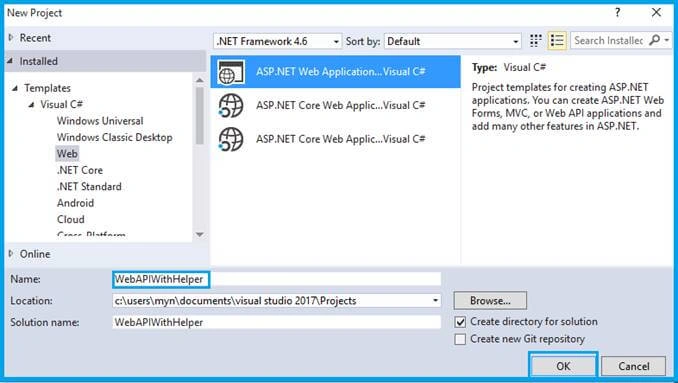
In the New Project menu, select ASP.NET Web Application on Framework 4.6. Enter the name of project in “Solution name” textbox and click OK button.
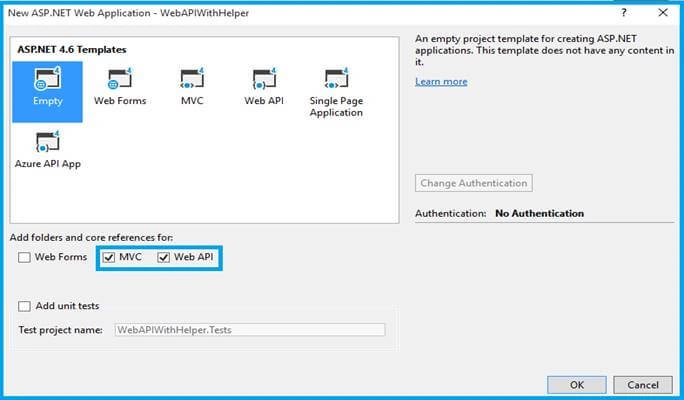
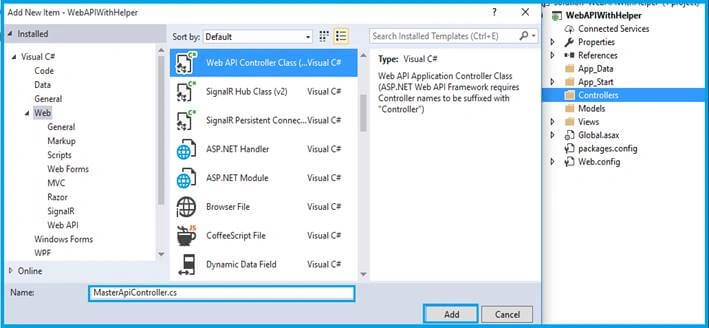
Once the project is created, add new API in the Controllers folder. Right click on Controllers-> Add Controller. Now, add Scaffold & create an API Controller “MasterApiController”.
Helper Class
Create new folder as “Helper” in Solution Explorer; then paste the below code in your class file.
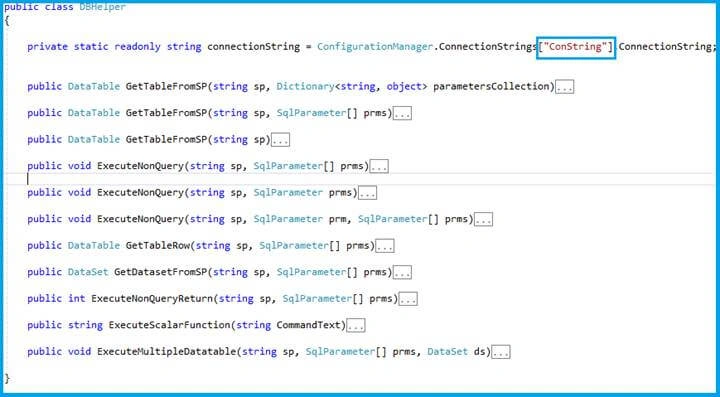
Follow the connection string name in web.config file.
- private static readonly string connectionString = ConfigurationManager.ConnectionStrings["ConString"].ConnectionString;
Write Web.Config File
I am accessing my local DB in Web.config file.
- <connectionStrings>
- <add name="ConString" providerName="System.Data.SqlClient" connectionString="Data Source=MYLTOP;Initial Catalog=DBMyn;User ID=sa;Password=Thiru@123" />
- </connectionStrings>
Create one more data convert class using Reflection, like below
- public static IList<T> ToList<T>(this DataTable table) where T : new()
- {
- IList<PropertyInfo> properties = typeof(T).GetProperties().ToList();
- IList<T> result = new List<T>();
- foreach (var row in table.Rows)
- {
- var item = CreateItemFromRow<T>((DataRow)row, properties);
- result.Add(item);
- }
- return result;
- }
If you want to know what Reflection is, see my blog here.
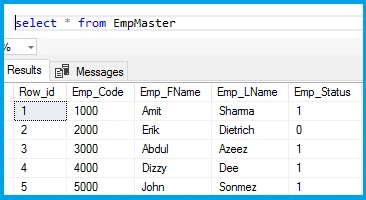
Create new database, Table, & Producer. Just use the below query.
SQL Query
- USE [ABCDB]
- GO
- /****** Object: StoredProcedure [dbo].[PC_EmpMaster] Script Date: 7/22/2017 1:20:35 PM ******/
- SET ANSI_NULLS ON
- GO
- SET QUOTED_IDENTIFIER ON
- GO
- CREATE PROCEDURE [dbo].[PC_EmpMaster]
- @Row_id BIGINT=NULL,
- @MODE VARCHAR(10)=NULL
- AS
- BEGIN
- SET NOCOUNT ON;
- IF(@MODE ='GET')
- BEGIN
- SELECT Row_id,Emp_Code,Emp_FName,Emp_Status,CONVERT(VARCHAR(12),Emp_DOB) AS Emp_DOB,Emp_Maritalstatus,Emp_Profilestatus,Emp_Expriance,Create_By,CONVERT(VARCHAR(12),Create_Date) AS Create_Date FROM EmpMaster
- END
- ELSE IF(@MODE ='GETBYID')
- BEGIN
- SELECT Emp_Code,Emp_FName,Emp_LName,Emp_Role,Emp_Department,Emp_Address FROM EmpMaster WHERE Row_id=@Row_id
- END
- SET NOCOUNT OFF;
- END
- GO
- /****** Object: Table [dbo].[EmpMaster] Script Date: 7/22/2017 1:20:35 PM ******/
- SET ANSI_NULLS ON
- GO
- SET QUOTED_IDENTIFIER ON
- GO
- SET ANSI_PADDING ON
- GO
- CREATE TABLE [dbo].[EmpMaster](
- [Row_id] [numeric](18, 0) IDENTITY(1,1) NOT NULL,
- [Emp_Code] [varchar](10) NULL,
- [Emp_FName] [varchar](50) NULL,
- [Emp_LName] [varchar](50) NULL,
- [Emp_Status] [bit] NULL,
- [Emp_DOB] [datetime] NULL,
- [Emp_Maritalstatus] [varchar](10) NULL,
- [Emp_Role] [varchar](50) NULL,
- [Emp_Department] [varchar](50) NULL,
- [Emp_Address] [varchar](500) NULL,
- [Emp_Profilestatus] [int] NULL,
- [Emp_Expriance] [int] NULL,
- [Create_By] [varchar](50) NULL,
- [Create_Date] [datetime] NULL
- ) ON [PRIMARY]
Ganapati PanapanaPosted Sep 10, 2017, 11:47 PM
Nice Article !!! Thanks !!
Tridip BhattacharjeePosted Jul 25, 2017, 4:47 AM
If possible please tell me few ado.net based DAL other than sql helper.