

Entity Framework 10 was released with LST (Long Term Support) in November 2025 and itrun with .NET 10 (or above) only. EF 10 brings many improvements, including the long-awaited support for outer joins through the new LINQ operators LeftJoin and RightJoin.
Quick refresh – Inner Join Vs Outer Join
Inner Join – Return matches only
Left Outer Join – Return all rows from the left with matches from the right and null when no match found
Right Outer Join - – Return all rows from the right with matches from the left and null when no match found
Way to write Outer join before EF 10
Before EF 10, the way to write a left outer join was to use a group join followed by DefaultIfEmpty(). This is the pattern that maps to a SQL LEFT JOIN.
Example: Consider the following table relationship between the Employee and Department tables, where the Employee table has an optional DepartmentId column.
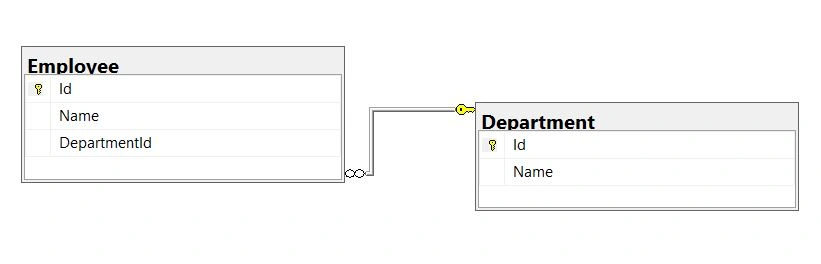
The following query shows an equivalent left outer join in EF (prior to EF 10). This is the canonical way to write a left join in EF Core.
var result = (from e in context.Employee
                        join d in context.Department
                            on e.DepartmentID equals d.ID into employeeDepartment
                        from ed in employeeDepartment.DefaultIfEmpty()
                        select new
                        {
                            Id = e.ID ,
                            Name = e.Name,
                            Department = ed.Name
                        }).ToList();
You can also, write left join using group join followed by DefaultIfEmpty().
var query = context.Employee
                    .GroupJoin(context.Department,
                        e => e.DepartmentID,
                        d => d.ID,
                        (emps, dep) => new { emps, dep })
                    .SelectMany(
                        g=> g.dep.DefaultIfEmpty(),
                        (a, e) => new
                        {
                            Id = a.emps.ID ,
                            Name = a.emps.Name,
                            Department = e.Name
                        }).ToList();
SQL Generated in above two cases.

Entity Framework (prior to EF 10) does not support a native right outer join operator, but you can achieve it by swapping the tables.
Following is SQL Rule and EF is also following same rule
A RIGHT JOIN B
≡
B LEFT JOIN A
EF Core 10: the new LeftJoin and RightJoin LINQ Operators
EF Core 10 (with .NET 10) introduced two new LINQ operators, LeftJoin and RightJoin, allowing your code to read more like SQL. EF Core translates these into SQL LEFT JOIN and RIGHT JOIN statements.
Considering the above-mentioned example, the left outer join query looks as follows with LeftJoin operator:
var employee = context.Employee
                    .LeftJoin(
                               context.Department,
                                emp=>emp.DepartmentID,
                                dep => dep.ID,
                    (emp, dep) => new
                        {
                            Id = emp.ID,
                            Name = emp.Name,
                            Department = dep !=null?dep.Name:null
                        }
                    ).ToList();
If there is a relationship between tables based on more than two columns, you can write the query in the following way.
var query =
    context.Table1
        .LeftJoin(
            context.Table2,
            o => new { o.Col1, o.Col2 },
            d => new { d.Col1, d.Col2 },
            (o, d) => new
            {
                //select required columns
            });
Considering the above-mentioned example, the right outer join query looks as follows with RightJoin operator:
var employee = context.Department
                    .RightJoin(
                        context.Employee,
                        dep => dep.ID,
                        emp=> emp.DepartmentID,
                    (dep, emp) => new
                        {
                            Id = emp.ID,
                            Name = emp.Name,
                            Department = dep !=null?dep.Name:null
                        }
                    ).ToList();
SQL Generated

Wrap-up
It is recommended to use the new LeftJoin and RightJoin operators in EF Core 10 for clearer code.
EF Core 10 still supports the earlier approach to writing left joins—using a group join followed by DefaultIfEmpty()—to maintain backward compatibility with older .NET frameworks.
You can inspect your generated SQL using ToQueryString() method
Join the conversation! Your thoughts help the community grow.