Let's start by building a simple app layout.
The structure is,
- Header at the top
- Left Sidebar for navigation
- Right Sidebar for extra info
- Content in the middle
- The footer at the bottom
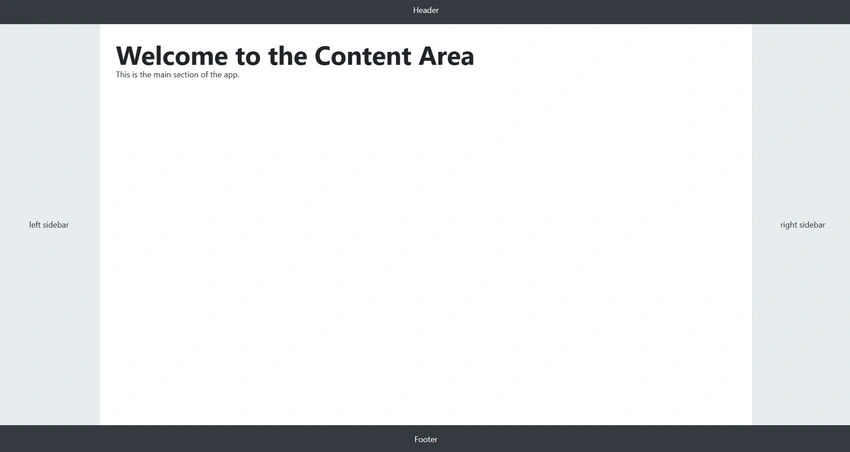
You’ll create each part as a React component using TypeScript, and along the way, you’ll learn.
- What components are?
- What .tsx files are?
- How to write, export, and reuse components?
- Best practices and naming conventions
Step 1. Set Up a React + TypeScript App.
We’ll use Vite to create a fast dev setup.
npm create vite@latest my-layout-app -- --template react-ts
cd my-layout-app
npm install
code .
npm run dev
What is a React Component?
A component is a reusable block of UI, like a button, header, card, or page section.
It’s just a JavaScript or TypeScript function that returns JSX (HTML-like syntax).
Here’s a simple example.
function Button() {
  return <button>Click Me</button>;
}

export default Button;
Key Points
- The function name starts with a capital letter
- It returns JSX
- It is stored in a .tsx file
- It's exported, so you can use it elsewhere
Why .tsx?
- .ts = TypeScript (typed JavaScript)
- .tsx = TypeScript + JSX (React syntax)
React components return JSX. So all your React components go into .tsx files, not .ts.
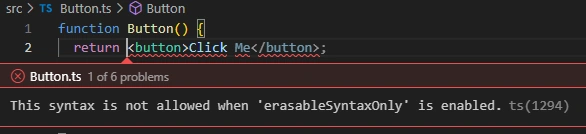
So, what happens if I save the above code with a .ts extension? I get a compile-time error saying: JSX expressions are not allowed in files with extension '.ts.
Folder and File Structure
Recommended structure in src/.
src/
└── components/
    ├── Header.tsx
    ├── Sidebar.tsx
    ├── Content.tsx
    └── Footer.tsx
App.tsx
Naming & File Norms
| Rule |
Example |
| Use PascalCase for file and component names |
Header.tsx, MyComponent.tsx |
| Keep one component per file |
Don't combine multiple components in one file |
| Use the default export for simple components |
export default MyComponent |
Step 2. Create the Components.
Now let's create the components one by one.
1. Header.tsx
function Footer() {
  return <footer>Footer</footer>;
}

export default Footer;
2. Sidebar.tsx (Reusable with Props)
type SidebarProps = {
  position: 'left' | 'right';
};

function Sidebar({ position }: SidebarProps) {
  return <aside className="sidebar">{position} sidebar</aside>;
}

export default Sidebar;
- SidebarProps defines the type of props that this component expects.
- The position prop is accessed using object destructuring: { position }
- You pass this prop when you use it like <Sidebar position="left" />
3. Content.tsx
function Content() {
  return (
    <main className="content">
      <h1>Welcome to the Content Area</h1>
      <p>This is the main section of the app.</p>
    </main>
  );
}

export default Content;
4. Footer.tsx
function Footer() {
  return <footer>Footer</footer>;
}

export default Footer;
Step 3. How to Use Components in React? Bring It All Together in App.tsx.
1. Import the Component.
import Header from './components/Header';
import Sidebar from './components/Sidebar';
import Content from './components/Content';
import Footer from './components/Footer';
This means: Go to the components folder and bring in each component so I can use it in this file.
2. Use the Component as a Custom HTML Tag.
<Header />
<Sidebar position="left" />
<Content />
<Sidebar position="right" />
<Footer />
For reference, here is the full App.tsx.
import Header from './components/Header';
import Sidebar from './components/Sidebar';
import Content from './components/Content';
import Footer from './components/Footer';
import './App.css';

function App() {
  return (
    <div style={{ display: 'flex', flexDirection: 'column', height: '100vh' }}>
      <Header />

      <div style={{ display: 'flex', flex: 1 }}>
        <Sidebar position="left" />
        <Content />
        <Sidebar position="right" />
      </div>

      <Footer />
    </div>
  );
}

export default App;
Quick Recap
| Concept |
Explanation |
Example |
| Component |
A function that returns JSX |
function Header() { return <h1>...</h1> } |
| Props |
Inputs to components |
Sidebar({ position: 'left' }) |
| TypeScript Props |
Define props with a type |
type Props = { title: string } |
| Default Export |
Common export style |
export default Header |
| One Component per File |
Clean and scalable |
Header.tsx, Sidebar.tsx |
Common Mistakes to Avoid
| Mistake |
Fix |
| Using .ts instead of .tsx |
Use .tsx for components |
| Lowercase component name |
Use PascalCase like MyComponent |
| Forgetting export |
Always export your component |
| Using multiple components in one file |
One per file is the best practice |
Well, what is up with the 4th mistake?
When should you not use multiple components in a single file?
- When each component serves a separate purpose
- When components need to be reused in different files
- When files become too large or hard to scan
But there can be exceptions
When is it okay to have multiple components in one file?
- Only one of them is exported (usually the main one), and the others are small helpers.
- The secondary components are not reused anywhere else.
In the following example,
- CardTitle and CardBody are private helpers.
- The card is the only exported component.
// Card.tsx

function CardTitle({ title }: { title: string }) {
  return <h2>{title}</h2>;
}

function CardBody({ children }: { children: React.ReactNode }) {
  return <div>{children}</div>;
}

function Card({ title, children }: { title: string; children: React.ReactNode }) {
  return (
    <div>
      <CardTitle title={title} />
      <CardBody>{children}</CardBody>
    </div>
  );
}

export default Card;
Lemme also summarize naming conventions in React for you.
React + TypeScript Naming Conventions Cheat Sheet
| Item |
Naming Convention |
Example |
Notes |
| Component Name |
PascalCase |
UserCard |
Must start with uppercase |
| Component File |
PascalCase.tsx |
UserCard.tsx |
One component per file |
| Folder Name |
lowercase |
components/ |
Flat or kebab-case preferred |
| Props Type/Interface |
PascalCase + Props |
UserCardProps |
For typing props |
| Hook Name |
camelCase with use |
useAuth |
All hooks must start with use |
| Helper Function |
camelCase |
formatDate |
No JSX → use .ts file |
| Page Component |
PascalCase.tsx |
Dashboard.tsx |
Treated like normal components |
| App/Project Folder |
kebab-case |
my-app/ |
For CLI tools, repos, npm |
| JSX Component Use |
Capitalized Tag |
<UserCard /> |
Lowercase = treated as an HTML tag |
| Export Style |
default (usually) |
export default Header |
One component per file |
Now you know
- What a component is and where it lives
- How .tsx works and why it’s used
- How to create and type components
- How to export and reuse them
- Best practices for file structure and naming


Join the conversation! Your thoughts help the community grow.