

For those of us entering the world of .NET through the eyes of C# and VB.NET, our life is somewhat uncomplicated. We are safely tucked away inside the .NET environment using managed code. C# and VB.NET were designed specifically to navigate through the managed environment. We can access the .NET libraries easily, our code looks uncluttered (if it's well designed), our code compiles in the blink of an eye, and we can leverage all the nice C# tools on the market (such as resharper) to make are coding even easier than it already is.
What about those few of us that are sitting pretty with those big Visual C++ / MFC applications? You know, the ones that have precompiled headers that supposedly make our compile times faster. Yeah, you programmers know who you are, and I suspect there are a good majority of you. If you are still not sure you are that person, please take a few moments to answer the following simple quiz:
1. Do you find yourself looking for memory leaks on a daily basis?
2. Do you occasionally see a GPF (General Protection Fault) when running your application?
3. Are you busy debugging through 6 layers of inheritance CDocument, COleDocument, CMyOleDocument and CMyGrandmothersOleDocument?
4. Are COM reference counts getting you down?
5. Are you still trying to figure out what is the real difference between a pointer, a reference, and a stack variable?
6. Are you still debating whether you should have made your application SDI, MDI, or just a plain old dialog?
7. Are you still thinking of collections in terms of STL (Standard Template Library)?
8. Does the abbreviation DDX actually mean something to you?
9. Are you trying to figure out which of the dozen character formats (wchar, BSTR, CString, char, tchar) you are supposed to use?
10. Are you tired of typing a header declaration for every implementation you write?
11. Do you still find yourself writing #ifdef, or #pragma once at the top of every header file?
12. Are you stuck in an interdependency nightmare between your headers and wonder if you should use some more forward class declarations?
If you answered yes to most of or all of these questions, you've been programming with MFC for too long, and it's time to start migrating to .NET. Fortunately this does not have to be a drastic change, but can be done gradually, because Microsoft had the foresight of building Visual C++ into the .NET framework. In fact Visual C++ is the only compiler you can use to mix managed and unmanaged code directly in the same files. You can have a pointer on line 16, and a managed reference on line 17. You can compile, build, debug, and run your application with mixed managed and unmanaged code, all living happily together. You can even bring up .NET Windows Forms and Dialogs from inside your MFC application. In the discussion to follow we will show you how:
Steps to Migrating to using .NET
The first step in migrating to .NET is to get your existing MFC application to compile in Visual Studio.NET 2005. I advise taking baby steps when migrating, because too many steps at once will lead you to trying to guess at wrong causes for hurdles you'll need to overcome. The Visual Studio.NET 2005 Framework will attempt to convert your existing project file (if it is in Visual Studio 6.0) to the current Visual Studio. There may be some errors in your compilation that you didn't have in Visual Studio 6.0. The reason for the errors is that the Visual Studio .NET compiler is very strict in its rule checking. You may need to alter some of your code to get the compile to actually work.
Once you've gotten your unmanaged project to compile under Visual Studio.NET, it's time to add the CLR option into your project through the project properties. To get to the CLR option, Right-Click on your project, and choose the Properties menu item. Then click the General node under Configuration Properties shown in figure 1. Choose the first CLR option: Common Language Runtime Support (/clr).
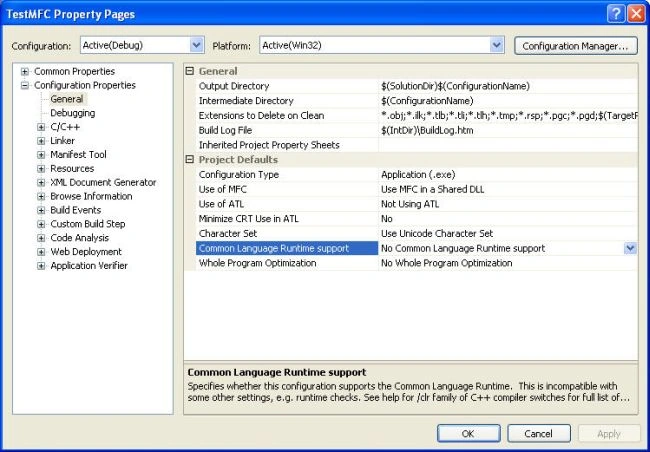
Figure 1 - Adding Common Language Runtime (CLR) Support to your MFC Application
Now you are ready to use .NET in your application, but not so fast! First make sure you can compile your existing application. You may find that some of the class types in .NET conflict with your existing class types. (You may even find that some of the platform sdk conflicts with the .NET class types.) For example, if you have a class in your application called System, you have to rename it, because the clr uses System as its root namespace. Also you may find that some of your variable names conflict with compiler keywords, such as a variable name generic. Once you sort through these conflicts, and have gotten to the link, you may also find problems. I found that sometimes method names in Visual C++ 6.0 are not mangled the same way they were with the CLR on as they were off. So I found, on some occasions, you may have to compile libraries included in your application with the /clr option on as well.
Once you have gotten through your link, you'll need to run your application. Visual Studio .NET 2005 has a debugging agent called the Managed Debugging Assistant. If there is a conflict in how you call managed code from the unmanaged application, an error will be triggered through this agent. Some of the errors will point you to places where you may need to adjust your code. Some are false alerts, and may need to be turned off. You can find the options for the Managed Debugging Assistant under the Debug -->Exceptions menu.
Adding Managed Code
To access an unmanaged type in C++ (the types you are already accustomed with), you construct the variable on the stack or use a new to create the variable on the heap.
e.g. CString x; // stack
CString *x = new CString("hello"); // pointer on the heap
In managed code, you have to construct the variable so it ends up being managed by the garbage collector. The way to construct a managed variable is by using gcnew and referencing the variable with a handle:
e.g. System::String^ myString = gcnew System::String("hello");
or
using namespace System;
...
String^ myString = gcnew String("hello C# Corner");
If you are curious about how this handle different than a pointer, check out this MSDN blog. Because you constructed the .NET System::String inside the auspices of the CLR, you don't need to worry about deleting it out of memory. It will automatically get garbage collected when the runtime decides to clean it up. Although declaring a managed type in C++ is a little more painful than it is in C#, you still get the benefit of the .NET framework. For instance, you now have all the wonderful methods of the immutable String class at your disposal:
String^ firstTwoCharacters = myString->Substring(0,2);
John MorrisonPosted Oct 17, 2008, 5:29 PM
I don't know whether you received my last comment posted because I had to register. I am a MFC developer version 6.0 wanting to upgrade and learn VS2008 and use the .NET compiler. It seems like this managed C++ technique would help, but I am wondering if another way exists. I wanted to know whether you can write in Visual Studio 2008 code in C++ and code in C# and then call eachothers code (C++ calling the C# and vice-versa). The reason is that I want to use examples of using ADO.Net , but they are usually written in C#(or VB). It seems to me that the CLR compiler was created for doing such a thing because all the languages were said to be easily integrated in the .NET environment. Sincerely, JM_2008
Michael SchulzeeditedPosted Jan 4, 2007, 4:04 AMEdited Jan 4, 2007, 4:17 AM
Nice article and everything you're telling is working fine. Using a "stand-alone" application it works smoothly to show WinForms dialogs or to host .NET UserControls inside your MFC CDialog. But everything seems to change if you want to do the same thing for a MFC ActiveX. I'm running into major problems here. If I'm doing the same steps as for the "stand-alone" app I currently have two major problems: (1) When starting a debug session Visual Studio (VS2005 by the way) starts our client app that implements an ActiveX container and loads the MFC WinForms ActiveX during startup. In the moment the client app is about to load the MFC WinForms ActiveX, Visual Studio freezes and hangs infinitely. Last messages I see in VS output window are that the CLR DLLs are being loaded. Looks like the LoaderLock problem described here. But until now I didn't figure out how to prevent this LoaderLock. If the client app is started normally, means not via Visual Studio, it starts without problems. (2) This leads to the next problem: When the MFC WinForms ActiveX is about to be displayed I get a crash in 'CWinFormsControl<TManagedControl>::InternalCreateManagedControl' (<VS2005-install-path>\vc\atlmfc\include\afxwinforms.inl). An analogous crash occurs when using the CWinFormsDialog template class instead of CWinFormsControl. Could be this known bug which seems to be fixed with VS2005 Service Pack 1. But I didn't install and try it until now. So do you have any experiences with the new MFC 8.0 template classes CWinFormsControl / CWinFormsDialog / CWinFormsView in combination with a MFC ActiveX or with MFC WinForms ActiveXs in general? Any help would really be appreciated! cheers, Michael