

Pre-requisite to understand this
Directory Service: A centralized database storing user and resource information
Authentication vs Authorization: Authentication verifies identity; authorization defines access
Client-Server Architecture: Apps (clients) communicate with LDAP servers
DN (Distinguished Name): Unique identifier for each user in LDAP
Bind Operation: LDAP term for login/authentication request
Introduction
Lightweight Directory Access Protocol (LDAP) is a protocol used to access and manage a centralized directory of users and their credentials. In authentication systems, LDAP allows applications to delegate user verification to a dedicated directory server instead of maintaining their own user database. This is widely used in enterprise environments where multiple systems need to share the same user identity store. Systems like Microsoft Active Directory are built on LDAP principles, making it a foundational technology in corporate authentication architectures.
What problem we can solve with this?
In large organizations, managing user credentials across multiple applications becomes complex, error-prone, and insecure. Without a centralized system, each application would need its own user database, leading to duplication and inconsistent access control. LDAP solves this by providing a unified directory where all user credentials are stored and managed. This reduces administrative overhead, improves security, and enables seamless login across multiple systems. It also supports organizational hierarchies and group-based access control, making it highly scalable. Additionally, LDAP enables integration with legacy systems and enterprise tools, ensuring consistency across the IT ecosystem.
Problems solved:
Centralized user management: One directory for all applications
Single source of truth: Avoid duplicate user databases
Improved security: Credentials stored and managed securely
Scalability: Works well for thousands/millions of users
Consistency: Same credentials across systems
Ease of integration: Works with enterprise tools and services
How to implement/use this?
To implement LDAP authentication, an application must connect to an LDAP server and perform a bind operation using user credentials. Typically, the app first searches for the user’s DN (Distinguished Name) using a service account, then attempts authentication by binding with the user’s DN and password. If the bind is successful, the user is authenticated. Many frameworks (Java Spring Security, Node.js ldapjs, etc.) provide built-in LDAP support. Secure communication using LDAPS (LDAP over SSL) is recommended. Additionally, group-based authorization can be implemented by querying user roles from LDAP. Proper error handling and connection pooling are essential for production systems.
Steps:
Connect to LDAP server: Establish network connection
Search user DN: Find user entry using username
Bind with credentials: Authenticate using DN + password
Validate response: Check if authentication succeeded
Fetch roles/groups: Retrieve authorization data
Grant access: Allow or deny login
Sequence Diagram
This sequence diagram shows how LDAP authentication works step by step. The user initiates the login process by providing credentials to the application. The application does not directly validate the password; instead, it queries the LDAP server to find the user’s DN. Once the DN is retrieved, the application attempts a bind operation using the provided password. The LDAP server validates the credentials internally and returns a success or failure response. Based on this response, the application either grants or denies access. This approach ensures that sensitive credential validation is handled centrally, improving security and maintainability.
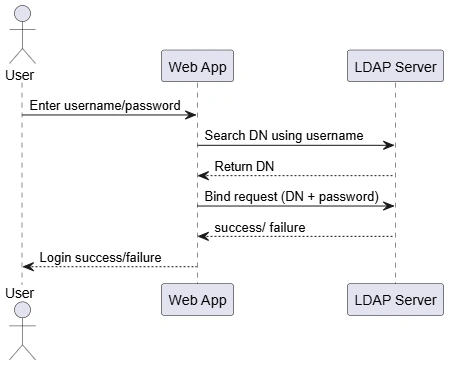
Key steps:
User input: Credentials entered
Search operation: Find user DN
Bind request: Attempt authentication
Validation: LDAP checks credentials
Response handling: App decides access
Component Diagram
The component diagram highlights the structural interaction between different parts of the system. The user interacts with the web application, which delegates authentication to an LDAP client module. This module is responsible for communicating with the LDAP server using protocol-specific operations such as search and bind. The LDAP server processes the request and returns the result. The LDAP client module translates this response back to the application, which then informs the user. This separation of concerns ensures modularity, making the system easier to maintain and extend. It also allows swapping LDAP implementations without affecting the main application logic.
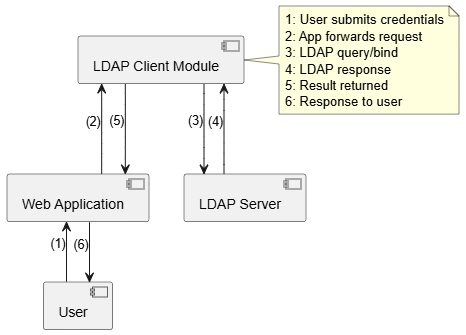
Key components:
User: Initiates authentication
Web Application: Handles request/response
LDAP Client Module: Communicates with LDAP
LDAP Server: Validates credentials
Decoupling: Improves maintainability
Deployment Diagram
The deployment diagram illustrates how LDAP authentication is distributed across physical or virtual infrastructure. The user interacts through a browser on their device, sending login requests over HTTPS to the application server. The application server hosts the web application, which processes the request and communicates with the LDAP server. The LDAP server resides on a separate directory server, often within a secure internal network. Communication between the application and LDAP server typically uses LDAP or LDAPS protocols. This separation enhances security by isolating credential validation from the application layer. It also allows independent scaling and management of authentication infrastructure.
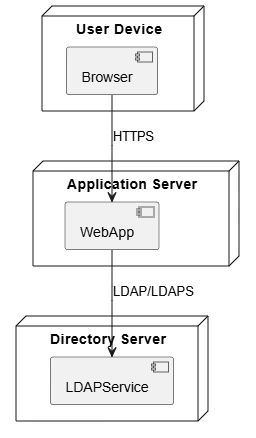
Key deployment elements:
User Device: Entry point for login
Application Server: Hosts business logic
LDAP Server: Central authentication system
Secure communication: HTTPS and LDAPS
Separation of layers: Improves scalability
Advantages
Centralized authentication: Single identity store.
Reduced duplication: No multiple user databases.
Enterprise-ready: Works with systems like Active Directory.
Scalable architecture: Handles large organizations.
Secure credential handling: Passwords validated centrally.
Flexible authorization: Supports group-based access.
Summary
LDAP authentication is a robust and widely adopted mechanism for centralized identity management in enterprise systems. By delegating authentication to a directory service like LDAP, applications can avoid maintaining their own credential stores and instead rely on a secure, scalable, and consistent system. The process involves searching for a user’s identity and validating credentials through a bind operation. With clear separation between application logic and authentication infrastructure, LDAP enhances security, simplifies user management, and enables seamless integration across multiple systems.
Join the conversation! Your thoughts help the community grow.