

Introduction
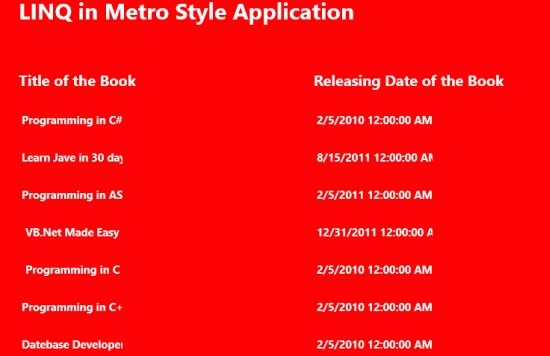
I hope all of you become familiar with the new technology LINQ (Language Integrated Query) that is used instead of SQL. It works for all type of data Source. In this article we are going to implement LINQ in a Metro style application and use a list of a Books class as a data source. The front end for showing the information in a XAML page uses a GridView control.
In the following we are including the entire code of the XAML file and the code behind file to create this mini application.
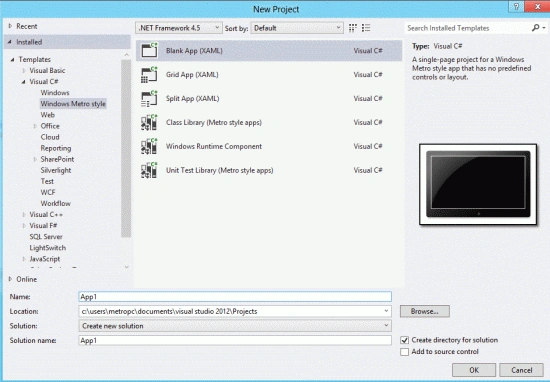
Step 1 : First, you will create a new Metro Style Application. Let us see the description with images of how you will create it.
- Open Visual Studio 2012
- File -> New -> Project
- Choose Template -> Visual C# -> Metro Style Application
- Rename the application
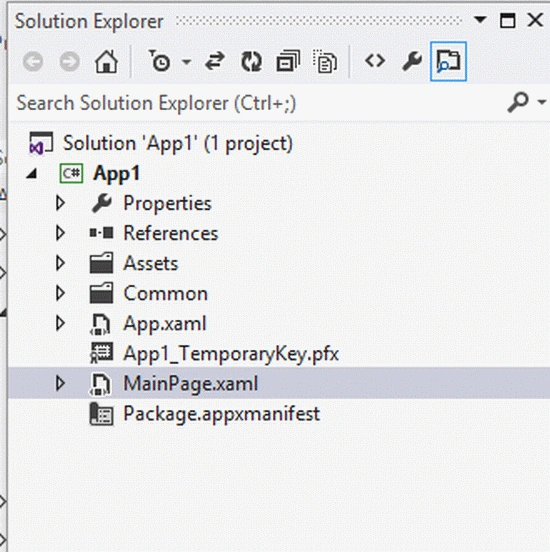
Step 2 : In the Solution Explorer there are two files that we will primarily work with; the MainPage.xaml and MainPage.xaml.cs files.
Step 3 : The MainPage.xaml file is as in the following code:
Code :
<Page
x:Class="App1.MainPage"
IsTabStop="false"
xmlns="http://schemas.microsoft.com/winfx/2006/xaml/presentation"
xmlns:x="http://schemas.microsoft.com/winfx/2006/xaml"
xmlns:local="using:App17"
xmlns:d="http://schemas.microsoft.com/expression/blend/2008"
xmlns:mc="http://schemas.openxmlformats.org/markup-compatibility/2006"
mc:Ignorable="d">
<Grid Background="Red">
<Grid.ColumnDefinitions>
<ColumnDefinition Width=".333*"></ColumnDefinition>
<ColumnDefinition Width=".233*"></ColumnDefinition>
<ColumnDefinition Width=".233*"></ColumnDefinition>
<ColumnDefinition Width=".333*"></ColumnDefinition>
</Grid.ColumnDefinitions>
<Grid.RowDefinitions>
<RowDefinition Height=".083*"></RowDefinition>
<RowDefinition Height=".033*"></RowDefinition>
<RowDefinition Height=".333*"></RowDefinition>
<RowDefinition Height=".133*"></RowDefinition>
<RowDefinition Height=".333*"></RowDefinition>
</Grid.RowDefinitions>
<TextBlock Grid.Column="1" Grid.Row="0" Grid.ColumnSpan="3"
Text="LINQ in Metro Style Application" FontSize="30"
FontWeight="ExtraBold">
</TextBlock>
<TextBlock Grid.Column="1" Grid.Row="1" Text="Title of the Book"
FontSize="20" FontWeight="ExtraBold">
</TextBlock>
<TextBlock Grid.Column="2" Grid.Row="1" Text="Releasing Date of the Book"
FontSize="20" FontWeight="ExtraBold">
</TextBlock>
<GridView x:Name="gridview1" FontSize="10" FontWeight="Bold" Grid.Column="1" Grid.Row="2" >
</GridView>
<GridView x:Name="gridview2" FontSize="10" FontWeight="Bold" Grid.Column="2" Grid.Row="2" >
</GridView>
</Grid>
</Page>
Step 4 : Add the class Books.cs to our project to be used as the data source:
Code :
using System;
using System.Collections.Generic;
using System.Linq;
using System.Text;
Krishna GaradPosted Nov 2, 2012, 6:57 AM
Nice but "I hope all of you become familiar with the new technology LINQ (Language Integrated Query) that is used instead of SQL. It works for all type of data Source." I think cause of this feature only LINQ fails it does not support other than SQL server.