

Introduction
After publishing Linq to SQL Performance Considerations, many readers replied and asked me to extend the benchmarking examples to include Linq to SQL compiled queries.
This article takes a look at what it takes to convert Linq queries to compiled queries and what performance gains can be obtained.
Here is a link to Part 1 of this article:
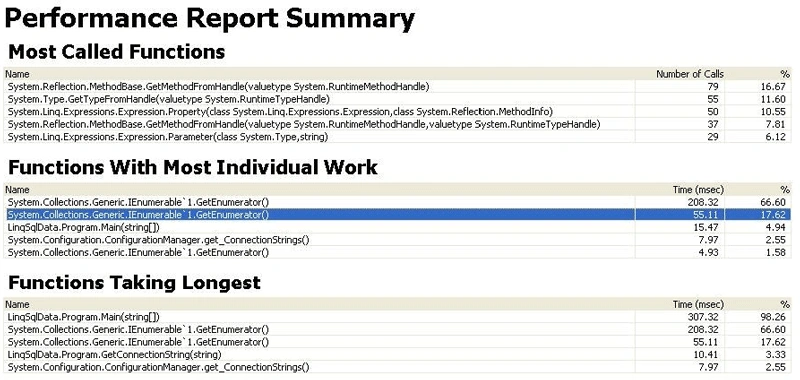
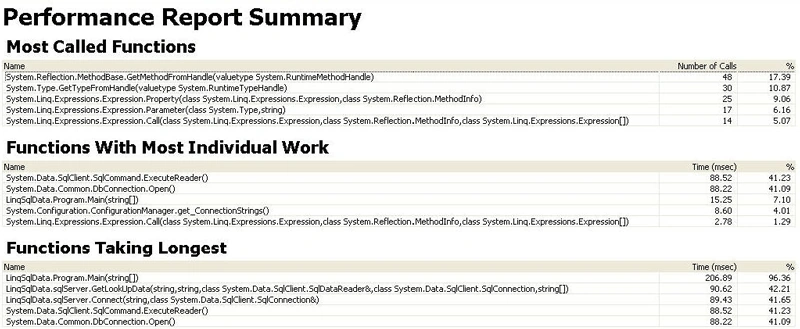
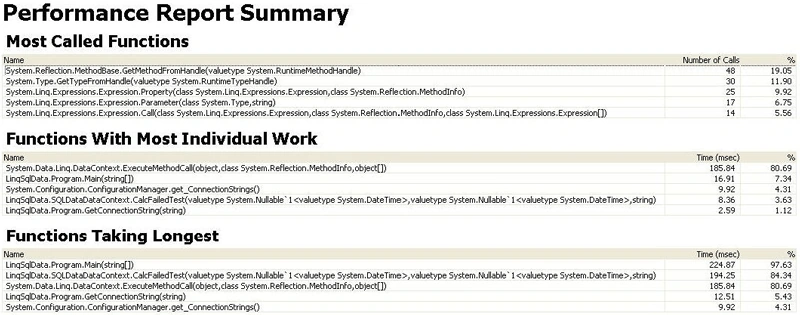
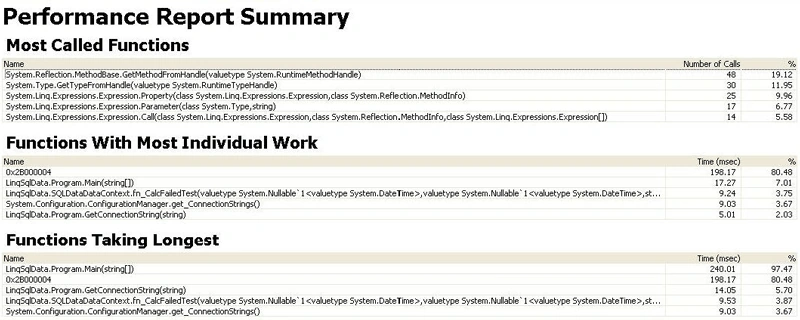
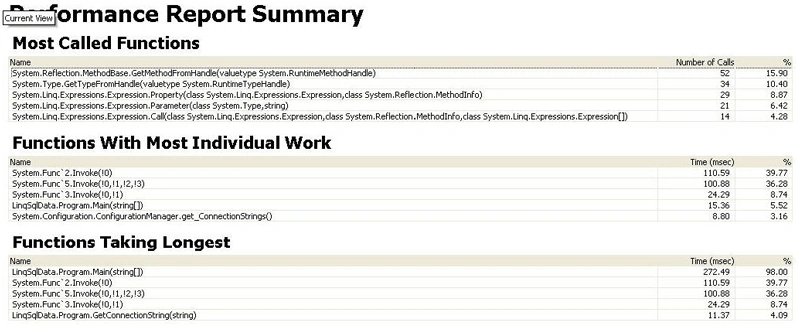
I have also decided to run each of the data access scenarios, discussed in Part 1, of this article, through the Visual Studio Performance profiler using the Instrumentation profiling method.
The Instrumentation profiling methods goes beyond the Sampling profiling method which collects information only when the program actively uses the CPU.
The Instrumentation profiling method adds probes to the beginning and end of each function and is used to measure elapsed time.
Probes are also used to determine how much CPU time each function is using and how expensive external functional are. (Find Application Bottlenecks with Visual Studio Profiler,2010)
Please refer to the previous article as I plan on listing only the changes to the code that was originally listed.
Part 1 of this article compared benchmarking Linq to SQL against various data access methods which included ADO.NET accessing a SQL Server Stored Procedure, Linq to SQL accessing the same Stored Procedure and Linq to Sql accessing a SQL Server user defined function.
Compiled Queries
In order to create Linq to SQL compiled queries there are several design patterns that can be used as a guide in the conversion process. This article will use a design pattern that creates static methods that call a delegate.
There are some really good articles on these design patterns and I will post a reference to these later in the reference section.
Let us look at one of the simple query expressions that were referenced in Part 1 of this article:
var shift1 =
from sft1 in sq.Shifts
where sft1.ShiftName == "Shift1"
select new { sft1.StartTime };
This query expression was used to extract the start time of the first shift.
In order to convert this query into a compiled query the query has to be converted into a method. In order to do so we must parameterize several key pieces of data. (Solving Common Problems with Compiled Queries in Linq to SQL for High Demand asp net web sites, 2008)
IQueryable<string> GetShift1(SQLDataDataContext sq, string strShift)
{
return from sft1 in sq.Shifts
where sft1.ShiftName == strShift
select sft1.StartTime;
}
In the above code a generic method has been created that receives a data context and a string argument for the desired shift.
Next the method must be converted to include a delegate and a Lambda expression. The Func<> delegate and Lambda expressions are two new constructs introduced in C# 3.0 to aid in the construction of Linq to SQL expressions.
public static readonly Func<SQLDataDataContext, string, IQueryable<string>>
GetShift1 = (sq, strShift) =>
from sft1 in sq.Shifts
where sft1.ShiftName == strShift
select sft1.StartTime;
Notice the above delegate is declared as static readonly. You want the compiled query to be declared once and re-used across all threads. If you do not include the static modifier the compiled query will be re-compiled every time you reference it and you will loose any performance gains.
Now the final transformation can take place. The method can now be converted into a compiled query by adding the following syntax:
public static readonly Func<SQLDataDataContext, string, IQueryable<string>>
GetShift1 = CompiledQuery.Compile((SQLDataDataContext sq, string strShift) => from sft1 in sq.Shifts
where sft1.ShiftName == strShift
select sft1.StartTime);
By adding the CompiledQuery.Compile() method to the code, the delegate is compiled upon execution, a single time, and no further compiling occurs during subsequent execution.
There are a few more issues that need to be addressed when creating compiled queries. These issues will be addressed when we discuss the other Linq to Sql queries that were defined in Part 1 of this article,
var shift2 =
from sft2 in sq.Shifts
where sft2.ShiftName == "Shift2"
select new { sft2.StartTime, sft2.Hours };
In the above Linq to SQL query the select new {sft2.StartTime, sft2.Hours} statement implies an anonymous type. No type name is provided. Compiled queries cannot contain anonymous types. Generics requires a type name to be specified.
There is a way around this:
public static readonly Func<SQLDataDataContext, string, IQueryable<Shift>>
GetShift2 = CompiledQuery.Compile((SQLDataDataContext sq, string strShift
=> from sft2 in sq.Shifts
where sft2.ShiftName == strShift
select sft2 );
Notice the return type is IQueryable<Shift>. One way to address the problem is to specify a type. In this case the compiled query is referencing the Shift class, which was created by the Designer.
var icount =
from insp in sq.Inspections
where insp.TestTimeStamp > dStartTime && insp.TestTimeStamp < dEndTime
&& insp.Model == "EP"
group insp by insp.Model into grp
select new { Count = grp.Count() };
Notice, this query also contains an anonymous type. The below compiled query gets around this by referencing a known type of IQueryable<Int32>.
public static readonly Func<SQLDataDataContext, string, DateTime, DateTime, IQueryable<Int32>>
GetModelCnt = CompiledQuery.Compile((SQLDataDataContext sq, string strModel, DateTime dStartTime, DateTime dEndTime) =>
from insp in sq.Inspections
where insp.TestTimeStamp > dStartTime && insp.TestTimeStamp < dEndTime
&& insp.Model == strModel
group insp by insp.Model into grp
select grp.Count());
We removed the code that references the anonymous type and used projection to query the group by Count() method.
var unordered =
from insp in sq.Inspections
where insp.TestTimeStamp > dStartTime && insp.TestTimeStamp < dEndTime
&& insp.Model == "EP" && insp.TestResults != "P"
group insp by new { insp.TestResults, insp.FailStep } into grp
select new
{
FailedCount = (grp.Key.TestResults == "F" ? grp.Count() : 0),
CancelCount = (grp.Key.TestResults == "C" ? grp.Count() : 0),
grp.Key.TestResults,
grp.Key.FailStep,
PercentFailed = Convert.ToDecimal(1.0 * grp.Count() / tcount * 100)
};
There are two issues in converting the above query to a compiled query.
As above this query contains an anonymous type. The second issue pertains to the number of types that must be passed to the method. Apparently a compiled query is limited in the number of types that can be passed as arguments. (Solving Common Problems with Compiled Queries in Linq to SQL for High Demand asp net web sites, 2008)
The way around this is to use a struct or a class to package up the arguments and pass the object to the compiled query.
public struct testargs
{
public int tcount;
public string strModel;
public string strTest;
public DateTime dStartTime;
public DateTime dEndTime;
}
public static readonly Func<SQLDataDataContext, testargs, IQueryable<CalcFailedTestResult>>
GetInspData = CompiledQuery.Compile((SQLDataDataContext sq, testargs targs) =>
from insp in sq.Inspections
where insp.TestTimeStamp > targs.dStartTime && insp.TestTimeStamp < targs.dEndTime
&& insp.Model == targs.strModel && insp.TestResults != targs.strTest
group insp by new { insp.TestResults, insp.FailStep } into grp
select new CalcFailedTestResult
{
FailedCount = (grp.Key.TestResults == "F" ? grp.Count() : 0),
CancelCount = (grp.Key.TestResults == "C" ? grp.Count() : 0),
TestResults = grp.Key.TestResults,
FailStep = grp.Key.FailStep,
PercentFailed = Convert.ToDecimal(1.0 * grp.Count() / targs.tcount * 100)
});
The anonymous type issue was handled by providing a named type that was build by the designer. The struct was built and populated before calling the compiled query.
var fStepc =
from selection in unorderedc
orderby selection.FailedCount descending, selection.CancelCount descending
select selection;
The last query is querying an IQueryable<CalcFailedStepResult> object that was created by the previous compile query. Since the query operation is being performed on an object and not a data context we do not have to compile this query.
Venkatesan JayakanthamPosted Jun 6, 2010, 9:43 PM
Very impressive article. Cheers, Venkatesan Prabu .J http://venkattechnicalblog.blogspot.com/
Mike GalePosted Apr 29, 2010, 6:29 PM
I haven't tackled these myself yet. Thanks very much for doing this ground work. I'll come back to it when I do this next. I hope that serious LINQ users out there find your work. I've added a link to this article in my online reading list. Thanks.
Mahesh ChandPosted Apr 29, 2010, 3:43 PM
Really great. Informative. We really need articles like this. Thank you for sharing with us!