

In this article, I am showing you a new feature in SharePoint 2010 called throttling.
In SharePoint 2007 the maximum number of items that could be returned by a list view was approximately 2000 items and any query over this limit would result in low performance and increased load on the server. However, the SharePoint P2010 list is now capable of handling a very large amount of data. But most of the time we don't want to return all of the data in a single query. To aid with this, SP2010 introduces list throttling settings that allow us to specify how many items a user can query before the throttle kicks in and aborts the query. This applies to both the queries that are retrieved through SharePoint UI and from custom code. List throttling enables the display of an error message.
SharePoint 2010 allows Administrators to control a limit of how many items to be retrieved from the lists at a time using a User Interface or Object Model. We can override it by calling RequestThrottleOverride on the SPQuery object. This will allow us to execute large unsafe queries.
You can find the setting in the Central Administration under the General Setting of a Web Application.
- Open your SharePoint Central Administration.
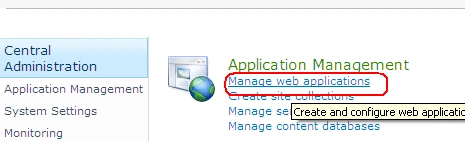
- Click on Manage web applications.
- There you can see the list of your web applications.
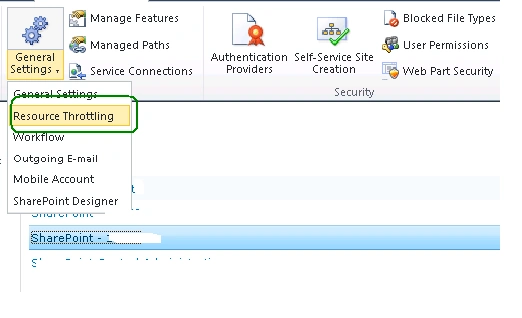
- Select your web application as shown below.
- From general settings select Resource Throttling.
- You will get a popup as shown below; you can change the settings if you want
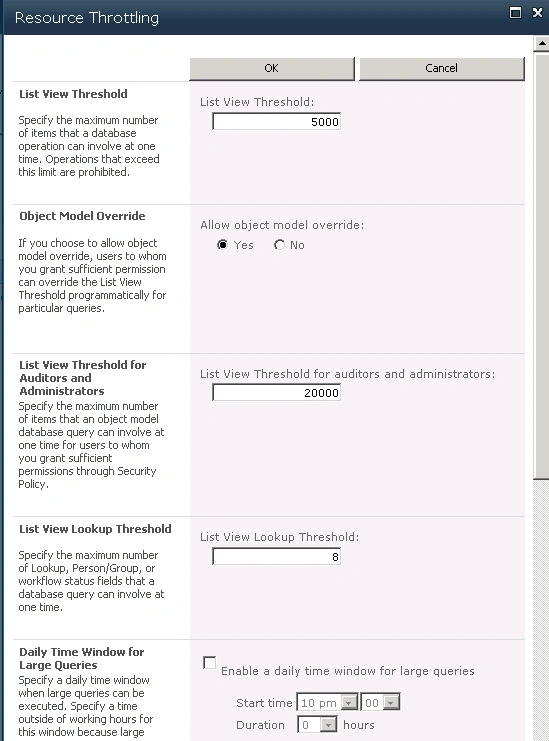
- List View Threshold: The number of results that can be returned in a user query if this exceeds the limit set by the administrator it will throw an exception.
- List View Threshold for Auditors and Administrators: The number of results that can be returned for Auditors and Administrators. It will be somewhat high for them.
- List View Lookup Threshold: A lot of lookups in a list also decrease the list performance. So this is the maximum no of lookups that a list can have.
- Object Model Override: This will allow the developers to override the property and ignore the throttling. I already mentioned the same in the second paragraph of this article.
- Daily Time Window for Large Queries: This will allow the application to query the Large SharePoint 2010 List during the time set by the administrator.
Elvira AcostaPosted Oct 13, 2011, 4:44 AM
SharePoint Job throttling is the technique of regulating the performance of these tasks in any system. It can be used in situations where it is required to limit the amount of data that can be transferred in a unit of time. StorageEdge (a third-party tool which can dramatically improve SharePoint performance and scalability) provides comprehensive SharePoint job throttling features. When these jobs / tasks are run, various time slots can be configured to make sure that SharePoint application is not under continuous job processing stress. A nice blog elaborating all this can be found on this URL http://www.alachisoft.com/blogs/storageedge/ I hope it will help :)
Kavin FrancisPosted Nov 8, 2010, 10:13 AM
Good Work.