

In earlier article we discussed about new scripting methods introduced in CRM 2016 to implement AutoComplete feature. In last example we used hard coded option to show over autocomplete list, but in this post we are going to demonstrate how we can bring these options from a custom configuration entity to populate under autocomplete list.
We have setup a custom entity named Configuration, where we have not created any custom fields so we are just using default primary attribute field to store possible options for salutations.
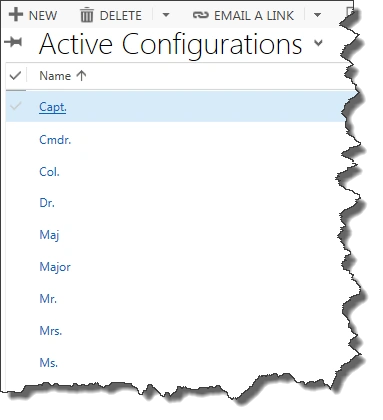
Using this custom entity CRM admin can create/delete required salutations easily, so it is easy to configure list options without any coding changes. We will write OData query to get list of our configuration entity records and will utilize here retrievemultiple method of CRM organization service to get data based on the character enter by the user, so our query filter will be like the following,
- var odataQuery = "?$select=him_name&$top=10&" +
- "$filter=startswith(him_name,'" + salutationtxt + "')";
Note: Here we are using schema name of the attributes, because in OData query we need to use schema name of the entity and attributes. You can get schema name of the entity and attributes from solution.
In above query we are just retrieving name attribute and applied top clause to fetch only 10 records, in case there are many record based on the character entered by the user. To filter results we are using startswith operator which will compare first character of this attribute value.
To write OData query we will use SDK.Rest.js library that comes with SDK, so we need add this library as a web resource in CRM, please refer our earlier article for how to do the same.
We need to update our earlier AutoCompleteSalutations.js web resource with the following code (if you have not check our earlier article, please read it here first):
- function ContactOnLoad() {
- Xrm.Page.getControl("salutation").addOnKeyPress(LoadAutoComplete);
- }
- //query configuration entity using OData
- function LoadAutoComplete() {
- var salutationtxt = Xrm.Page.getControl("salutation").getValue();
- var entitySchemaName = "him_configuration";
- var odataQuery = "?$select=him_name&$top=10&" +
- "$filter=startswith(him_name,'" + salutationtxt + "')";
- if (typeof(SDK) != "undefined") {
- SDK.REST.retrieveMultipleRecords(entitySchemaName, odataQuery, Callback, function(error) {
- alert(error.message);
- }, function() {});
- } else {
- alert("Not able to load REST.SDK library");
- }
- }
- //call back to process results
- function Callback(entityresultSet) {
- if (entityresultSet.length > 0) {
- var salutationtxt = Xrm.Page.getControl("salutation").getValue();
- resultSet = {
- results: new Array(),
- commands: {
- id: "salutationcmd",
- label: "Search in Google",
- action: function() {
- window.open("http://google.com");
- }
- }
- };
- var salutationtxtLowerCase = salutationtxt.toLowerCase();
- for (i = 0; i < entityresultSet.length; i++) {
- if (salutationtxtLowerCase === entityresultSet[i].him_name.substring(0, salutationtxtLowerCase.length).toLowerCase()) {
- resultSet.results.push({
- id: i,
- fields: [entityresultSet[i].him_name]
- });
- }
- }
- if (resultSet.results.length > 0) {
- Xrm.Page.getControl("salutation").showAutoComplete(resultSet);
- } else {
- Xrm.Page.getControl("salutation").hideAutoComplete();
- }
- }
- }
Now we need to add our SDK script web resource to contact entity form and need to call ContactOnLoad method on contact form OnLoad like the following,
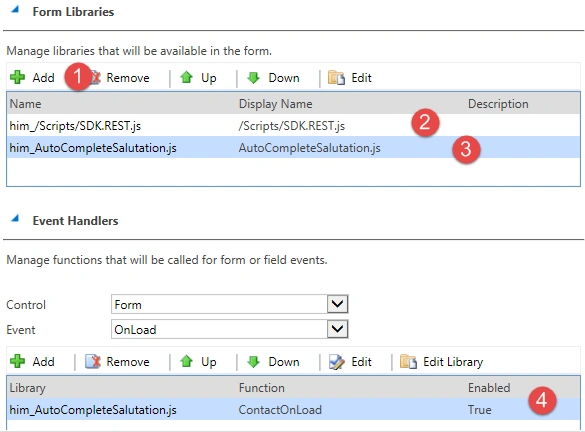
Make sure to keep SDK.Rest.js first in order.
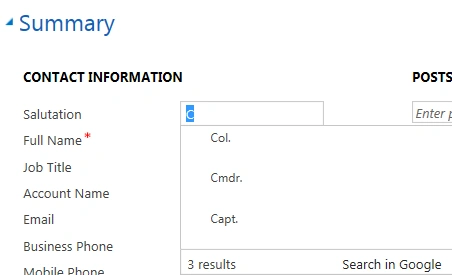
Save and publish your changes and now try to modify salutation field for existing or new contact record, it will load list from configuration entity like the following,
Elangamban MPosted Jun 4, 2016, 1:03 PM
How to trigger this autocomplete from a textbox which is inside HTML Webresource? Thanks