

In the financial industry, especially in NBFCs (Non-Banking Financial Companies) or Banking, loan underwriting plays a critical role. Loan eligibility and loan amount decisions are typically based on multiple factors such as income, credit score, age, and existing liabilities.
In this article, we will build a Loan Amount Prediction system using Python and Linear Regression. We will:
Generate 20,000 synthetic customer records
Store data in Excel format
Train a Machine Learning model
Evaluate performance using R² Score
Predict loan amount for new customers
This practical example simulates a real-world NBFC or Banking model.
🟦 Problem Statement
NBFCs or Banking must determine how much loan amount a customer is eligible for based on:
Age
Monthly Income
Credit Score
Existing EMI
Employment Type
We will build a regression model to predict the eligible loan amount.
🟦 Project Structure

🟦 Step 1 – First, we need to set up a virtual environment for Python and activate it to begin this exercise.
We will start by creating a project folder named 03_loan_amount_prediction. Inside this folder, create two subfolders:
src– for source codedata– for dataset files
After setting up the folder structure, create a virtual environment and activate it for further development in this exercise.
Create virtual environment - python -m venv .venvActivate virtual environment - .\.venv\Scripts\activate
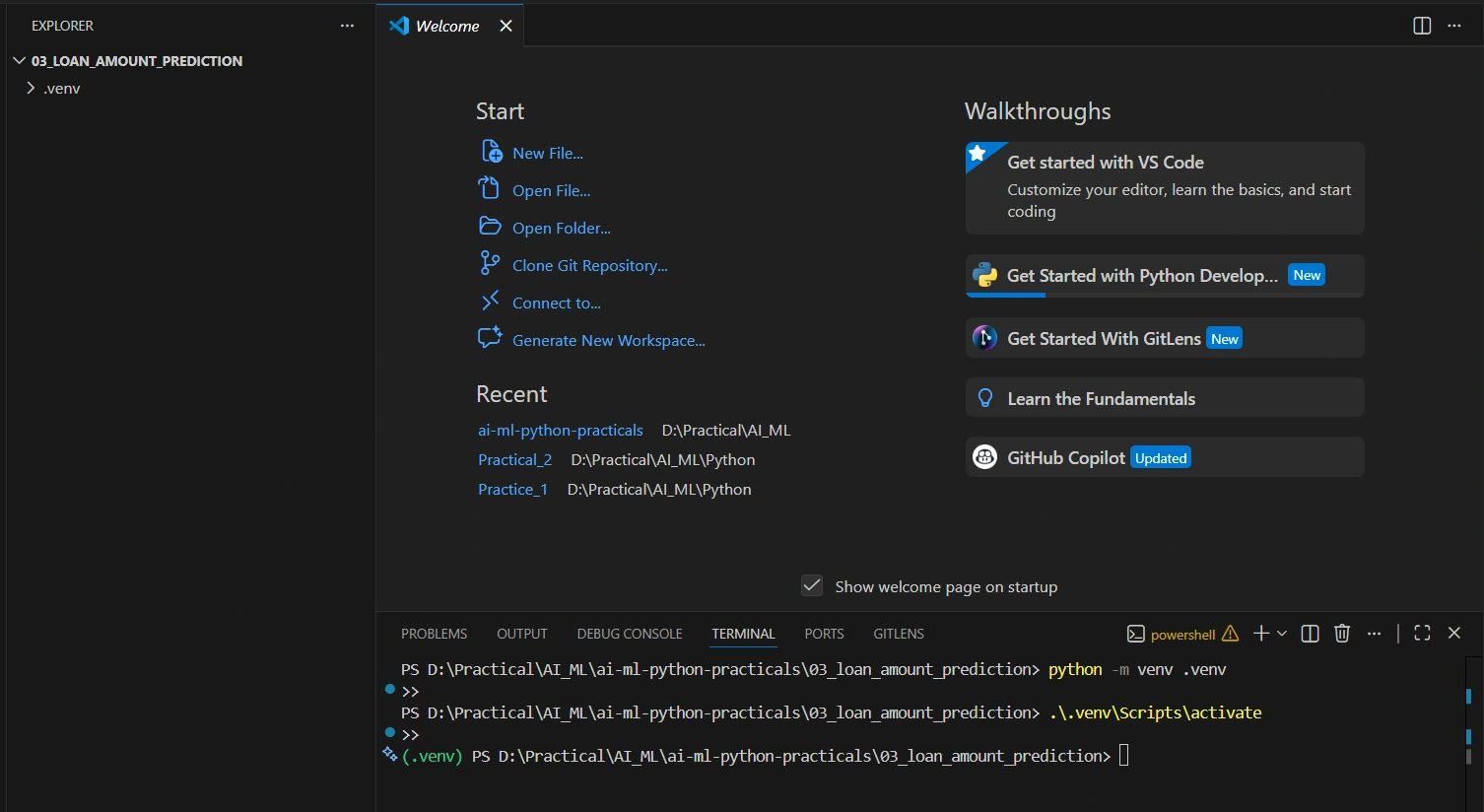
After successfully activating the virtual environment, you will see the following in your terminal:
(.venv) PS D:\Practical\AI_ML\03_nbfc_regression\loan_amount_prediction>🟦 Step 2 – Once Step 1 is completed, in Step 2 we need to install the required Python libraries: pandas, numpy, scikit-learn, and matplotlib.

🟦 Step 3 -Generate the dataset in Excel. Create a dataset of around 20,000 records using the script provided below.
Create file generate_data.py
import numpy as np
import pandas as pd
import os

np.random.seed(42)
n = 20000

age = np.random.randint(21, 60, n)
income = np.random.randint(20000, 150000, n)
credit_score = np.random.randint(550, 850, n)
existing_emi = np.random.randint(0, 20000, n)
employment_type = np.random.choice(["Salaried", "Self-Employed"], n)

loan_amount = (
    income * 5
    + credit_score * 100
    - existing_emi * 10
    + np.where(employment_type == "Salaried", 50000, 0)
    - age * 1000
)

loan_amount = np.maximum(loan_amount, 50000)

df = pd.DataFrame({
    "Age": age,
    "Income": income,
    "CreditScore": credit_score,
    "ExistingEMI": existing_emi,
    "EmploymentType": employment_type,
    "EligibleLoanAmount": loan_amount
})

os.makedirs("../data", exist_ok=True)
df.to_excel("../data/loan_data.xlsx", index=False)

print("Excel file generated successfully.")
Once you run the above script, the data will be generated and saved as an Excel file inside the data folder.
🟦 Step 4 - Now create a file named loan_amount_prediction.py, paste the script below into it, and run the code.
You can refer to the explanations provided below, where I describe each line of the code.
import pandas as pd
import os
from sklearn.model_selection import train_test_split
from sklearn.linear_model import LinearRegression
from sklearn.metrics import r2_score, mean_absolute_error

# Load Excel file
base_dir = os.path.dirname(__file__)
file_path = os.path.join(base_dir, "..", "data", "loan_data.xlsx")

df = pd.read_excel(file_path)

# Convert EmploymentType to numeric
df["EmploymentType"] = df["EmploymentType"].map({
    "Salaried": 1,
    "Self-Employed": 0
})

# Define Features and Target
X = df[["Age", "Income", "CreditScore", "ExistingEMI", "EmploymentType"]]
y = df["EligibleLoanAmount"]

# Train/Test Split
X_train, X_test, y_train, y_test = train_test_split(
    X, y, test_size=0.2, random_state=40
)

# Train Model
model = LinearRegression()
model.fit(X_train, y_train)

# Predict
y_pred = model.predict(X_test)

# Evaluate r2 and MAE
r2 = r2_score(y_test, y_pred)
mae = mean_absolute_error(y_test, y_pred)

print("===== Model Evaluation =====")
print(f"R² Score: {r2:.4f}")
print(f"Mean Absolute Error: {mae:.2f}")

# User input prediction
print("\n===== Loan Amount Prediction =====")

age_input = int(input("Age: "))
income_input = float(input("Monthly Income: "))
credit_input = int(input("Credit Score: "))
emi_input = float(input("Existing EMI: "))
emp_input = input("Employment Type (Salaried/Self-Employed): ")

emp_numeric = 1 if emp_input.lower() == "salaried" else 0

input_data = pd.DataFrame([{
    "Age": age_input,
    "Income": income_input,
    "CreditScore": credit_input,
    "ExistingEMI": emi_input,
    "EmploymentType": emp_numeric
}])

predicted = model.predict(input_data)[0]

print(f"\nPredicted Eligible Loan Amount: {predicted:.2f}")

# Evaluate on test set
y_pred = model.predict(X_test)

r2 = r2_score(y_test, y_pred)
mae = mean_absolute_error(y_test, y_pred)

print("===== Model Evaluation =====")
print(f"R² Score: {r2:.4f}")
print(f"Mean Absolute Error: {mae:.2f}")
🔹 IMPORT SECTION
import pandas as pdImports the pandas library.
We use it to:
Read Excel files
Handle tables (DataFrame)
import osUsed to work with file paths (important for writing portable code).
from sklearn.model_selection import train_test_splitUsed to split the dataset into:
Training data
Testing data
from sklearn.linear_model import LinearRegressionImports the Linear Regression model (used for regression problems).
from sklearn.metrics import r2_score, mean_absolute_errorImports evaluation metrics:
R² Score → Measures how well the model fits the data
MAE (Mean Absolute Error) → Measures the average prediction error
🔹 LOAD EXCEL FILE
base_dir = os.path.dirname(__file__)Gets the current file's folder location.
Example file path:
src/train_model.pyIt returns:
.../loan_amount_prediction/srcfile_path = os.path.join(base_dir, "..", "data", "loan_data.xlsx")Builds the correct file path:
..→ Go one folder updataloan_data.xlsx
Final path becomes:
loan_amount_prediction/data/loan_data.xlsxdf = pd.read_excel(file_path)Reads the Excel file into a pandas DataFrame.
Now df contains the full dataset.
🔹 DATA PREPARATION
df["EmploymentType"] = df["EmploymentType"].map({
    "Salaried": 1,
    "Self-Employed": 0
})
Machine Learning models cannot understand text values.
So we convert:
| Before | After |
|---|---|
| Salaried | 1 |
| Self-Employed | 0 |
This process is called:
1. Encoding categorical data
🔹 DEFINE FEATURES & TARGET
X = df[["Age", "Income", "CreditScore", "ExistingEMI", "EmploymentType"]]X= Input features (independent variables)
These are the factors that influence the loan amount.
y = df["EligibleLoanAmount"]2.y = Target (dependent variable)
This is what we want to predict.
🔹 TRAIN / TEST SPLIT
X_train, X_test, y_train, y_test = train_test_split(
    X, y, test_size=0.2, random_state=40
)
This does:
80% data → Training
20% data → Testing
Why?
We must test the model on unseen data.
What is random_state=40?
It ensures:
Same split every time
Reproducible results
42 is just a number — it could be 1, 100, or 999.
🔹 TRAIN MODEL
model = LinearRegression()Creates a Linear Regression object.
model.fit(X_train, y_train)This is the most important line.
It means:
2. Learn the relationship between inputs (X) and output (y).
The model calculates something like:
LoanAmount = b0
           + b1 * Age
           + b2 * Income
           + b3 * CreditScore
           + b4 * ExistingEMI
           + b5 * EmploymentType
🔹 PREDICT
y_pred = model.predict(X_test)Uses the trained model to predict loan amounts for test data.
🔹 EVALUATE
r2 = r2_score(y_test, y_pred)R² Score measures how well predictions match real values.
Range:
1 → Perfect prediction
0 → Useless model
Negative → Very poor model
mae = mean_absolute_error(y_test, y_pred)MAE tells us the average error in rupees.
If:
MAE = 3000That means:
On average, the prediction is off by ₹3,000.
🔹 USER INPUT PREDICTION
age_input = int(input("Age: "))Takes age input from the user.
emp_numeric = 1 if emp_input.lower() == "salaried" else 0Converts text input into numeric format.
input_data = pd.DataFrame([{ ... }])Creates a DataFrame from user input.
Machine Learning models expect data in table format.
predicted = model.predict(input_data)[0]Predicts the loan amount for the user.
[0] is used because prediction returns an array.
🔹 DUPLICATE EVALUATION SECTION
At the bottom, you repeated:
y_pred = model.predict(X_test)
r2 = r2_score(...)
mae = ...
This is unnecessary because you already evaluated the model earlier.
You can safely remove this repeated block.
🎯 Full Flow Summary
1️⃣ Load data
2️⃣ Convert text to numeric
3️⃣ Define X and y
4️⃣ Split data
5️⃣ Train model
6️⃣ Predict test data
7️⃣ Calculate R² & MAE
8️⃣ Take user input
9️⃣ Predict new loan amount
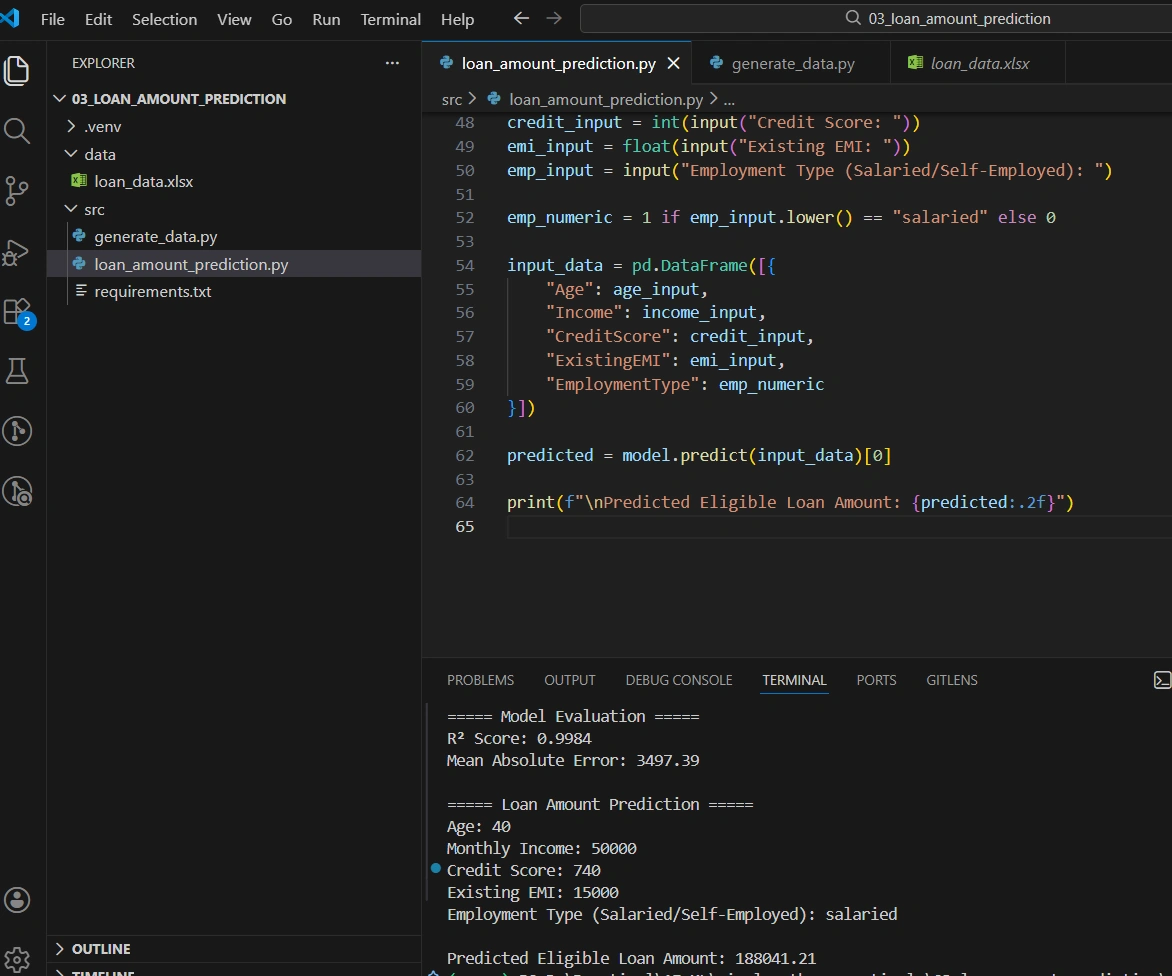
🟦 Step 5 - Now run the Python script to predict the loan amount for a new customer.
(.venv) PS D:\Practical\AI_ML\ai-ml-python-practicals\03_loan_amount_prediction\src> python loan_amount_prediction.py
>> 
To validate the R² Score & MAE, print it after calculating it in your script.
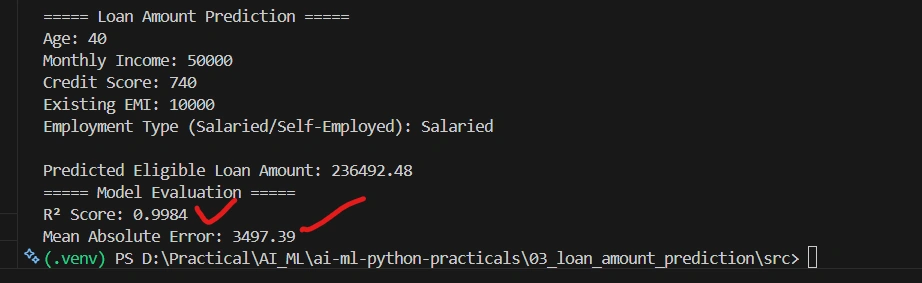
🟦 Understanding R² Score
R² (Coefficient of Determination) measures how well the regression model explains variability in the data.
1 → Perfect prediction
0 → Model has no predictive power
Negative → Poor model
In this case, high R² is expected because the dataset follows a linear formula.
🟦 Real-World Considerations
In real NBFC or Banking environments:
Data contains noise and missing values
Non-linear relationships may exist
Feature scaling may be required
Advanced models like Random Forest or XGBoost are often used
🟦 Conclusion
In this article, we:
Created a realistic NBFC or Banking loan dataset
Stored it in Excel format
Built a Linear Regression model
Evaluated it using R² Score
Predicted loan eligibility
GitHub link : https://github.com/pramodsingh-ai/ai-ml-python-practicals
This project demonstrates how Machine Learning can assist financial institutions in automating decisions.
Join the conversation! Your thoughts help the community grow.