

Introduction
Storing Data on the Client
- localStorage - stores data with no time limit(just like application state in asp.net)
- sessionStorage - stores data for one session(just like normal session object in asp.net)
In HTML5, the data is NOT passed on by every server request, but used ONLY when asked for; that means it is an asynchronous postback.
It is possible to store large amounts of data without affecting the website's performance.
The data is stored in different areas for different websites, and a website can only access data stored by it.
HTML5 uses JavaScript to store and access the data.
Now I will build a small example where we will use localstorage and session storage HTML5 objects.
We will build a small web application where we will track the number of sites being visited by the user.
I just built it in a simple notepad and saved this file as .html.
Step 1:
Please see the following code segment:

- <!DOCTYPE html>
- <html>
- <body bgcolor="aqua">
- <script type="text/javascript">
- if (localStorage.pagecount)
- {
- localStorage.pagecount=Number(localStorage.pagecount) +1;
- }else
- {
- localStorage.pagecount=1;
- }
- document.write("Total User Visits: " + localStorage.pagecount + " time(s).");
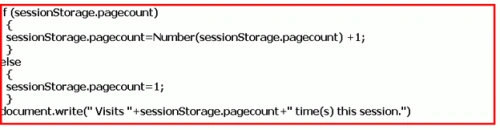
- if (sessionStorage.pagecount)
- {
- sessionStorage.pagecount=Number(sessionStorage.pagecount) +1;
- }
- else
- {
- sessionStorage.pagecount=1;
- }
- document.write(" Visits "+sessionStorage.pagecount+" time(s) this session.")
- </script>
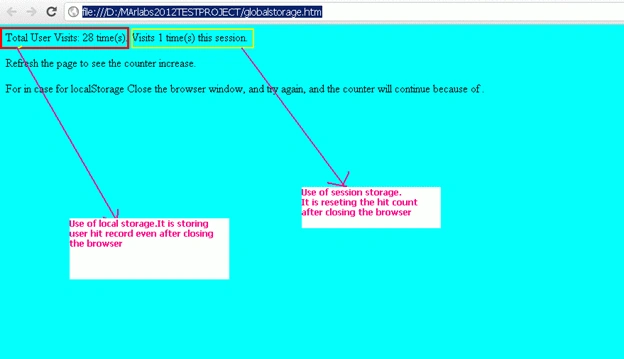
- <p>Refresh the page to see the counter increase.</p>
- <p>For in case for localStorage Close the browser window, and try again, and the counter will continue.</p>
- </body>
- </html>
Sandeep ChPosted Jul 27, 2016, 1:59 AM
Nice Explanation , this example made me clear understanding on Web storage API in HTML5. Thanks.
Manish SinghPosted Jan 20, 2012, 11:23 PM
it is really helpful or useful
Arjun PanwarPosted Jan 20, 2012, 11:18 PM
Thanks it is very useful
Akshay TeotiaPosted Jan 20, 2012, 11:17 PM
Nice one Thanks for sharing this.
Akash AhlawatPosted Jan 20, 2012, 11:03 PM
Nice explanation about state management in HTML5