
Description
This article explains how you can map database tables to C# objects. In other words, The application generates C# Class files for each table in a relational database. I have used Mysql and ODBC.NET for this project. The application only supports MySQL right now. However, it is easy to port to other databases. I will do it for the second version of this application. How you can download MySQL and MySQL ODBC driver. if you browse the web page http://www.mysql.com, you will see that MyODBC 2.50.39 link on the right side of the screen. After that you have download ODBC driver, you should download MySQL 3.23.43 server, and install it in your Windows if you have Windows running on your computer.
MySQL can be downloaded from www.mysql.com.
After downloading and installation, you should configure the ODBC driver. Here is how you can do it. goto Control Panel, run DataSources(ODBC). While you are at USER DSN, click on the Add button, Then choose MySQL from the list click on the Finish button then you will see
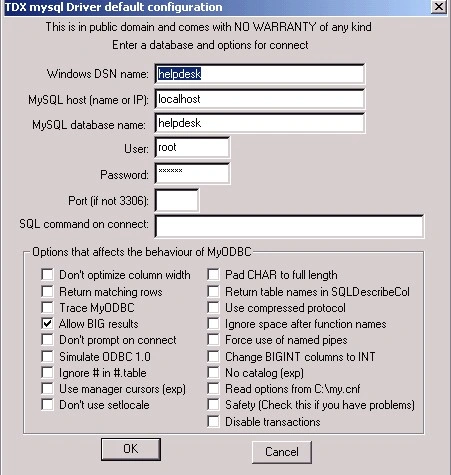
Enter, Windows DSN Name as you wish.
MySQL Host is either a remote computer or local computer, If you have installed MySQL server to your computer, then choose the localhost.
MySQL Database Name: Before entering the name here, you should create a database in MySQL server and tables. I can recommend a software you can download from http://dbtools.vila.bol.com.br/
with this tool, you can create databases, tables, and so on. When you try to connect to the MySQL server, you can use the user name as root and password as just empty.
User: root
Password:
then click on the OK button, You are all set. if you have problems with the settings, just let me know.
This application supports
- Mapping attributes to columns: a class attribute will map to one column in a relational database.
- Mapping classes to tables: Classes map to tables.
So, how you can use this application. First of all, as I said before, It supports an Odbc connection, so you have to setup ODBC. You can name it as you want. Then click on the Get Tables button to receive tables from Database and you can see them in the tree view at the left. After that, Just Enter the Namespace that you want to put in the C# class files.
the Last thing is that you should enter the folder name that will have these C# class files.
When you click on Generate C# Class Files, it will create all C# files in a given folder.
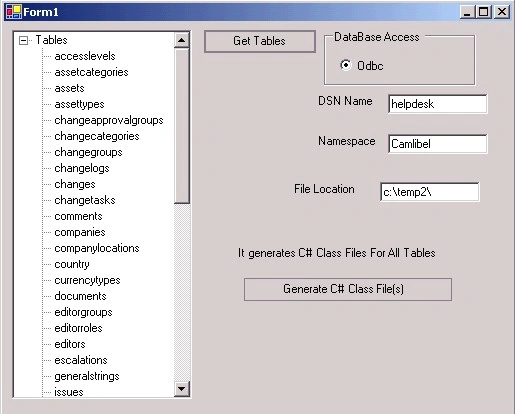
You can add any datatype you want. therfore, it is going to be easy to port the application to other databases.
Neophytos ChristodoulideseditedPosted Apr 5, 2009, 11:00 PMEdited Apr 5, 2009, 11:01 PM
The Orasis Mapping Studio 2009 Database Edition Library Reflector allows developers to utilize their class libraries that do not and should not resemble the physical database table schemas. With no requirements on the development of the data models such as attributing them or implementing interfaces or extending third party classes or even requiring them to contain ID properties, developers can simply provide a default constructor and start mapping! The Reflector brings in all of the needed assembly dependencies in the project. Developers can even add library dependencies the same way that they are familiar with. The Studio’s Field Mapping control enables nested object graph mappings between SQL columns/parameters and object fields. Use the pure object models that you have generated by visually mapping them to query results and parameters. Visually expand nested class references or simply replace them with derived instances. Replace interfaces with their implementation classes, or simply replace an abstract class with one of its implementation classes. The Studio’s Smart Data Access code generation engine will minimize the number of statements that are required to select, insert, update and delete whether the mappings target queries or stored procedures. With full knowledge of database metadata at design time, .Net object metadata and standard .Net conversions the code generation engine produces extremely efficient code free of any reflection code. Start Mapping object graphs to your database queries at http://www.orasissoftware.com