

Introduction
HTTP is a stateless protocol, meaning that the web server does not retain the user's state between requests. This limitation can present significant challenges for web developers. To overcome these challenges, developers often use solutions such as appending query strings to URLs, storing cookies on client machines, or saving user session information on the server. In this article, I will provide a brief overview of session management, discuss its limitations, and explain the use of distributed caching solutions for effective state management in large-scale applications. Additionally, I will offer practical guidance on installing, configuring, and using a distributed cache in ASP.NET Core web applications.
Overview of Session Management in .NET
Session management is one of the key features of any web application. It allows the server to save user-specific data such as authentication status, shopping cart information, etc., and the server to track users across multiple requests. Sessions data is typically stored in server memory or disk but can also be stored in a distributed cache for scalability and reliability. Each user is assigned a unique session identifier called a session ID, which is stored in a cookie or passed in the URL. This session ID is then used to retrieve the session data on subsequent requests. In .NET, session data can be stored in one of the following locations.
- In-Process: The session data is stored in the web server's memory. This is the fastest option, but it is not very scalable because session data is available memory, and it can easily be lost if the application pool is recycled or if the web app is hosted on multiple servers and a load balancer sends the request to another server.
- State Server: The session data is stored in a dedicated state server, separate from the web server. This allows session data to persist even if the application pool or web server is restarted. The State Server runs as a Windows service, and session data is accessed over the network, making it suitable for load-balanced environments. However, using a State Server can introduce network latency compared to in-process session storage, though it improves scalability and session persistence.
- SQL Server: The session data is stored in an SQL Server database, which provides persistent storage if you are using multiple web servers or have a load-balanced environment. This approach is more resilient than in-memory sessions but it can introduce overhead due to database read/write operations. This is the best option if your application requires high availability, data persistence, and scalability, and you can slightly compromise on performance.
- Distributed Caching: Distributed caching is a method of storing data across multiple servers or nodes in a network, allowing web applications to access cached data more efficiently and reliably. This method is more suitable in cloud-native and distributed applications where you want to keep cached data on the server that is nearest to the user.
Limitations of Traditional Session Management
Although session management seems like a very attractive and useful feature to most developers, as they gain more experience, they realize that there are several limitations to using traditional session management techniques. Some of the limitations are mentioned below.
- Scalability Issues: If you are using in-memory sessions, your sessions are tied to a specific server. This creates problems in load-balanced or multi-server environments, where users may be routed to different servers, causing session data loss unless you are using sticky sessions.
- Memory Consumption: If you are storing a large amount of session data in the server’s memory, your application will consume significant memory resources, especially if you have a large-scale application with millions of users. This can not only degrade application performance, but it also increase the risk of server crashes.
- Session Data Loss: If you are using in-memory session storage, your session data can be lost if the server is restarted or crashes. This disrupts user experiences and requires external solutions to ensure persistence.
- Session Timeout Limitations: Fixed session timeouts can frustrate users, especially if they lose their session due to inactivity. Managing these timeouts effectively while balancing resource consumption can be challenging for most beginner and intermediate-level developers.
- Security Concerns: Traditional session management often relies on cookies to store session IDs, making them vulnerable to session hijacking or cross-site scripting (XSS) attacks if not properly secured.
- Managing Large Sessions: Sessions that store large amounts of data can slow down requests, as reading and writing session data becomes more resource-intensive, particularly when stored in databases or other persistent stores.
The limitations mentioned above often prompt developers to adopt more high-performance and scalable solutions that can not only solve all of the problems but can also provide many additional features to cache session data for your applications.
Introduction of NCache for .NET Developers
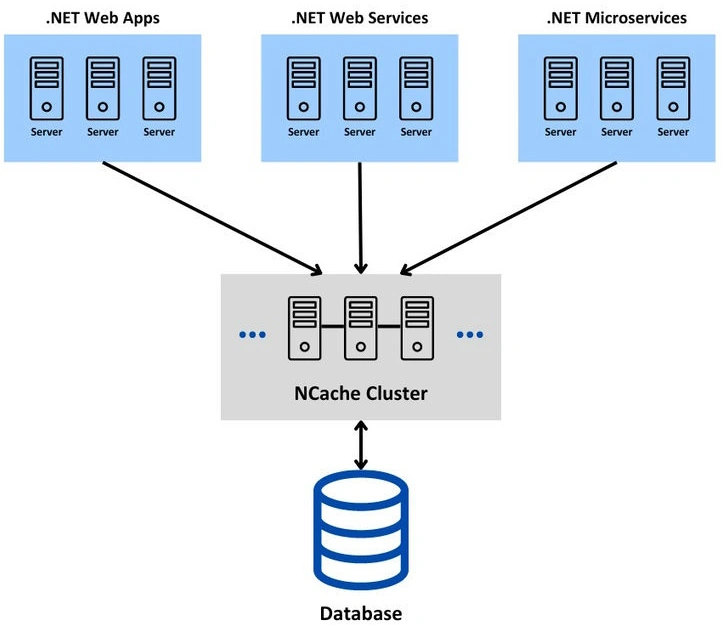
NCache is a powerful, distributed caching solution designed specifically for .NET applications. It enhances application performance and makes the application more scalable by providing both an in-memory and a distributed cache across multiple servers. NCache reduces database load and speeds up data access in high-traffic applications. NCache supports a wide range of caching scenarios, such as simple key-value storage, transactional data caching, or session caching. The following diagram shows how the NCache cluster can sit between your .NET applications and the database and cache data for multiple applications.
NCache provides various APIs to add, update, or remove data to/from cache. The data can be stored as a single item or as bulk data. Developers also have the option to store data either synchronously or asynchronously as per their application requirements. The data stored in the cache can be a primitive data type such as int, double, bool, object, etc. or it can be any custom serializable class object, e.g. Product, Order, etc.
Advantages of using NCache for Session Management
Following are some of the benefits of using NCache as your ASP.NET Core Session State Provider.
- High Availability: NCache replicates sessions across multiple cache nodes to ensure that the session data is always available, even during server failures. NCache provides a self-healing peer-to-peer clustering architecture that has no single point of failure. This dynamic clustering also allows us to add or remove any cache server from the cluster without stopping the cache or the applications.
- Multi-Region Replication: NCache can also replicate ASP.NET Core sessions across multiple regions (data centers) to ensure that the sessions remain safe, even if a data center goes offline.
- Distributed & Scalable: NCache stores session data in a distributed cache that allows your sessions to scale across multiple servers. This also eliminates the single-point-of-failure issues.
- Improved Performance: It enhances the performance of session retrieval by caching session data in memory, reducing the load on databases or slower storage systems. NCache also uses its custom serialization method called ‘Compact Serialization’ which is much faster than the slow serialization method available in .NET.
- Session Failover and Persistence: In the event of an application server failure, NCache automatically handles session failover to make sure that the sessions are not lost. It also supports persistent session storage, allowing session data to survive across application restarts.
- Support for Large Sessions: NCache can handle large session objects, distributing them efficiently across cache nodes.
- Cross-Platform Compatibility: NCache offers flexibility for different development environments by supporting both ASP.NET and ASP.NET Core applications.
- Increased Web Farm Efficiency: In multi-server environments, NCache eliminates the need for "sticky sessions" by synchronizing the session state across all servers.
- Enhanced Security: With encryption and secure communication between cache clients and servers, NCache ensures that sensitive session data remains protected.
Installing and Configuring NCache in ASP.NET Core App
Before we learn how to use NCache, we need to make sure we have installed and configured NCache on the development machine. There are multiple versions of NCache available, and you can choose the specific version as per your application requirements.
- NCache Open Source: A free, open-source, and community-supported version of NCache that provides basic distributed caching features for small to medium applications.
- NCache Professional: This is a paid version of NCache and it is suitable for small to medium-sized business applications. It provides additional features such as client cache and better performance optimizations.
- NCache Enterprise: The most advanced version of NCache that provides the most advanced caching features, including disaster recovery, high availability, and performance monitoring, and it's the best choice for large enterprise applications.
Note. NCache Professional and Enterprise versions are also available as SaaS in both Azure and AWS marketplaces.
The next thing we need to decide is how we want to install and use NCache. We can choose one of the following options.

Join the conversation! Your thoughts help the community grow.