

A developer in the forums is asking how to pass data that is coming from a UserControl control to the main page. Basically, the scenario is that he has a user control which contains a GridView which is wrapped around within an ASP.NET AJAX UpdatePanel control. The UserControl will then be used in the page that is hosted within a master page. The page contains some TextBox in which it will be populated once the user selects a row from the GridView, also the ModalPopup is defined within that page.
The question is quite interesting, and so I’ve given it a shot and created a simple demo. Here’s the solution that I came up with, and provided it to the developer.
The Page Markup
- <%@ Page Title="" Language="C#" MasterPageFile="~/Site.Master" AutoEventWireup="true" CodeBehind="Modal.aspx.cs" Inherits="WebAppDemo.Modal" %>
- <%@ Register Assembly="AjaxControlToolkit" Namespace="AjaxControlToolkit" TagPrefix="asp" %>
- <%@ Register src="UserControl/WebUserControl1.ascx" tagname="WebUserControl1" tagprefix="uc1" %>
- <asp:Content ID="Content1" ContentPlaceHolderID="HeadContent" runat="server">
- <style type="text/css">
- .modal-bg{
- background-color:Gray;
- filter:alpha(opacity=50);
- opacity:0.6;
- z-index:999;
- }
- .modal{
- position:absolute;
- }
- </style>
- </asp:Content>
- <asp:Content ID="Content2" ContentPlaceHolderID="MainContent" runat="server">
- <asp:ToolkitScriptManager ID="ToolkitScriptManager1" runat="server">
- </asp:ToolkitScriptManager>
- <asp:TextBox ID="txtProductName" runat="server" />
- <asp:TextBox ID="txtPrice" runat="server" />
- <asp:LinkButton ID="LinkButton1" runat="server" Text="Show" />
- <asp:Panel ID="pnlPopUp" runat="server" style="display:none" CssClass="modal" >
- <uc1:WebUserControl1 ID="WebUserControl11" runat="server" />
- </asp:Panel>
- <asp:ModalPopupExtender ID="ModalPopupExtender1" runat="server" TargetControlID="LinkButton1" PopupControlID="pnlPopUp" BackgroundCssClass="modal-bg">
- </asp:ModalPopupExtender>
- </asp:Content>
You may also have noticed that I’ve created a simple CSS for the modal.
UserControl Markup
- <%@ Control Language="C#" AutoEventWireup="true" CodeBehind="WebUserControl1.ascx.cs" Inherits="WebAppDemo.UserControl.WebUserControl1" %>
- <%@ Register Assembly="AjaxControlToolkit" Namespace="AjaxControlToolkit" TagPrefix="asp" %>
- <asp:UpdatePanel ID="UpdatePanel1" runat="server">
- <ContentTemplate>
- <asp:GridView ID="GridView1" runat="server" AutoGenerateColumns="False">
- <Columns>
- <asp:BoundField DataField="ID" />
- <asp:BoundField DataField="ProductName" HeaderText="Product Name" />
- <asp:TemplateField>
- <ItemTemplate>
- <asp:TextBox ID="txtPrice" runat="server" Text='<%# Eval("Price") %>' />
- </ItemTemplate>
- </asp:TemplateField>
- <asp:TemplateField>
- <ItemTemplate>
- <asp:TextBox ID="txtAmount" runat="server" Text='<%# Eval("Amount") %>' />
- </ItemTemplate>
- </asp:TemplateField>
- <asp:TemplateField>
- <ItemTemplate>
- <asp:Button ID="Button1" runat="server" Text="Select" onclick="Button1_Click" />
- </ItemTemplate>
- </asp:TemplateField>
- </Columns>
- </asp:GridView>
- </ContentTemplate>
- <Triggers>
- <asp:PostBackTrigger ControlID="GridView1" />
- </Triggers>
- </asp:UpdatePanel>
CODE BEHIND
Now, here’s the code for the UserControl.
- using System;
- using System.Collections.Generic;
- using System.Linq;
- using System.Web;
- using System.Web.UI;
- using System.Web.UI.WebControls;
- using System.Data;
- using AjaxControlToolkit;
- namespace WebAppDemo.UserControl
- {
- public partial class WebUserControl1 : System.Web.UI.UserControl
- {
- private DataTable GetSampleData()
- {
- //NOTE: THIS IS JUST FOR DEMO
- //If you are working with database
- //You can query your actual data and fill it to the DataTable
- DataTable dt = new DataTable();
- DataRow dr = null;
- //Create DataTable columns
- dt.Columns.Add(new DataColumn("ID", typeof(string)));
- dt.Columns.Add(new DataColumn("ProductName", typeof(string)));
- dt.Columns.Add(new DataColumn("Price", typeof(string)));
- dt.Columns.Add(new DataColumn("Amount", typeof(string)));
- //Create Row for each columns
- dr = dt.NewRow();
- dr["ID"] = 1;
- dr["ProductName"] = "Galaxy S";
- dr["Price"] = "100";
- dr["Amount"] = "10";
- dt.Rows.Add(dr);
- dr = dt.NewRow();
- dr["ID"] = 2;
- dr["ProductName"] = "iPhone 4";
- dr["Price"] = "200";
- dr["Amount"] = "2";
- dt.Rows.Add(dr);
- dr = dt.NewRow();
- dr["ID"] = 3;
- dr["ProductName"] = "HTC Mobile";
- dr["Price"] = "50";
- dr["Amount"] = "10";
- dt.Rows.Add(dr);
- return dt;
- }
- private void BindGrid(DataTable source)
- {
- GridView1.DataSource = source;
- GridView1.DataBind();
- }
- protected void Page_Load(object sender, EventArgs e)
- {
- if (!IsPostBack)
- BindGrid(GetSampleData());
- }
- protected void Button1_Click(object sender, EventArgs e)
- {
- Button b = (Button)sender;
- GridViewRow gvRow = (GridViewRow)b.NamingContainer;
- string productName = gvRow.Cells[1].Text;
- string price = ((TextBox)gvRow.FindControl("txtPrice")).Text;
- Type thePage = Page.GetType();
- System.Reflection.PropertyInfo[] pi = thePage.GetProperties();
- foreach (System.Reflection.PropertyInfo pinfo in pi)
- {
- if (pinfo.Name == "ProductName")
- {
- pinfo.SetValue(Page, productName, null);
- }
- else if (pinfo.Name == "Price")
- {
- pinfo.SetValue(Page, price, null);
- }
- }
- ((ModalPopupExtender)this.Parent.Parent.FindControl("ModalPopupExtender1")).Hide();
- }
- }
- }
You can also use properties if you want to get the value from a UserControl in the main page. For example, you expose a public property within your UserControl. Then in your main page, you simply reference the property defined in your UserControl. For example, at Button’s click event. Though using properties isn’t applicable for this particular scenario, since we are passing data to the main page and not getting data.
Output
Running the page will display something like this,
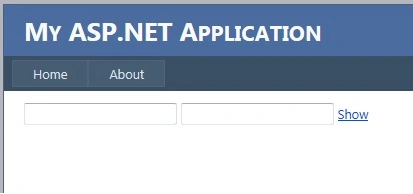
After clicking the “Show” link,
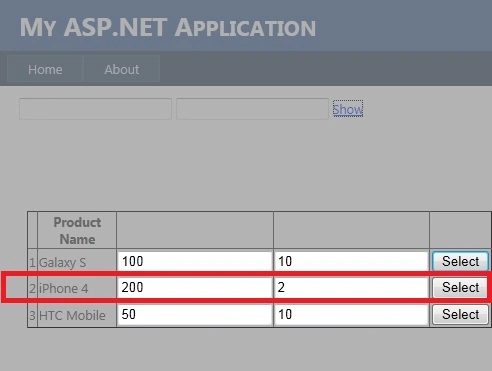
After selecting a row from GridView,
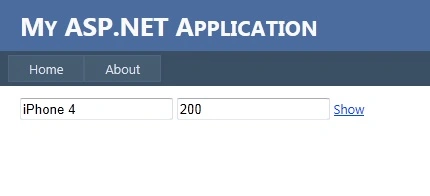
That’s it! I hope someone finds this post useful.
Sanjay GuptaPosted Jul 22, 2016, 7:19 AM
As you said, the better approach would be, create Properties and Events like Product_Selected in User Control. The Page should only subscribe the User Control's events.
Hanif HefazPosted Jul 22, 2016, 3:06 AM
And thank you
Hanif HefazPosted Jul 22, 2016, 3:05 AM
Cool
Shridhar SharmaPosted Jul 22, 2016, 1:58 AM
Nice share
Vignesh ManiPosted Jul 21, 2016, 4:43 PM
Good One
RakeshPosted Jul 21, 2016, 3:47 PM
Good one
kalu singh raoPosted Jul 21, 2016, 10:05 AM
Excellent