

Introduction
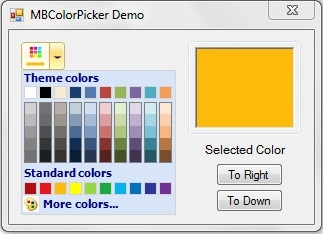
What is the use of MBColorPicker? It provides a graphical interface to select a color from a set of various colors. It is simple to use, just drop it onto a form, adjust the design time properties and use it like normal controls.
Background
MBColorPicker is a color picker control that provides various functionalities so the user can select the required color from a set of colors. The language used is VB.NET.
Control properties
Here is the list of properties available in MBColorPicker:
PickedColor: This property gets and sets the color picked byMBColorPicker.Arrow: This property sets the arrow on theMBColorPickerbutton.BaseColor: This property sets the base color of theMBColorPickerbutton.BaseStrokeColor: This property sets the base stroke color of theMBColorPickerbutton.OnColor: This property sets the on color of theMBColorPickerbutton.OnStrokeColor: This property sets the on stroke color of theMBColorPickerbutton.PressColor: This property sets the press color of theMBColorPickerbutton.PressStrokeColor: This property sets the press stroke color of theMBColorPickerbutton.Radius: This property sets the corner radius of theMBColorPickerbutton.
Code
The concept for this MBColorPicker came from the Microsoft Office 2007 color picker. I organized my paint event into layers like this:
- Protected Overrides Sub OnPaint(ByVal pevent As System.Windows.Forms.PaintEventArgs)
- Dim g As Graphics = pevent.Graphics
- g.SmoothingMode = SmoothingMode.HighQuality
- g.InterpolationMode = InterpolationMode.High
- Dim r As Rectangle = New Rectangle(New Point(-1, -1), New Size(Me.Width + _radius, Me.Height + _radius))
- Dim path As GraphicsPath = New GraphicsPath
- Dim rp As Rectangle = New Rectangle(New Point(0, 0), New Size(Me.Width - 1, Me.Height - 1))
- DrawArc(rp, path)
- FillGradients(g, path)
- DrawImage(g)
- DrawText(g)
- DrawArrow(g)
- End Sub
The following are some methods that provide a transparent look to
MBColorPicker. This method draws the background for MBColorPicker. - ''' <summary>
- ''' Draw the MBColorPicker Control.
- ''' </summary>
- Protected Overrides Sub OnCreateControl()
- MyBase.OnCreateControl()
- A0 = BaseColor.A
- R0 = BaseColor.R
- G0 = BaseColor.G
- B0 = BaseColor.B
- _colorStroke = _baseStroke
- Dim r As Rectangle = New Rectangle(New Point(-1, -1), _
- New Size(Me.Width + _radius, Me.Height + _radius))
- If Me.Size <> Nothing Then
- Dim pathregion As GraphicsPath = New GraphicsPath
- DrawArc(r, pathregion)
- Me.Region = New Region(pathregion)
- End If
- End Sub
This methods draws the color boxes for
MBColorPicker:
- ''' <summary>
- ''' Draw Color Boxes For MBColorPicker.
- ''' </summary>
- ''' <param name="graphics">Graphics As Graphics</param>
- Private Sub DrawColorBoxes(ByVal graphics As Graphics)
- DrawColorBelt(graphics, 0, _TopBoxMargin1, True)
- For i As Int16 = 1 To _ColorMatrixY - 2
- DrawColorBelt(graphics, i, (i - 1) * _ColorBoxUnit + _TopBoxMargin2, False)
- Next
- For i As Int16 = 0 To _ColorMatrixX - 1
- graphics.DrawRectangle(New Pen(Color.Gray), i * _
- (_ColorBoxUnit + _ColorBoxMarginX) + _ColorBoxMarginX, _
- _TopBoxMargin2, _ColorBoxUnit, _ColorBoxUnit * 5)
- Next
- DrawColorBelt(graphics, _ColorMatrixY - 1, _TopBoxMargin3, True)
- End Sub
- ''' <summary>
- ''' Draw Color Belt For MBColorPicker.
- ''' </summary>
- ''' <param name="graphics">Graphics As Graphics</param>
- ''' <param name="no">No As Int16</param>
- ''' <param name="yOffSet">yOffSet As Int16</param>
- ''' <param name="border">Border As Boolean</param>
- ''' <remarks></remarks>
- Private Sub DrawColorBelt(ByVal graphics As Graphics, ByVal no As Int16, _
- ByVal yOffSet As Int16, ByVal border As Boolean)
- For i As Int16 = 0 To _ColorMatrixX - 1
- DrawColorBox(graphics, _ColorMatrix(i, no), _
- New Point(i * (_ColorBoxUnit + _ColorBoxMarginX) + _ColorBoxMarginX, yOffSet), border)
- Next
- End Sub
This method handles the drop down color for
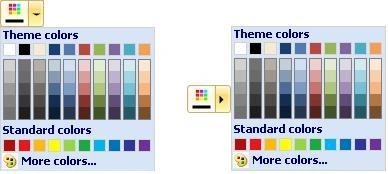 It is very easy to use the
MBColorPicker:
- Protected Overrides Sub OnMouseUp(ByVal mevent As System.Windows.Forms.MouseEventArgs)
- R0 = OnColor.R
- G0 = OnColor.G
- B0 = OnColor.B
- _colorStroke = OnStrokeColor
- _showbase = MB_ShowBase.Yes
- i_mode = 1
- mouse = True
- If _splitlocation = MB_SplitLocation.Right And xmouse > _
- Me.Width - _splitdistance And _splitbutton = MB_SplitButton.Yes Then
- If (_arrow = MB_Arrow.ToDown) Then
- Dim _MBColorPicker As MBColorPickerHelper = New MBColorPickerHelper(Me)
- _MBColorPicker.Show(Me.Parent, New Point(Me.Location.X, Me.Height + Me.Location.Y))
- ElseIf (_arrow = MB_Arrow.ToRight) Then
- Dim _MBColorPicker As MBColorPickerHelper = New MBColorPickerHelper(Me)
- _MBColorPicker.Show(Me.Parent, New Point(Me.Location.X + Me.Width, _
- (Me.Location.Y + Me.Height / 2) - _MBColorPicker.Height / 2))
- End If
- Else
- MyBase.OnMouseUp(mevent)
- If (_Keeppressed) Then
- _Ispressed = True
- For Each _control As Control In Me.Parent.Controls
- If _control.Name <> Me.Name And TypeOf (_control) Is MBColorPickerButton = True Then
- CType(_control, MBColorPickerButton)._Ispressed = False
- CType(_control, MBColorPickerButton).UpdateMouseLeave()
- End If
- Next
- End If
- End If
- End Sub
Using the code
MBColorPicker in your application. Just add the reference of the provided DLL to your application and just drag and drop.
History
MBColorPickerversion 1.0.
Join the conversation! Your thoughts help the community grow.