

Introduction
In this article, we are going to learn about how to create a menu in Xamarin Android app.
Solution
Here are the steps to add tabs in an Android app.
Step 1
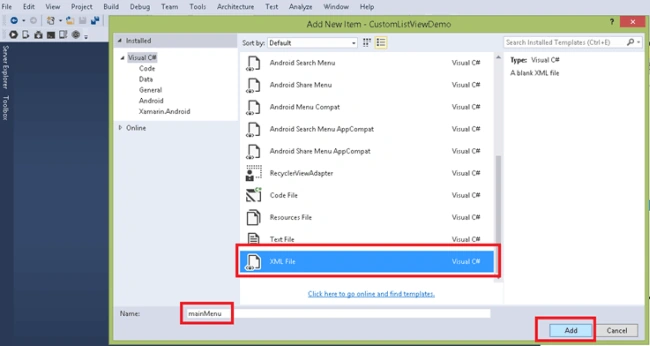
First, open the solution, add go to Resource, create menu folder and add new item as XML file. For the details, refer to the screenshot given below.
Step 2
Now, go to Values folder and add the lines of code given below in Strings.XML file to add the names of the tabs.
(File Name: Strings.XML)
- <string name="menuItem1">Item 1</string>
- <string name="menuItem2">Item 2</string>
- <string name="menuItem3">Item 3</string>
Step 3
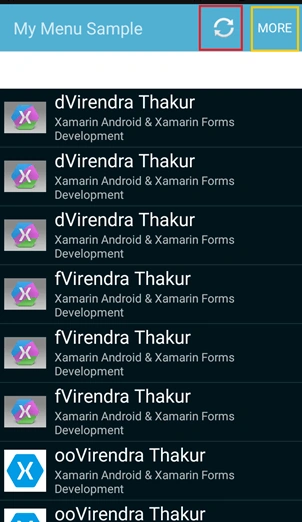
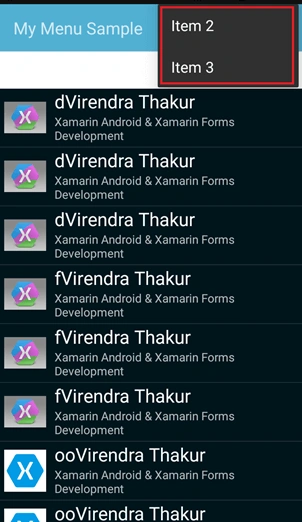
Open the mainMenu.XML file and the code given below to add the menu on the Main Activity, as shown below.
(File Name: mainMenu.XML)
- <?xml version="1.0" encoding="utf-8"?>
- <menu xmlns:android="http://schemas.android.com/apk/res/android">
- <!-- Add menu Item 1 -->
- <item android:id="@+id/menuItem1"
- android:icon="@android:drawable/ic_popup_sync" android:showAsAction="always"/>
- <!-- Add menu Item 2 -->
- <item android:id="@+id/menuItem2"
- android:title="@string/menuItem2"/>
- <!-- Add menu Item 3 -->
- <item android:id="@+id/menuItem3"
- android:title="@string/menuItem3"/>
- </menu>
Federico NavarretePosted Nov 23, 2017, 1:52 AM
Can you update to the latest version with Toolbars? The IMenu doesn't work anymore.
Madhanmohan DevarajanPosted Mar 17, 2017, 12:52 PM
Thanks for sharing nice article on xamarin, the way you have described things are easy to understand.