

Introduction
In this article, let us see how to bind a ComboBox with various columns from various datatables.
For example, I have a datatable "Server" with columns "server" and "database". Another datatable "server1" with columns "servername" and "databasename". Now I want to display all the values in the server and servername columns into a single ComboBox.
Using the code
- Create a new Windows application. Add a ComboBox control.
- I have 2 XML files to dump into datasets:
XML File 1
<?xml version="1.0" standalone="yes" ?>
-<NewDataSet>
-<Table1>
<Server>Server1</Server>
<Database>Database1</Database>
</Table1>
-<Table1>
<Server>Server2</Server>
<Database>Database2</Database>
</Table1>
-<Table1>
<Server>Server3</Server>
<Database>Database3</Database>
</Table1>
</NewDataSet>XML File 2
<?xml version="1.0" standalone="yes" ?>
-<NewDataSet>
-<table2>
<ServerName>Server4</ServerName>
<DatabaseName>Database4</DatabaseName>
</table2>
-<table2>
<ServerName>Server5</ServerName>
<DatabaseName>Database5</DatabaseName>
</table2>
-<table2>
<ServerName>Server6</ServerName>
<DatabaseName>Database6</DatabaseName>
</table2>
</NewDataSet>
- Now in the form_load, add the following code. I am going to merge 2 datatables from 2 datasets. Then going to create a new column in the merged dataset and fill the new column with values from both datatables. See the commented lines for more explanation and a better understanding.
privatevoid Form1_Load(object sender, EventArgs e)
{DataSet ds = newDataSet();
string path = "C:\\XMLFile1.xml";
//Read XMLFILE1.XML and save it in ds
ds.ReadXml(path);
path ="C:\\XMLFile2.xml";
DataSet ds2 = new DataSet();
//Read XMLFILE2.XML and save it in ds2
ds2.ReadXml(path);
//Merge datatable from both datasets
ds.Tables[0].Merge(ds2.Tables[0]);
//add new column "All Servers"
ds.Tables[0].Columns.Add("All Servers", typeof(string));
//Read datatable and fetch all server and dump it into new column "All servers"
foreach (DataRow dr in ds.Tables[0].Rows)
{
dr["All Servers"] = dr["server"].ToString();
}
//Read datatable and fetch all servername and dump it into new column "All servers"
foreach (DataRow dr in ds.Tables[0].Rows)
{
//When we merged 2 datatables if there are 3 rows in datatable 1 and 2 in datatable2
//now it will become 5rows,So am checking if its blank, then fill it with servername column from datatable2(initial)
if (dr["All Servers"] == "")
dr["All Servers"] = dr["servername"].ToString();
}
//Bind the datatable
comboBox1.DataSource = ds.Tables[0];
//set displaymember as "All servers", the newly created column.
comboBox1.DisplayMember = "All Servers";
}
- Now run the application and check the ComboBox; you will have all the servers listed inside the ComboBox:
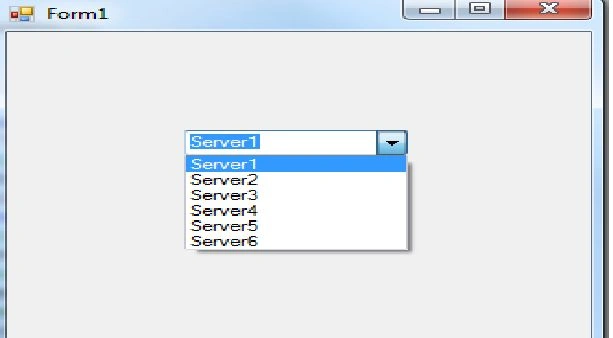
I have attached the complete source code also.
Hamid AkbariPosted Oct 30, 2013, 2:28 AM
tanks