

Methods are one of the most important building blocks in C#.
They allow developers to group logic into reusable units, making programs easier to read, maintain, test, and extend.
Without methods, programs would become:
Repetitive
Difficult to understand
Hard to debug
Impossible to scale
This article explains methods in C# in a descriptive and practical way, covering types of methods, syntax, parameters, return values, method overloading, and best practices.
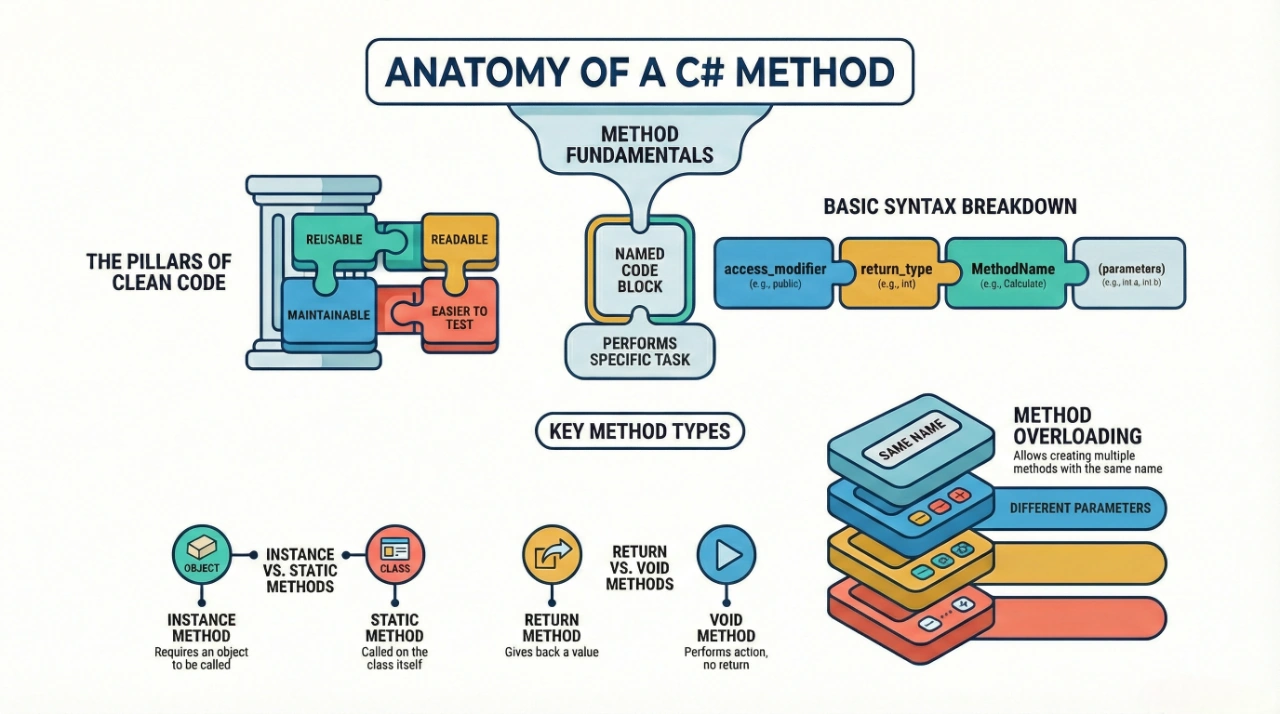
What Is a Method in C#?
A method is a block of code that:
Performs a specific task
Can be executed whenever it is called
May accept input (parameters)
May return a result
In simple words:
A method is a function written inside a class that defines what an object can do.
Why Methods Are Important
Methods play a critical role in application development:
Code Reusability: The same method can be called multiple times.
Readability: Code becomes easier to understand and follow.
Maintainability: Changes need to be made in only one place.
Modularity: Large problems are broken into smaller parts.
Testing:Individual methods can be tested independently.
Basic Syntax of a Method
access_modifier return_type MethodName(parameters)
{
    // method body
}
Explanation
Access Modifier – Controls visibility (
public,private, etc.)Return Type – Type of value returned (
voidif nothing is returned)Method Name – Identifier used to call the method
Parameters – Input values (optional)
Method Body – Logic to execute
Simple Example of a Method
public void DisplayMessage()
{
    Console.WriteLine("Welcome to C# Methods");
}
This method:
Does not take parameters
Does not return any value
Performs a simple task
Calling a Method
A method is executed by calling it using its name.
DisplayMessage();If the method belongs to an object:
MyClass obj = new MyClass();
obj.DisplayMessage();
Types of Methods in C#
C# supports different types of methods based on behavior and usage.
1. Void Methods
Void methods do not return any value.
Key Points
Used when the method performs an action only.
Common for printing, logging, or updating data.
Ends execution using
return;or by reaching the end.Improves clarity when no result is required.
Example
public void PrintHello()
{
    Console.WriteLine("Hello");
}
2. Methods with Return Value
These methods return a value to the caller.
Key Points
Must specify a return type.
Must use the
returnkeyword.Returned value must match the return type.
Useful for calculations and data processing.
Example
public int Add(int a, int b)
{
    return a + b;
}
3. Methods with Parameters
Parameters allow methods to accept input values.
Key Points
Make methods flexible and reusable.
Parameters act like local variables.
Multiple parameters are separated by commas.
Values are passed during a method call.
Example
public void Greet(string name)
{
    Console.WriteLine($"Hello {name}");
}
4. Static Methods
Static methods belong to the class, not an object.
Key Points
Called using the class name.
Do not require object creation.
Can access only static members.
Commonly used for utility or helper methods.
Example
public static int Square(int x)
{
    return x * x;
}
5. Instance Methods
Instance methods belong to an object.
Key Points
Require object creation.
Can access both instance and static members.
Represent object behavior.
Most commonly used in OOP.
Example
public void ShowDetails()
{
    Console.WriteLine("Instance Method");
}
6. Method Overloading
Method overloading allows multiple methods with the same name but different parameters.
Key Points
Improves readability and usability.
Methods differ by the number or type of parameters.
Return type alone cannot differentiate methods.
The compiler decides which method to call.
Example
public int Add(int a, int b)
{
    return a + b;
}

public int Add(int a, int b, int c)
{
    return a + b + c;
}
7. Parameter Passing Methods
Pass by Value (Default)
public void Update(int x)
{
    x = 50;
}
Changes do not affect the original value.
Pass by Reference (ref)
public void Update(ref int x)
{
    x = 50;
}
Changes affect the original value.
Output Parameter (out)
public void GetResult(out int result)
{
    result = 100;
}
Used to return multiple values.
8. Optional Parameters
Optional parameters have default values.
Key Points
Makes method calls flexible.
The default value is used if the argument is missing.
Optional parameters must be at the end.
Reduces method overloads.
Example
public void Display(string message = "Hello")
{
    Console.WriteLine(message);
}
9. Named Parameters
Named parameters improve readability.
Example
Display(message: "Welcome");Useful when methods have many parameters.
10. Recursive Methods
A method that calls itself.
Key Points
Useful for repetitive problems.
Must have a base condition.
Excessive recursion may cause a stack overflow.
Common in mathematical and tree structures.
Example
public int Factorial(int n)
{
    if (n == 1)
        return 1;

    return n * Factorial(n - 1);
}
Best Practices for Writing Methods
Keep methods short and focused
Use meaningful method names
Avoid long parameter lists
Follow the single responsibility principle
Use access modifiers properly
Write reusable methods
Add XML comments for public methods
Methods in Real-World Applications
Methods are used to:
Process business logic
Handle user input
Perform calculations
Communicate with databases
Call APIs
Reuse functionality
They form the core logic layer of applications.
Methods are fundamental to writing clean, efficient, and maintainable C# programs. They enable modular design, code reuse, and better readability.
By mastering:
Method syntax
Parameters and return values
Overloading
Static and instance methods
ref and out keywords
You gain strong control over program structure and logic.
Thank you for reading this detailed guide on Methods in C#.
Understanding methods is essential for building professional, scalable, and maintainable .NET applications.
Join the conversation! Your thoughts help the community grow.