

Introduction
Are you new to the world of Microsoft Dataverse Accelerator and feeling a bit overwhelmed? Don't fret! This comprehensive guide will demystify the aspects of Microsoft Dataverse Accelerator and help you understand its basics, features, tools, and benefits. Plus, we’ll dive into how you can get started with it, all in plain, easy-to-understand language.
What is Microsoft Dataverse Accelerator?
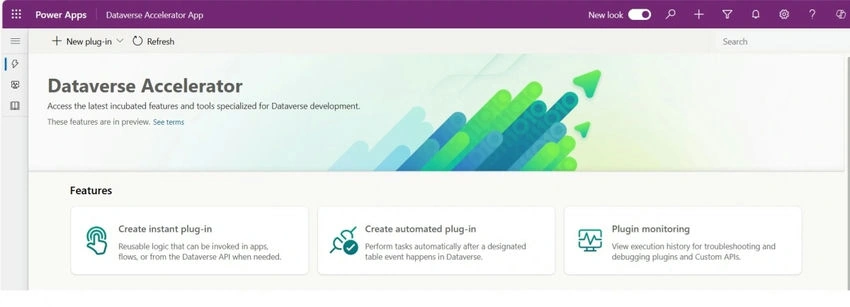
Let's start at the beginning. Microsoft Dataverse Accelerator is a powerful, user-friendly tool designed to enhance your experience with Microsoft Dataverse. Think of it as a turbocharger for your Dataverse projects, streamlining development and enabling faster, more efficient data management.
Understanding Microsoft Dataverse
Before diving deeper into the accelerator, it's crucial to understand Microsoft Dataverse itself. Dataverse is a secure and scalable data platform that's part of the Microsoft Power Platform. It allows you to store and manage data used by business applications. Whether you're developing a simple canvas app or a complex enterprise-level solution, Dataverse helps streamline your data management tasks.
Features of Microsoft Dataverse
Microsoft Dataverse comes loaded with several compelling features that make it a preferred choice for data management:
- Data Storage and Management: Dataverse stores data in a set of tables called entities. Each entity holds a set of records, and these records are akin to rows in a database table.
- Security: It offers robust security options. Data is encrypted, and you can define detailed access control for different users.
- Business Logic: Dataverse lets you apply business logic through rules, workflows, and business process flows, thus enabling complex scenarios without writing code.
- Integration: It integrates seamlessly with other Microsoft products like Power BI, Power Apps, and Dynamics 365, facilitating smoother workflows.
What is Microsoft Dataverse Accelerator?
Now that we've got the basics down, let’s zoom in on the Microsoft Dataverse Accelerator. This tool essentially simplifies and speeds up your work with the Dataverse environment, particularly for developers and administrators. It offers a suite of tools and features designed to make your life easier by automating repetitive tasks, debugging issues, and optimizing performance.
Key Features of Microsoft Dataverse Accelerator
- API Playground: This is an interactive environment to explore and test Dataverse Web APIs. It's incredibly useful for developers who wish to understand the APIs better before integrating them into their apps.
- Debugging Tools: With features to debug plugins without installing profilers, the accelerator saves you precious time and headaches.
- Environment Management: Easily manage multiple Dataverse environments with error tracking and performance monitoring tools.
- Data Migration: Simplified tools for data migration ensure a fast and headache-free way to move data between environments.
Installing Microsoft Dataverse Accelerator
So, how do you get started? Let's walk through the installation process step-by-step.
- Pre-requisites: Before installing, make sure you have administrative access to your Dataverse environment and have the necessary Power Platform licenses.
- Download: Visit the official Microsoft Power Platform website and download the Dataverse Accelerator tool.
- Installation: Run the installer and follow the on-screen instructions. It’s pretty straightforward!
- Configuration: Once installed, you can configure the tool to align with your specific Dataverse environment's needs.
Join the conversation! Your thoughts help the community grow.