

A few weeks ago, one of our team talked about an assignment of how to make a game.
I felt the challenge to make that game. It's the Windows most famous game "MineSweeper". I've made the MineSweeper using .NET Framework 2.0 with C# language.
It's a windows application which is documented using XML comments.
The Design:
I thought of the design of the MineSweeper of 3 layers. I guess this design is a little bit complicated for such a small game but from my experience I can say that "Everything is small today is going to turn to be huge tomorrow" So don't you ever think of a solution to be tight.
Ok, Let's talk a little bit of the design.
The 3 layers are:
-
The interface layer (which is responsible of drawing the User Interface of the game)

Figure 1.
2. The BLT (Which is responsible of the Business Logic Tier)
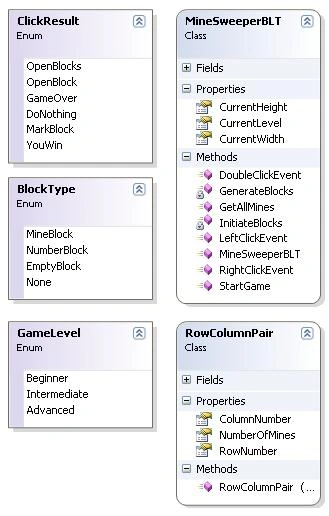
Figure 2.
3. The Core classes that represent the internal mines, blocks and etc. components of the game.
e.g You can replace the interface tier with your own interface that you find suitable like you can replace my buttons with you images to improve performance another example You can replace the BLT layer with your own logic, You can find something like this useful in case the rules of the game have changed.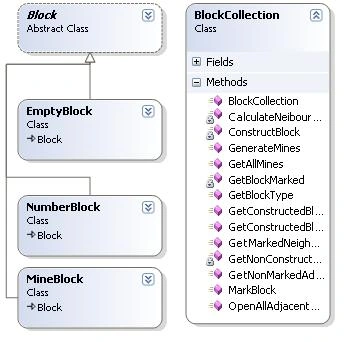
Figure 3.
Deep into the design:
There are some aspects of my design I'd like to talk about.
It's complicated as I mentioned earlier.
It's a little bit slow especially when you try the expert mode.
Navigating through layers: public ClickResult LeftClickEvent(int rowNo, int colNo, ref int adjacentBlocks, ArrayList pairs) { BlockType aType = blocks.GetBlockType(rowNo, colNo, ref adjacentBlocks); switch (aType) { case BlockType.EmptyBlock: blocks.OpenAllAdjacentBlocks(rowNo, colNo, pairs); return ClickResult.OpenBlocks; case BlockType.MineBlock: return ClickResult.GameOver; case BlockType.NumberBlock: return ClickResult.OpenBlock; } return ClickResult.DoNothing; }
Every event in MineSweeper is initially catched in the interface layer. Then it's being processed in the BLT layer. Then the BLT takes its decision what to do with this action. For brevity we will take one example for such actions.
The example we will deal with is when the user press left click on a block of the MineSweeper.
First the interface layer tells the BLT that a left click has been clicked over certain coordinates. The BLT stops and sees the status of this block:
If the block is Mine then it's game over and the interface just shows the map of the Mines. If the block is an empty block i.e. it doesn't have any adjacent mines, the BLT opens this block and opens all it's neighbors till it ends to closed mines.
If the block is a number block i.e. it has adjacent mines then do nothing.
Future Work:
I guess the design can be enhanced somehow by doing a couple of things. I see we can use image instead of buttons to improve the performance. This image can be loaded once and being drawled several times instead of drawing a button. Anyone is welcomed to say his opinion in the design and/or the implementation of the MineSweeper, just add your comment to the article.
Summary:
Hope you all enjoy playing the game.
Katran KORPosted Nov 14, 2010, 12:34 PM
My Brother Cong.
HaNhoc NhoPosted Oct 19, 2010, 12:02 PM
thank you
zain ahmedPosted Jan 3, 2009, 4:01 PM
luv u mwah
samaneh azharPosted Dec 18, 2008, 2:19 AM
thanks a lot
Igor YoPosted Jun 15, 2007, 12:51 PM
When you lose the game, and hit File -> New, nothing is happening! For beginning the new game, after losing the game, you need to click on one of the levels (Beginner, Expert..). Also, if you are in the middle of the game and hit New game, nothing is happening too! Check it out! Anyway, great work!
Saurabh KumarPosted Jun 12, 2007, 9:05 AM
how to make round buttons or forms in custom shapes in vb.net
SimonPosted Jun 11, 2007, 10:50 AM
One thing though, is it just me or is there no way to complete the game successfully? if I have all the mines marked with a flag and the rest of the blocks are already revealed I'm not told that I have won, is it suppose to be like that?