

We’ll explore this architecture through a mini ToDo List project in a two-part series.
Article 1:
This article explains what Vertical Slice Architecture and CQRS are, why they complement each other, when to use them (and when not to), includes a simple diagram and high-level request flow, explores real-world use cases, outlines pros and cons, and compares this approach to traditional layered architecture.
Article 2:
The implementation: how the ToDo API is built. You can read it here: Modern Backend Architecture in .NET – Implementing Vertical Slice + CQRS
You’ll see the actual project structure, how Commands and Queries are implemented using MediatR, how FluentValidation integrates into the pipeline, and a step-by-step walkthrough of how a request flows from endpoint → MediatR → handler → database → response.
The Project We're Building
We use one concrete example throughout both articles: a Todo API. The app lets users create, read, update, and delete todo items (each has a title, an optional description, and a completed flag). It’s a small, familiar domain so we can focus on architecture instead of business rules.
Because the whole project is built around this Todo feature, you’ll see the word Todo everywhere: Todo entity, CreateTodo command, GetTodo query, TodoEndpoints, Features/Todos/, and so on. Once you see how Vertical Slice and CQRS work with Todos, you can apply the same ideas to any other feature (e.g., Orders, Invoices, Users).
You can find project here: https://github.com/RikamPalkar/vertical-cqrs-architecture-dotnet/tree/main
1. What is Vertical Slice Architecture?
Vertical Slice Architecture means organizing code by feature (or by “use case”), not by layer.
Traditional (horizontal/layered): You have folders like
Controllers/,Services/,Repositories/,Models/One feature (e.g. “Create Todo”) is spread across many of these folders.
Vertical slice: You have one folder per feature or per action. Everything needed for that action lives in one place: the request (command/query), the handler, the validator, and the endpoint mapping.
In this project, the “Todo” feature is split into slices like:
Features/Todos/CreateTodo/— create a todoFeatures/Todos/GetTodo/— get one todoFeatures/Todos/GetTodos/— get all todosFeatures/Todos/UpdateTodo/— update a todoFeatures/Todos/DeleteTodo/— delete a todo
In one sentence: You organize by “what the system does” (features/use cases), not by “what kind of class it is” (controllers, services, repositories).
Where entities and DTOs live
In this style of project:
Entities (the classes that represent database tables and are used by EF Core) live in Core. All table definitions go there. Entities are shared across the app: handlers that write data create or update these objects and save them via the DbContext.
DTOs (Data Transfer Objects, shapes used for input or output of an operation, not the table itself) live with the feature:
Request DTOs (what the client sends in the API, e.g. the body of POST/PUT) usually sit next to the endpoints or in the same feature folder.
Result DTOs (what a command or query returns, e.g.
CreateTodoResult,GetTodoResult) live in the same slice as the command or query, often in the same file. Each slice owns its request/response shape.
2. What is CQRS?
CQRS stands for Command Query Responsibility Segregation.
Command = an intention to change state (create, update, delete). Commands usually return a small result (e.g. id, or success).
Query = an intention to read state. Queries return data and do not change it.
So you separate:
Writes: Commands + Command Handlers
Reads: Queries + Query Handlers
In this project:
Commands:
CreateTodoCommand,UpdateTodoCommand,DeleteTodoCommandQueries:
GetTodoQuery,GetTodosQuery
Each command/query has one handler that contains the logic. MediatR is the library that “sends” the command or query to the right handler.
Purpose of Command, Handler, and Validator
In each slice you typically have three kinds of pieces.
Command (or Query): Represents what the user wants to do. It is a small object that carries only the data needed for that action (e.g. "create a todo with this title and description"). It does not contain logic. Commands are for writes; queries are for reads.
Handler: Contains the business logic for that action. It receives the command (or query), talks to the database or other services, and returns a result. One handler per command/query. Handlers are where the real work happens (create entity, save, return result).
Validator: Checks that the input of a command (or request) is valid before the handler runs. It answers: "Is the title present? Is it too long?" If validation fails, the handler is never called and the API can return a 400 with error messages. Validators keep validation rules in one place and out of the handler.
3. What is MediatR?
MediatR is a .NET library that implements the mediator pattern. In plain terms:
Your endpoint (or controller) does not call the handler directly. Instead, it creates a command or query object and sends it to MediatR (e.g.
mediator.Send(command)).MediatR looks at the type of that object and finds the one handler registered for that type, then calls it and returns the result.
So the endpoint stays thin: it only builds the request and sends it. MediatR is the "middleman" that delivers the request to the correct handler and gives you back the response.
Why use it? It keeps the HTTP layer decoupled from business logic: the endpoint does not need to know which handler runs or how it works. It also makes it easy to add pipeline behaviors (e.g. validation, logging) that run before or after every request. In this project we use MediatR to wire commands and queries to their handlers and to run validators before the handler.
4. Why They Work Well Together
Vertical slices need a clear “action” per slice. CQRS gives you exactly that: one command or one query per action.
Each slice can contain:
The command or query (the “request”)
The handler (the “do the work” part)
Optional validator
Endpoint that sends the command/query to MediatR
So: one slice = one use case = one command or one query + its handler.
5. Simple Diagram
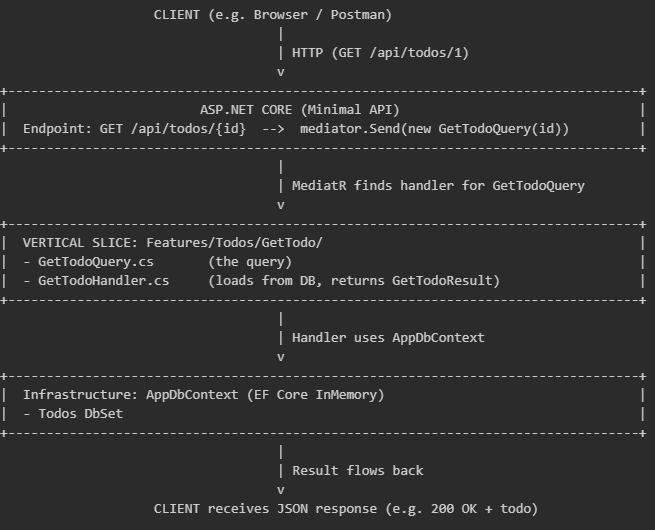
Same flow for a command (e.g. POST create):
Request hits endpoint → endpoint builds CreateTodoCommand → MediatR sends it.
ValidationBehavior runs CreateTodoValidator (if any); if invalid, returns 400.
CreateTodoHandler runs → creates entity, saves via DbContext → returns CreateTodoResult.
Endpoint returns 201 Created with the result.
6. Comparison with Controller / Layered Architecture
How controller or layered architecture works
In a controller-based or layered setup you organize by technical role:
Controllers Handle HTTP: one controller per resource (e.g.
TodosController). Each action (Create, Get, Update, Delete) is a method that receives the request, calls a service, and returns a response.Services Hold business logic: e.g.
TodoServicewith methods likeCreateTodo(),GetTodo(),GetAllTodos(). The controller calls the service; the service may call a repository.Repositories Handle data access: e.g.
TodoRepositorywithAdd(),GetById(), etc. The service calls the repository.
So for one feature (e.g. "create a todo") the code lives in several places: the controller action, the service method, the repository method, and maybe DTOs in a shared folder. To understand or change "create todo" you open multiple files across different layers.
How vertical slice + CQRS is different
Here you organize by use case, not by role:
There is no single "TodoController" or "TodoService" that owns all todo operations. Instead, each action has its own small slice.
"Create todo" = one folder (
CreateTodo/) with the command (the request), the handler (the logic what would be in the service method), and optionally a validator. The endpoint (Minimal API) only builds the command and sends it to MediatR; it does not call a service or repository directly.So one feature = one place. To change "create todo" you go to
Features/Todos/CreateTodo/. No jumping between Controllers, Services, and Repositories.
Difference in one line: In layered you ask "which controller, which service, which repository?"; in vertical slice you ask "which slice?" and everything for that use case is there.
Quick comparison table
| Aspect | Layered (horizontal) | Vertical Slice + CQRS (this project) |
|---|---|---|
| Organization | By technical role (Controller, Service, Repository) | By feature/use case (CreateTodo, GetTodo, …) |
| Adding a feature | Often touch Controller, Service, maybe Repository, DTOs | Add one folder (e.g. CreateTodo) with command, handler, endpoint |
| Finding code | “Create todo” logic spread across layers | “Create todo” in Features/Todos/CreateTodo/ |
| Read vs write | Often same service/repository for both | Commands vs queries and handlers separated (CQRS) |
| Best for | Simple CRUD, small teams, straightforward domains | Growing APIs, many features, teams that like feature-based structure |
Both are valid. Layered is simpler for very small apps; vertical slice + CQRS keeps each use case in one place and scales better when you have many features.
Summary
Vertical Slice Architecture = organize by feature/use case (one folder per action or feature).
CQRS = separate commands (write) from queries (read), each with its own handler.
In this project, one slice = one command or query + handler + optional validator + endpoint; MediatR connects endpoints to handlers.
Flow: Request → Endpoint → MediatR (validation if configured) → Handler → DbContext → Result → Response.
Use this approach when the benefits of clear structure and CQRS matter; skip it or simplify when the project is very small or the team prefers fewer concepts and files.
Code: https://github.com/RikamPalkar/vertical-cqrs-architecture-dotnet/tree/main
Join the conversation! Your thoughts help the community grow.