

ASP.NET Core is built around the principles of modularity, lightweight design, and flexibility. Unlike its predecessor, ASP.NET Framework, which was monolithic and tightly coupled, ASP.NET Core embraces a modular architecture that enables developers to build only what they need, resulting in faster, smaller, and more efficient applications.
This architectural transformation allows ASP.NET Core to power everything from minimal APIs to large enterprise microservices —all with exceptional performance and scalability.
In this article, we’ll explore the modular and lightweight architecture of ASP.NET Core, understand its components, and see how to implement modular design patterns with real code examples.
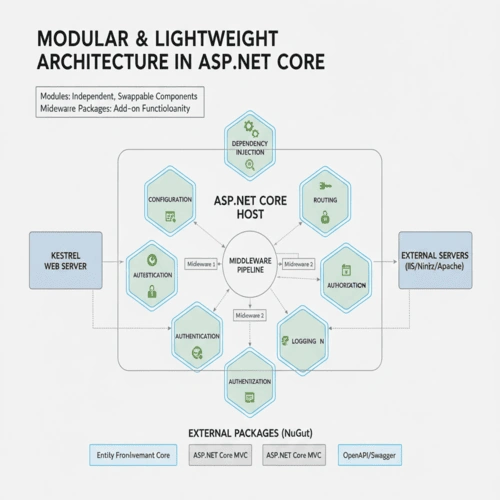
🧩 What is a Modular Architecture?
A modular architecture means breaking down an application into independent, reusable components (modules). Each module handles a specific concern—such as authentication, data access, or logging—and can be developed, tested, and maintained independently.
Benefits of Modularity in ASP.NET Core
Separation of Concerns – Each module has a single responsibility.
Reusability – Modules can be reused across multiple applications.
Maintainability – Easier debugging, testing, and code updates.
Scalability – Modules can evolve independently as the system grows.
Performance – Load only the modules you need, reducing memory footprint.
⚙️ Lightweight Core Framework
The lightweight nature of ASP.NET Core comes from its dependency injection system , NuGet-based modularity , and middleware pipeline .
In ASP.NET Core, you can add only the libraries and services your application requires using NuGet packages, avoiding unnecessary dependencies.
✅ Example: Minimal Dependencies
In a minimal web API, you can start with almost nothing:
    var builder = WebApplication.CreateBuilder(args);
var app = builder.Build();

app.MapGet("/", () => "Hello, Modular ASP.NET Core!");

app.Run();
This app doesn’t include MVC, Razor Pages, or EF Core — only the minimal HTTP pipeline. You can later add components as required, keeping your app lightweight.
🧱 Middleware-Based Architecture
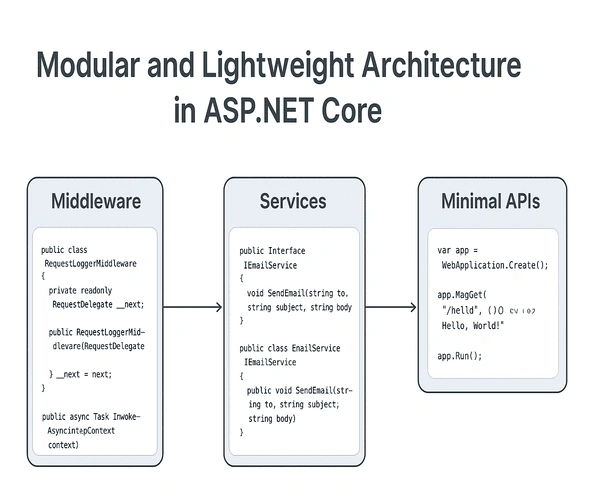
ASP.NET Core replaces the old HttpModules and HttpHandlers with a middleware pipeline. Each middleware component processes requests in sequence and passes them to the next component.
✅ Example: Custom Middleware
    public class RequestLoggerMiddleware
{
    private readonly RequestDelegate _next;
    private readonly ILogger<RequestLoggerMiddleware> _logger;

    public RequestLoggerMiddleware(RequestDelegate next, ILogger<RequestLoggerMiddleware> logger)
    {
        _next = next;
        _logger = logger;
    }

    public async Task InvokeAsync(HttpContext context)
    {
        _logger.LogInformation($"Incoming Request: {context.Request.Method} {context.Request.Path}");
        await _next(context);
        _logger.LogInformation($"Response Status: {context.Response.StatusCode}");
    }
}

// Register in Program.csvar app = builder.Build();
app.UseMiddleware<RequestLoggerMiddleware>();
app.MapGet("/", () => "Middleware in Action!");
app.Run();
Each middleware is modular , allowing you to insert, replace, or remove parts of the request pipeline with ease.
🧩 Modular Services with Dependency Injection (DI)
ASP.NET Core has built-in dependency injection (DI) , allowing you to register and manage dependencies cleanly. This is a key enabler for modular design.
✅ Example: Modular Service Registration
    public interface IEmailService
{
    void SendEmail(string to, string subject, string body);
}

public class EmailService : IEmailService
{
    public void SendEmail(string to, string subject, string body)
    {
        Console.WriteLine($"Email sent to {to} with subject '{subject}'");
    }
}

// In Program.cs
builder.Services.AddScoped<IEmailService, EmailService>();

var app = builder.Build();
app.MapGet("/send-email", (IEmailService emailService) =>
{
    emailService.SendEmail("[email protected]", "Welcome", "Hello from ASP.NET Core!");
    return "Email sent successfully!";
});
app.Run();
You can organize each domain (email, user, order, etc.) as a separate service module, registered independently.
🧠 Modular Startup Configuration
Instead of a single Startup.cs , ASP.NET Core allows you to split configuration logic across modules.
✅ Example: Feature Module Extension
    public static class EmailModule
{
    public static IServiceCollection AddEmailModule(this IServiceCollection services)
    {
        services.AddScoped<IEmailService, EmailService>();
        return services;
    }

    public static IEndpointRouteBuilder MapEmailEndpoints(this IEndpointRouteBuilder app)
    {
        app.MapPost("/email/send", (IEmailService emailService, string to, string subject, string body) =>
        {
            emailService.SendEmail(to, subject, body);
            return Results.Ok("Email sent!");
        });
        return app;
    }
}
Now you can load this module easily in Program.cs :
Join the conversation! Your thoughts help the community grow.