Introduction
In this article, I will describe what a MongoDB database is and how we can integrate it with .Net.
Content: What is Mongo Database?
MongoDB is an open-source, high-performance, schema-free, document-oriented database.
It has been written in C++ as a document-oriented database, so it manages collections of JSON-like documents.
MongoDB supports cross-platform support (Windows, Linux, Solaris). It also has a rich set of data types (supports dates, regular expressions, code, and binary data).
MongoDB uses memory-mapped files. For Windows, the data size is limited to 2GB on 32-bit machines (64-bit systems have a much larger data size).
Language supports for MongoDB are (reference from Wikipedia):
- C
- C++
- Haskell
- Java
- Javascript
- Perl
- PHP
- Python
- Ruby
- C#
- Scala
So we can really use MongoDB in C#.
Why will we use Mongo DB?
- It is document-oriented (documents (objects) map nicely to programming language data types; also no joins are needed and no multi-document transactions for high performance and easy scalability).
- High performance (indexes including indexing of keys from embedded documents and arrays, asynchronous writes).
- High availability (if the master server fails then it will automatically replicate the server).
Data Model Hierarchy of Mongo Database
- A Mongo system holds a set of databases (for e.g. databases in SQL Server)
- A database holds a set of collections
- A collection holds a set of documents (tables in SQL Server)
- A document is a set of fields (for e.g. attributes in tables)
- A field is a key-value pair
- A key is a name (string)
- A value is a basic type like string, integer, float, timestamp, binary or a document, or an array of values (for e.g. Datatype in SQL Server)
Now we have to download MongoDB and the C# driver for programming in .Net.
Before downloading the software, create a folder named "Data" in the C: drive. After that create another folder named "db" under the "data" folder.
Actually all the databases and collections of the db will be stored in the "db" folder under the "Data" folder.
Step 1:
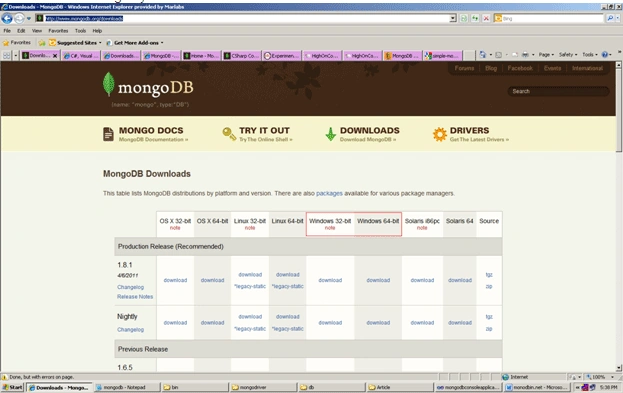
Now go to the below site and download MongoDB:
http://www.mongodb.org/downloads
You will see there for Windows there are 2 types of Download options:
- 32 bit
- 64 bit.
Download the one corresponding to your version of Windows.
Figure 1
Step 2:
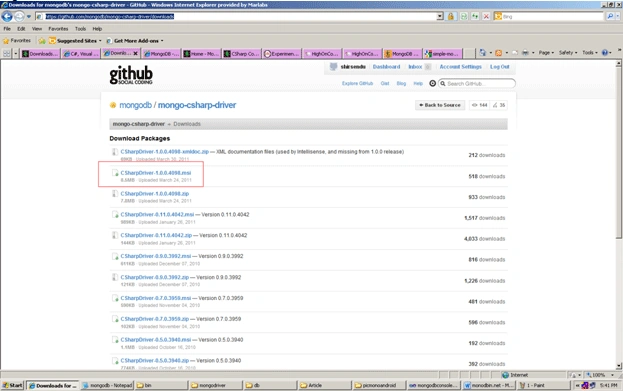
Now we have to download the C# driver for use of MongoDB with .Net. For that we have to click the link:
https://github.com/mongodb/mongo-csharp-driver/downloads.
Now download the software which I marked with red in Figure 2:
Figure 2
After downloading, install the C# driver software named "CSharpDriver-1.0.0.4098".
Step 2:
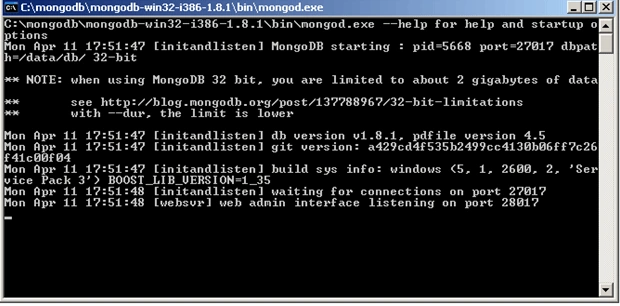
Now go to the "bin" folder under the "mongodb-win32-i386-1.8.1" folder. After that first click the "mongod" exe just like Figure 3; it is the MongoDB server.
Figure 3
Step 4:
Then click the "mongo" exe. It is the client version.
Actually MongoDB has a master and a slave. A master can perform reads and writes. A slave copies data from the master and can only be used for reads or backup (not writes).
So when you click the "mongod" exe it will look just like Figure 4. Here you will see the server is running.
Figure 4
Here you can see your server port id, pid, and other information. While using MongoDB in your .Net application you must open this server.
Conclusion
So in this article, we have learned how to set up MongoDB in a .Net application with C# driver support. This MongoDB version will runs on .Net framework 3.5, 3.5 sp1, and 4.0.



Join the conversation! Your thoughts help the community grow.