

Before reading this article, I highly recommend reading the following previous installments in the series:
- MongoDB - Day 1 (Introduction To MongoDB)
- MongoDB - Day 2 (Install MongoDB in Windows)
- MongoDB - Day 3 (Database Basics)
- MongoDB - Day 4 (Basics of Collection)
- MongoDB - Day 5 (Data Types in MongoDB)
Write operations are any type of operation that creates and modifies data. A relational database contains 3 types of write operations. They are Insert, Update and Delete. MongoDB has a number of write operations (in other words Insert, Update, save, Delete, upsert ) that are insert, update and remove data. Each write operation targets a single collection. Each write operation is atomic at the document level.
To remove, save, update and insert operations, we can specify the criteria, or conditions, that identify the documents to update or remove.
This article explains the insert method.
Insert
The Insert method in MongoDB is similar to the “Insert Into” command of Relational Databases. The Insert method inserts a new document into a collection. We can insert single, multiple and embedded documents into collections depending on our preferences or requirements.
Syntax: db.Collection_Name.insert()
Insert Single Document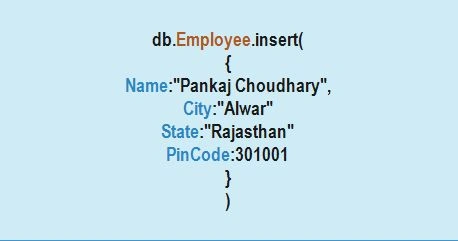
The preceding diagram shows a basic method to insert a single document into a collection. Now we execute some queries in the MongoDB shell.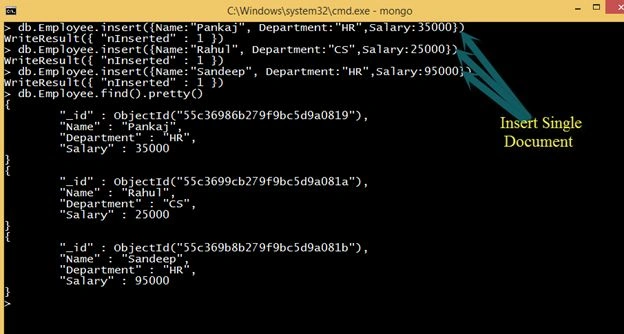
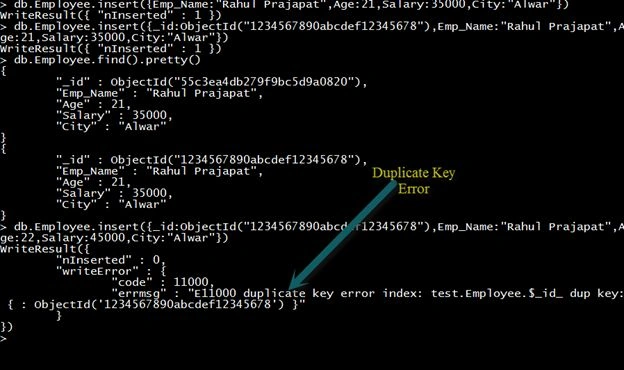
In the preceding example, we insert 3 documents, but only a single document at a time is in the Employee collection.
Insert Multiple Documents
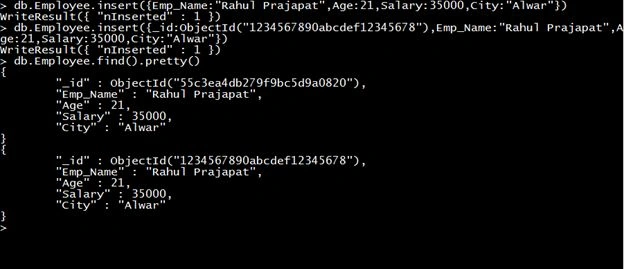
In the previous example, we saw how to insert a single document into a collection. This approach will take time if we have bulk data to insert. For such types, MongoDB provides a method for multiple insertions. Using this method, we can insert multiple documents in a single insert command.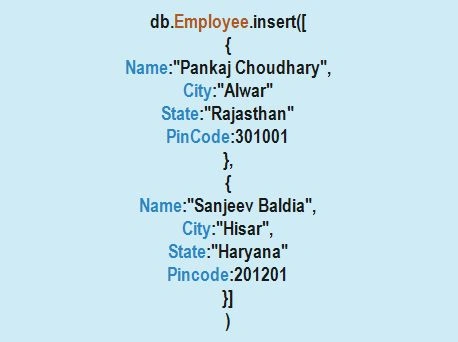
Let's see an example: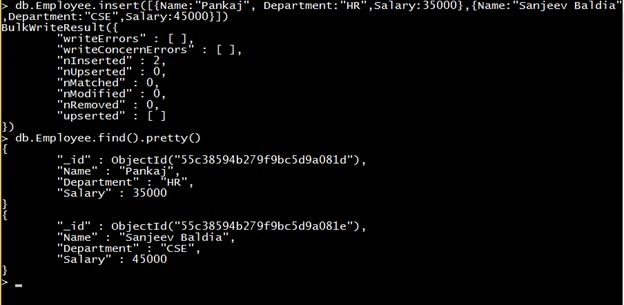
In the above example, we inserted two documents using a single insert command.
Insert Embedded Document
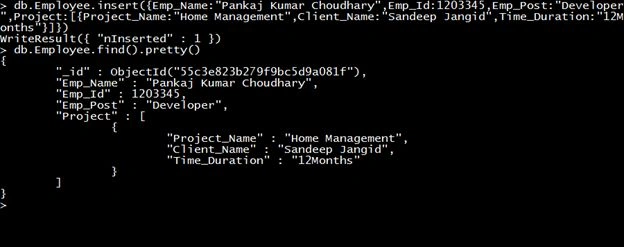
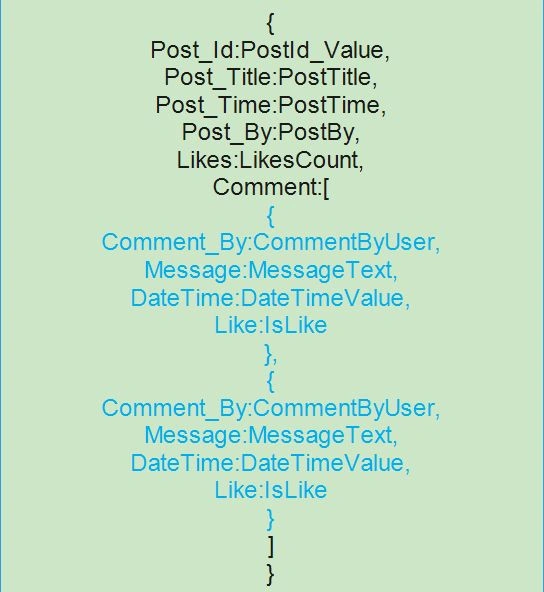
A document that contains another document as it's key-value pair is known as an Embedded Document. A MongoDB database has a flexible schema, so there is no need to have the same set of fields or structures and common fields in a collection document. The following image provides a basic idea of an embedded document structure.
Let's see an example:


muhammad zubairPosted Nov 9, 2017, 10:50 AM
Nice work nice workMongoDB save document http://programmershelper.com/mongodb-save-document/
Sr KarthigaPosted Feb 14, 2016, 7:43 AM
Good one sir
Guest UserPosted Aug 8, 2015, 9:22 PM
nice series Pankaj!
Pankaj Kumar ChoudharyPosted Aug 8, 2015, 7:05 AM
Thanks Chervine Bhiwoo Sir...........
Pankaj Kumar ChoudharyPosted Aug 8, 2015, 7:05 AM
Thanks Santhakumar Munuswamy Sir..........
Chervine BhiwooPosted Aug 8, 2015, 2:19 AM
Great series! Thanks for sharing!
Santhakumar MunuswamyPosted Aug 8, 2015, 2:05 AM
Good article. Thanks for sharing
Pankaj Kumar ChoudharyPosted Aug 7, 2015, 12:55 PM
Thanks Nilesh Jadav Sir........
Pankaj Kumar ChoudharyPosted Aug 7, 2015, 12:54 PM
Thanks Sibeesh Venu Sir.............
Pankaj Kumar ChoudharyPosted Aug 7, 2015, 11:19 AM
Thanks Rahul Prajapat........
Nilesh JadavPosted Aug 7, 2015, 9:46 AM
This is great Pankaj Kumar Choudhary sir thanks for sharing
Sibeesh VenuPosted Aug 7, 2015, 8:21 AM
Nice Share!.
Rahul PrajapatPosted Aug 7, 2015, 7:16 AM
Nice article pankaj sir
Pankaj Kumar ChoudharyPosted Aug 7, 2015, 7:00 AM
Thanks Manoj Kulkarni..........
Pankaj Kumar ChoudharyPosted Aug 7, 2015, 7:00 AM
Thanks Yashwant Vishwakarma Sir......
Pankaj Kumar ChoudharyPosted Aug 7, 2015, 6:59 AM
Thanks Gopi Chand Sir.....
Pankaj Kumar ChoudharyPosted Aug 7, 2015, 6:59 AM
Thanks Rajeesh Menoth Sir........
Manoj KulkarniPosted Aug 7, 2015, 5:09 AM
Nice article. Thank you for sharing
Yashwant VishwakarmaPosted Aug 7, 2015, 4:35 AM
Just awesome :-)
Gopi ChandPosted Aug 7, 2015, 4:34 AM
Good going
Rajeesh MenothPosted Aug 7, 2015, 4:20 AM
Good Pankaj Kumar Choudhary