

Description
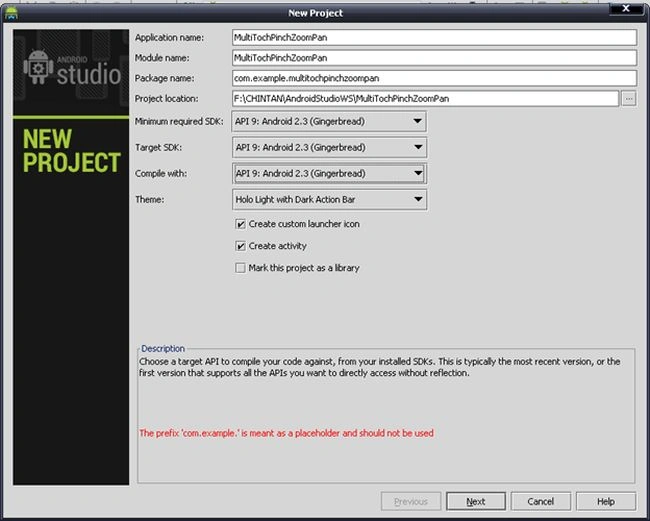
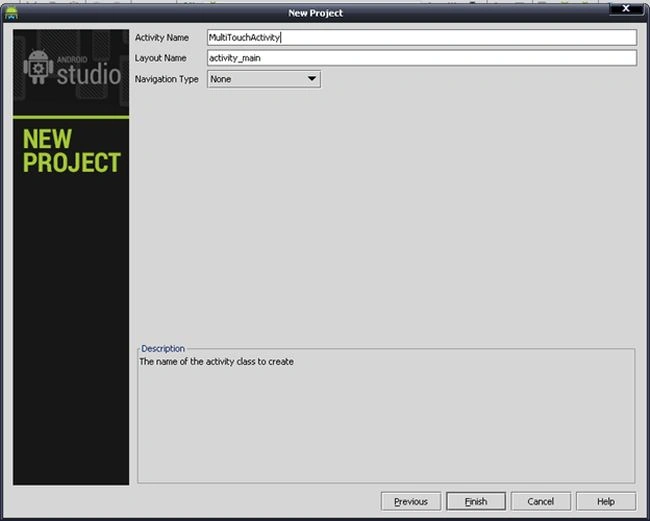
- import android.content.Context;
- import android.graphics.Matrix;
- import android.graphics.PointF;
- import android.graphics.drawable.Drawable;
- import android.util.AttributeSet;
- import android.util.Log;
- import android.view.MotionEvent;
- import android.view.ScaleGestureDetector;
- import android.view.View;
- import android.widget.ImageView;
- public class TouchImageView extends ImageView {
- Matrix matrix;
- // We can be in one of these 3 states
- static final int NONE = 0;
- static final int DRAG = 1;
- static final int ZOOM = 2;
- int mode = NONE;
- // Remember some things for zooming
- PointF last = new PointF();
- PointF start = new PointF();
- float minScale = 1f;
- float maxScale = 3f;
- float[] m;
- int viewWidth, viewHeight;
- static final int CLICK = 3;
- float saveScale = 1f;
- protected float origWidth, origHeight;
- int oldMeasuredWidth, oldMeasuredHeight;
- ScaleGestureDetector mScaleDetector;
- Context context;
- public TouchImageView(Context context) {
- super(context);
- sharedConstructing(context);
- }
- public TouchImageView(Context context, AttributeSet attrs) {
- super(context, attrs);
- sharedConstructing(context);
- }
- private void sharedConstructing(Context context) {
- super.setClickable(true);
- this.context = context;
- mScaleDetector = new ScaleGestureDetector(context, new ScaleListener());
- matrix = new Matrix();
- m = new float[9];
- setImageMatrix(matrix);
- setScaleType(ScaleType.MATRIX);
- setOnTouchListener(new OnTouchListener() {
- @Override
- public boolean onTouch(View v, MotionEvent event) {
- mScaleDetector.onTouchEvent(event);
- PointF curr = new PointF(event.getX(), event.getY());
- switch (event.getAction()) {
- case MotionEvent.ACTION_DOWN:
- last.set(curr);
- start.set(last);
- mode = DRAG;
- break;
- case MotionEvent.ACTION_MOVE:
- if (mode == DRAG) {
- float deltaX = curr.x - last.x;
- float deltaY = curr.y - last.y;
- float fixTransX = getFixDragTrans(deltaX, viewWidth, origWidth * saveScale);
- float fixTransY = getFixDragTrans(deltaY, viewHeight, origHeight * saveScale);
- matrix.postTranslate(fixTransX, fixTransY);
- fixTrans();
- last.set(curr.x, curr.y);
- }
- break;
- case MotionEvent.ACTION_UP:
- mode = NONE;
- int xDiff = (int) Math.abs(curr.x - start.x);
- int yDiff = (int) Math.abs(curr.y - start.y);
- if (xDiff < CLICK && yDiff < CLICK)
- performClick();
- break;
- case MotionEvent.ACTION_POINTER_UP:
- mode = NONE;
- break;
- }
- setImageMatrix(matrix);
- invalidate();
- return true; // indicate event was handled
- }
- });
- }
- public void setMaxZoom(float x) {
- maxScale = x;
- }
- private class ScaleListener extends ScaleGestureDetector.SimpleOnScaleGestureListener {
- @Override
- public boolean onScaleBegin(ScaleGestureDetector detector) {
- mode = ZOOM;
- return true;
- }
- @Override
- public boolean onScale(ScaleGestureDetector detector) {
- float mScaleFactor = detector.getScaleFactor();
- float origScale = saveScale;
- saveScale *= mScaleFactor;
- if (saveScale > maxScale) {
- saveScale = maxScale;
- mScaleFactor = maxScale / origScale;
- } else if (saveScale < minScale) {
- saveScale = minScale;
- mScaleFactor = minScale / origScale;
- }
- if (origWidth * saveScale <= viewWidth || origHeight * saveScale <= viewHeight)
- matrix.postScale(mScaleFactor, mScaleFactor, viewWidth / 2, viewHeight / 2);
- else
- matrix.postScale(mScaleFactor, mScaleFactor, detector.getFocusX(), detector.getFocusY());
- fixTrans();
- return true;
- }
- }
- void fixTrans() {
- matrix.getValues(m);
- float transX = m[Matrix.MTRANS_X];
- float transY = m[Matrix.MTRANS_Y];
- float fixTransX = getFixTrans(transX, viewWidth, origWidth * saveScale);
- float fixTransY = getFixTrans(transY, viewHeight, origHeight * saveScale);
- if (fixTransX != 0 || fixTransY != 0)
- matrix.postTranslate(fixTransX, fixTransY);
- }
- float getFixTrans(float trans, float viewSize, float contentSize) {
- float minTrans, maxTrans;
- if (contentSize <= viewSize) {
- minTrans = 0;
- maxTrans = viewSize - contentSize;
- } else {
- minTrans = viewSize - contentSize;
- maxTrans = 0;
- }
- if (trans < minTrans)
- return -trans + minTrans;
- if (trans > maxTrans)
- return -trans + maxTrans;
- return 0;
- }
- float getFixDragTrans(float delta, float viewSize, float contentSize) {
- if (contentSize <= viewSize) {
- return 0;
- }
- return delta;
- }
- @Override
- protected void onMeasure(int widthMeasureSpec, int heightMeasureSpec) {
- super.onMeasure(widthMeasureSpec, heightMeasureSpec);
- viewWidth = MeasureSpec.getSize(widthMeasureSpec);
- viewHeight = MeasureSpec.getSize(heightMeasureSpec);
- //
- // Rescales image on rotation
- //
- if (oldMeasuredHeight == viewWidth && oldMeasuredHeight == viewHeight
- || viewWidth == 0 || viewHeight == 0)
- return;
- oldMeasuredHeight = viewHeight;
- oldMeasuredWidth = viewWidth;
- if (saveScale == 1) {
- //Fit to screen.
- float scale;
- Drawable drawable = getDrawable();
- if (drawable == null || drawable.getIntrinsicWidth() == 0 || drawable.getIntrinsicHeight() == 0)
- return;
- int bmWidth = drawable.getIntrinsicWidth();
- int bmHeight = drawable.getIntrinsicHeight();
- Log.d("bmSize", "bmWidth: " + bmWidth + " bmHeight : " + bmHeight);
- float scaleX = (float) viewWidth / (float) bmWidth;
- float scaleY = (float) viewHeight / (float) bmHeight;
- scale = Math.min(scaleX, scaleY);
- matrix.setScale(scale, scale);
- // Center the image
- float redundantYSpace = (float) viewHeight - (scale * (float) bmHeight);
- float redundantXSpace = (float) viewWidth - (scale * (float) bmWidth);
- redundantYSpace /= (float) 2;
- redundantXSpace /= (float) 2;
- matrix.postTranslate(redundantXSpace, redundantYSpace);
- origWidth = viewWidth - 2 * redundantXSpace;
- origHeight = viewHeight - 2 * redundantYSpace;
- setImageMatrix(matrix);
- }
- fixTrans();
- }
- }
Step 3
Search any large image (not too large otherwise the heap will not handle it) and put it in the "drawable-hdpi" directory. In my case, the image is "ice_age_2.jpg".
Step 4
Open your main activity file and paste the following code into it.
MultiTouchActivity.java
- import android.os.Bundle;
- import android.app.Activity;
- import android.view.Menu;
- public class MultiTouchActivity extends Activity {
- @Override
- protected void onCreate(Bundle savedInstanceState) {
- super.onCreate(savedInstanceState);
- //setContentView(R.layout.activity_main);
- TouchImageView img = new TouchImageView(this);
- img.setImageResource(R.drawable.ice_age_2);
- img.setMaxZoom(4f);
- setContentView(img);
- }
- }
A real device is required because the emulator doesn't support Multi-Touch.
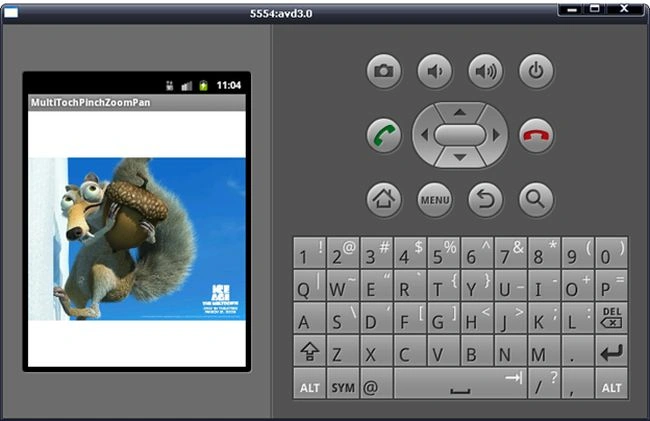 Now, touch the image with two fingers and zoom it by expanding your fingers. You can pan after zooming the image.
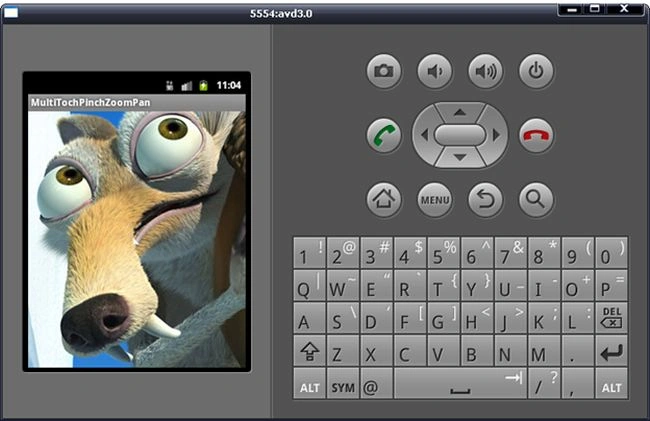 In this article, we learned how to use an ImageView and make another custom view. We also learned the use of a MultiTouch is a view as well as ScaleGestureDetector in our application.
Hundme AlfkPosted Jan 13, 2020, 3:49 PM
How to get axis x and y , from the selected area on the view??
Ajitesh SakarayPosted Jul 25, 2018, 2:50 AM
Good tutorial but when I apply this for different images to zoom in the same view "TouchImageView" the zoom in preserving the pervious image. so how to remove previous zoom ??
jamal maroufPosted Jun 20, 2018, 11:49 AM
Hi Mr Chintan Rathod i apprecied your code , is working well , can you explain the getFixTrans() method please .
Mohan NoonePosted Feb 8, 2018, 10:35 AM
Super like! This is the best multi touch image view code available in the whole world
Jessica SolagraciaPosted Jan 11, 2018, 3:53 AM
Hi, your tutorial works awesome! however, i wanted to make a toggle button to enable this pinch to zoom method, and when the button is off, i wanted to detect the image colors on button click. unfortunately, when i click some parts of the image after zoom, it still detect the original part. (for example; the original image has red color on top left and green color on bottom right, if i scale to the bottom right until the image is fully green and i clicked the top left, it still return red color). so my question is, what should i pass to the other button state to keep the scaled image? thank you. i hope my explanation is okay..
Rohit GargPosted Dec 20, 2017, 1:43 AM
Hi Chintan, I want to add zoom in and out functionality without making my behind view lose zoom in and out functionality. Basically, i have one background pdf where zoom in and out is already working but adding imageview on top of it, making my pdf not zoom in and out. Please let me know if you can help.
Abhishek MPosted Oct 24, 2017, 7:15 PM
Awesome Coding ... How do you learned it ?????
Jan DebiecPosted Jul 25, 2017, 4:16 AM
Fantastic article, thank you very much. Do you have any suggestions or ideas, how to preserve and restore the zoom and pan settings by restart of view/activity?
Jignesh PatelPosted Jun 5, 2017, 2:43 AM
How to zoom only x or y cordinate from both saide like top-bottom or left-right
Enrico CampagnaroPosted May 28, 2017, 11:17 AM
Is it possible to insert some space from the border? I'm not able to insert the img into a layout with the border.
Theh LiehPosted Oct 19, 2016, 4:34 AM
Hi Mr Chintan, thank you for the awesome and elegant code! However, is there a way to implement clickable and zoomable buttons that zooms along with the image? Hope you can give us some advice on this!
suvv mohantyPosted Jul 14, 2016, 7:08 AM
Hi Chintan the above code is working in a activity but it is not work in a fragment.Would you please help me on this .thanks for the code.It is really helpful.
kalu singh raoPosted Jul 12, 2016, 6:25 AM
Nice...
srikanth patelPosted Jul 11, 2016, 2:11 PM
Super boss.... Its working fine for android...
Shafqat MehmoodPosted Jun 22, 2016, 1:56 PM
please Help above code
Shafqat MehmoodPosted Jun 22, 2016, 1:55 PM
There is error on Activity . see code. above is fragment code below is image Zoom...................... import android.app.Activity;import android.os.Bundle;import android.support.v4.app.Fragment; import android.view.LayoutInflater; import android.view.View; import android.view.ViewGroup; import android.os.Bundle; import android.app.Activity; import android.view.Menu; import info.desi.umro.adapter.imagetouch; public class frag4 extends Fragment implements Activity { public View onCreateView(LayoutInflater inflater, ViewGroup container, Bundle savedInstanceState) { View rootView = inflater.inflate(R.layout.frag4, container, false); return rootView; // Image Zoom Code. but there is error // @Override public void onCreate (Bundle savedInstanceState){ super.onCreate(savedInstanceState); //setContentView(R.layout.activity_main); imagetouch img = new imagetouch(this); img.setImageResource(R.drawable.fas_4); img.setMaxZoom(4f); setContentView(img); } } }
Shafqat MehmoodPosted Jun 22, 2016, 1:54 PM
import android.app.Activity;import android.os.Bundle; import android.support.v4.app.Fragment; import android.view.LayoutInflater; import android.view.View; import android.view.ViewGroup; import android.os.Bundle; import android.app.Activity; import android.view.Menu; import info.desi.umro.adapter.imagetouch; public class frag4 extends Fragment implements Activity { public View onCreateView(LayoutInflater inflater, ViewGroup container, Bundle savedInstanceState) { View rootView = inflater.inflate(R.layout.frag4, container, false); return rootView; // Image Zoom Code. but there is error // @Override public void onCreate (Bundle savedInstanceState){ super.onCreate(savedInstanceState); //setContentView(R.layout.activity_main); imagetouch img = new imagetouch(this); img.setImageResource(R.drawable.fas_4); img.setMaxZoom(4f); setContentView(img); } } }
Shafqat MehmoodPosted Jun 22, 2016, 1:53 PM
import android.app.Activity;import android.os.Bundle; import android.support.v4.app.Fragment; import android.view.LayoutInflater; import android.view.View; import android.view.ViewGroup; import android.os.Bundle; import android.app.Activity; import android.view.Menu; import info.desi.umro.adapter.imagetouch; public class frag4 extends Fragment implements Activity { public View onCreateView(LayoutInflater inflater, ViewGroup container, Bundle savedInstanceState) { View rootView = inflater.inflate(R.layout.frag4, container, false); return rootView; // Image Zoom Code. but there is error // @Override public void onCreate (Bundle savedInstanceState){ super.onCreate(savedInstanceState); //setContentView(R.layout.activity_main); imagetouch img = new imagetouch(this); img.setImageResource(R.drawable.fas_4); img.setMaxZoom(4f); setContentView(img); } } }
Lim Lee YungPosted May 8, 2016, 11:19 AM
hi, how to make the image do not fit the screen?
Fadhlan ArnisPosted Apr 4, 2016, 4:52 AM
thank your tutorial,, your coding very help me..
Matheus ArielPosted Mar 2, 2016, 12:13 PM
I need help, I have a project with two ImageViews, and need to zoom and pan in both at the same time, you can adapt this code to do this? Thank you so much
Girish GhodaPosted Jan 30, 2016, 5:07 AM
i have two images and i want apply zoom on both images but not success. Both images have height & width=MATCH_PARENT.Pleaze Help.
Girish GhodaPosted Jan 30, 2016, 5:06 AM
my problem is only overlay image touch not below image touch
prashant khedkarPosted Jan 14, 2016, 11:21 PM
I tried the above implementation in C# for Android. But it's not working. Can anyone please help?
Slobodan SavicPosted Nov 21, 2015, 9:35 PM
how to set picture in image view?
Muhammed iscannPosted Nov 18, 2015, 4:07 AM
thank you very much but how to zooming multiple images
Aasim YazPosted Aug 17, 2015, 8:23 PM
Thank you very much chain,pls how can make the code display morethan one image_
Karthikeyan PaiyakarthiPosted Jul 14, 2015, 8:48 AM
Hi Christian, Am karthic i want to set Zooming option with two Fingers in already created xml layouts file please help me.......
Sergio GosalvezPosted Jul 7, 2015, 1:44 PM
Hi Christian, very useful tutorial!! By the way I would like to use the TouchImageView.java with images that I'm displaying from internet using PIcasso library. Is that possible?
Chris JohnsonPosted Mar 11, 2015, 5:41 PM
Thank you Chintan. I dropped your TouchImageView class straight into my project. I needed a simple mod to the code in the activity since I wanted to run it from a fragment instead. I particularly like the way it prevents the image from being zoomed out any further than its initial size.
Muhammad ShaharyarPosted Feb 19, 2015, 6:35 AM
hi great work dude. i am using svg vector image . this code is not working for this. any help will be highly appreciated
sagar maiyadPosted Jan 5, 2015, 11:36 AM
Chintan, how can i use this with crop funcationlity?
ilyas ilyasPosted Feb 12, 2014, 10:31 AM
any help or hint would be very much appreciated.
ilyas ilyasPosted Feb 12, 2014, 10:30 AM
Hello, I used your TouchImageView class to make zoom and pan on a imageview, and I want to include setOnLongClickListener and setOnClickListener in the main activity but they dont work!
adhi kPosted Feb 3, 2014, 11:24 AM
I am Begginer in java android programming ,, I want to call by method in TouchImageView.java in main activity.. Can you give an explanation call method by (ImageView)findViewById ? please help me