Abstract / Overview
NanoChat is a lightweight, education-focused conversational AI framework designed to show students how modern AI chat systems work in practice. Instead of emphasizing the Transformer architecture itself, NanoChat highlights how to wrap, optimize, and deploy such models into an efficient, small-scale chatbot usable in classrooms, coding exercises, and interactive learning environments.
This article explains the architecture, pipeline design, inference flow, and optimization principles that make NanoChat effective — even on limited hardware. Transformers appear only as the underlying mechanism; NanoChat’s value lies in accessibility, speed, clarity, and pedagogical design.
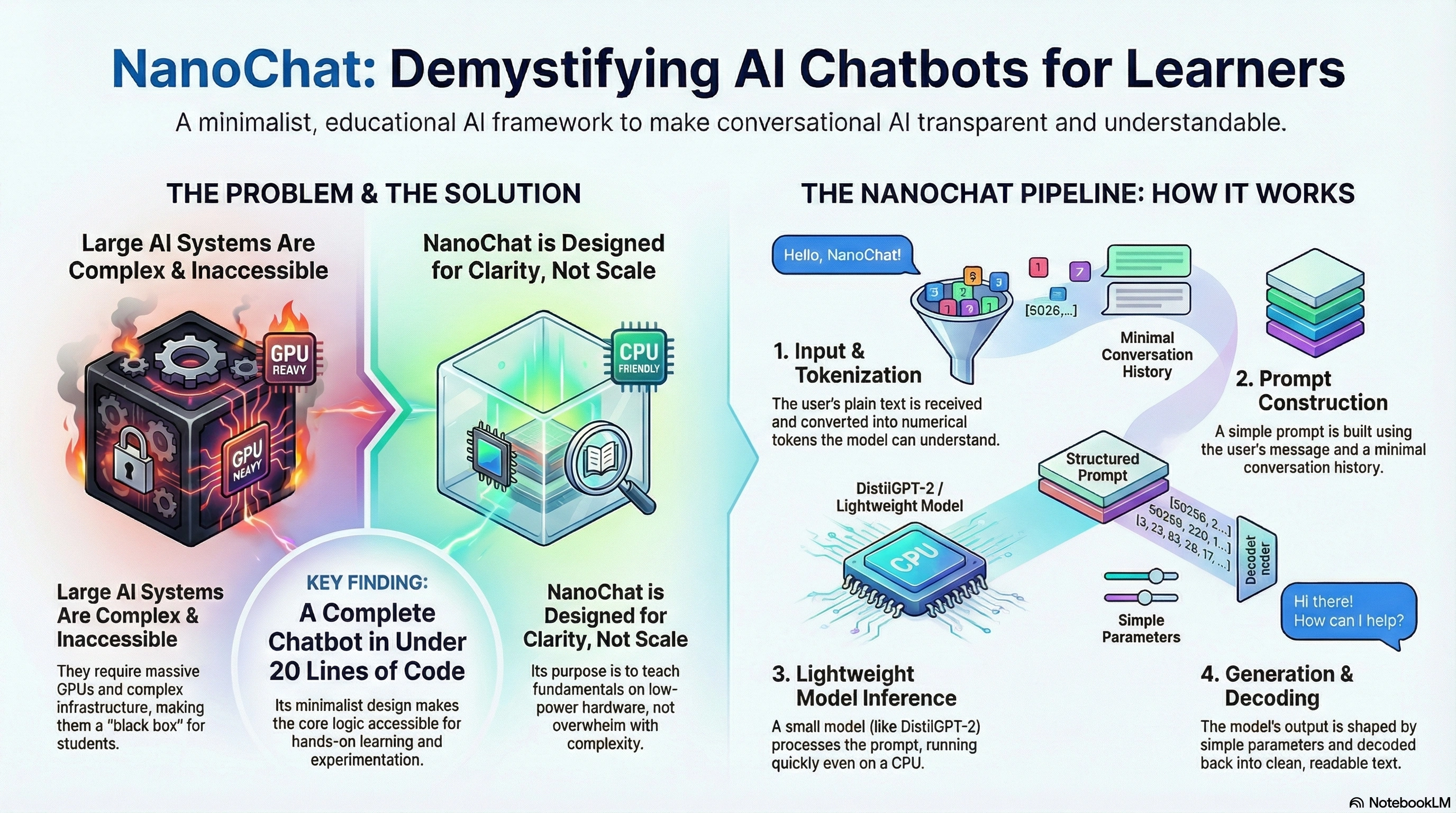
What Is NanoChat?
NanoChat is a compact, beginner-friendly AI chatbot built to demonstrate:
How text is processed before and after a model runs
How to call small Transformer models efficiently
How to manage prompts, context, and responses
How to create a functional chatbot in very few lines of code
How students can experiment with modern AI without needing GPUs
NanoChat is intentionally minimalist. Where enterprise chatbots use huge LLMs, caching layers, vector databases, and retrieval systems, NanoChat keeps a streamlined structure:
This simplicity makes NanoChat ideal for students learning the basics of AI inference.
Conceptual Background (Why NanoChat Exists)
Large chat systems like ChatGPT depend on massive infrastructure: dozens of GPUs, custom inference kernels, quantization, memory sharding, and optimized Transformer backbones.
NanoChat’s purpose is different:
Teach fundamentals — not overwhelm with scale
Run locally or in low-power notebooks
Show the anatomy of a chatbot
Use small Transformer models as examples
Where large LLMs emphasize capability, NanoChat emphasizes clarity.
Because most students cannot deploy billion-parameter models, NanoChat uses smaller pretrained models (e.g., DistilGPT-2, TinyBERT, small encoder-decoder models). The result: fast inference and easy experimentation.
NanoChat Architecture (High-Level)
NanoChat follows a simple conversational pipeline.

NanoChat is not about reinventing the Transformer; it is about orchestrating the whole chat pipeline around it minimally and educationally.
Step-by-Step Walkthrough of How NanoChat Works
1. User Input
NanoChat accepts plain text from the user. No complicated interfaces; simplicity is the goal.
2. Tokenization
NanoChat uses Hugging Face tokenizers because they are standardized, efficient, and match the format expected by small models.
3. Prompt Construction
NanoChat builds a short prompt focusing on:
Unlike full LLMs with large context windows, NanoChat keeps history tight for predictable performance.
4. Model Inference
NanoChat then calls a lightweight Transformer backbone. Examples:
DistilGPT-2 (lightweight decoder-only model)
TinyBERT (compressed encoder model)
MiniLM (Miniature language model from Microsoft)
These models run fast, even without GPU acceleration.
5. Generation Control
NanoChat exposes generation parameters to students for experimentation:
max_length
temperature
top_k or top_p sampling
repetition_penalty
These control creativity, randomness, and coherence.
6. Post-processing
The model’s raw output is decoded back to readable text. NanoChat trims unwanted tokens, removes artifacts, and returns a clean message.
7. Response Delivery
A lightweight API endpoint, Jupyter cell, or Hugging Face Space displays the final answer.
Example NanoChat Code (Minimal)
from transformers import AutoTokenizer, AutoModelForCausalLM

model_name = "distilgpt2"

tokenizer = AutoTokenizer.from_pretrained(model_name)
model = AutoModelForCausalLM.from_pretrained(model_name)

def nanochat(prompt):
    tokens = tokenizer(prompt, return_tensors="pt")
    output = model.generate(
        **tokens,
        max_length=60,
        temperature=0.8,
        top_p=0.95
    )
    return tokenizer.decode(output[0], skip_special_tokens=True)

print(nanochat("Hello NanoChat!"))
This is the essence of NanoChat: an entire chatbot in under 20 lines of code.
Sample Workflow JSON (For Teaching Pipelines)
{
  "workflow": "nanochat_inference",
  "steps": [
    {"step": "tokenize", "input": "user_message"},
    {"step": "prepare_prompt", "max_history": 2},
    {"step": "model_inference", "model": "distilgpt2"},
    {
      "step": "generate",
      "parameters": {
        "temperature": 0.7,
        "max_length": 80,
        "top_p": 0.9
      }
    },
    {"step": "decode_output", "strip_special_tokens": true}
  ]
}
Why NanoChat Matters (Its Strengths)
★ Educational Clarity
NanoChat makes AI transparent and understandable — ideal for teaching:
NLP fundamentals
Tokenization
Prompt engineering
Model inference
Generation strategies
★ Low Resource Requirements
NanoChat can run on:
Laptops
Classroom machines
Google Colab free tier
Hugging Face Spaces CPU
This opens AI learning to everyone, not just those with powerful hardware.
★ Customizable
Students can swap models, add context windows, modify sampling, or integrate tools.
★ Safe & Predictable
Since it uses small models and stable generation settings, NanoChat avoids wild outputs seen in large, unrestricted LLMs.
Key Concepts NanoChat Teaches (Without Making Transformers the Hero)
1. Tokenization ≠ Model
NanoChat helps students understand that tokenization is a preprocessing step, not intelligence.
2. The Model ≠ The Chatbot
A chatbot requires:
Input pipeline
Prompt design
Response generation
Safety constraints
NanoChat highlights the “glue code,” not just the model.
3. Context Management
Students learn practical limitations:
Small models forget context quickly
Long prompts slow inference
You must manage history explicitly
4. Sampling Matters
Temperature, top-k, and top-p dramatically shape chatbot personality. NanoChat invites experimentation.
Use Cases / Scenarios
▸ Classroom Learning
Teachers demonstrate real AI concepts interactively.
▸ Student Assignments
Build custom chatbots for:
Literature analysis
Coding tutors
Language practice
Math question answering
▸ Prototyping
Developers prototype conversation flows before scaling to full LLMs.
▸ Edge and Offline Use
NanoChat models can run offline for privacy or limited connectivity scenarios.
Limitations & Considerations
NanoChat keeps complexity low, which implies:
Short memory windows
Occasional incoherence (small models struggle with long reasoning)
Limited domain knowledge
Slower performance compared to quantized, optimized LLM runtimes
No inherent tool use, retrieval, or planning
These limitations are intentional — students see how real chatbots behave before advanced techniques are added.
Fixes & Enhancements
If NanoChat feels limited, here’s how to extend it:
Add RAG-lite: simple document lookup before generation
Add context summarization to expand memory
Replace models with quantized 4-bit LLMs for stronger capability
Integrate safety filters or regex-based content moderation
Add GUI interfaces using Gradio or Hugging Face Spaces
These steps help connect classroom basics to real-world AI apps.
Frequently Asked Questions (FAQ)
Is NanoChat meant to replace full LLMs?
No — NanoChat is designed for learning, not performance.
Does NanoChat require GPUs?
No. CPU-only environments are sufficient.
Can students plug in larger models later?
Yes. NanoChat’s architecture supports upgrading to bigger models with minimal code changes.
Why does NanoChat use Transformers at all?
Because Transformers are the standard interface for modern language models. NanoChat uses them without making them the focus.
Can NanoChat be integrated with APIs?
Absolutely — it can serve as a teaching example before students move to OpenAI, Gemini, or LLAMA APIs.
References
Hugging Face NanoChat Spaces documentation (public)
Hugging Face Transformers library
Educational model notebooks on HF Spaces
General AI pedagogy research
Foundational model architecture documentation
Conclusion
NanoChat brings conversational AI down to a scale that students and beginners can fully understand. Where large systems hide complexity behind APIs, NanoChat exposes the actual steps of building a chatbot — input, tokenization, prompts, models, and generation.
Transformers play only a supporting role; the real achievement of NanoChat is making AI accessible, explainable, and easy to experiment with.
For education, prototyping, and hands-on learning, NanoChat stands as one of the simplest and most elegant introductions to modern conversational AI.


Join the conversation! Your thoughts help the community grow.