

What is .NET Aspire Orchestration?
In .NET Aspire , orchestration is the process of defining, managing, and wiring together all components of your distributed application in a single, consistent way.
Instead of manually configuring APIs, frontends, databases, message brokers, and services, orchestration lets you describe how these parts fit together and automatically provisions, configures, and runs them – locally and in the cloud.
🏗 Key Concepts in Orchestration
| Concept | What It Means |
|---|---|
| AppHost Project | Central orchestrator project (a .NET Aspire app) where you declare all services and resources your app needs. |
| Distributed Application Model | A model where you define application components as resources (APIs, frontends, DBs) and link them. |
| Service Orchestration | Automatic wiring of dependencies between services (e.g., frontend → API → DB) and applying environment variables, connection strings, and secrets. |
| Cloud-Ready Configuration | Ensures that the same app orchestration works for local development, container deployment, and cloud environments. |
| Observability & Telemetry | Built-in logging, tracing, and health checks across all orchestrated services. |
⚙️ Typical Orchestration Flow
Here’s how orchestration usually works in a .NET Aspire solution:
Create an AppHost Project
dotnet new aspire-apphost -n MyApp.AppHostThis is where orchestration logic lives.
Declare Your Services and Resources
InsideProgram.cs(AppHost), you register:APIs (
.AddProject<>())Frontend apps
Databases (
.AddSqlServer(),.AddPostgres())Message brokers, caches, etc.
Wire Up Dependencies
Example:var builder = DistributedApplication.CreateBuilder(args); var db = builder.AddSqlServer("db").AddDatabase("MyDb"); var api = builder.AddProject<Projects.MyApp_Api>("api").WithReference(db); builder.AddProject<Projects.MyApp_Web>("web").WithReference(api); builder.Build().Run();This ensures the web project knows how to talk to the API, and the API knows how to talk to the database.
Run Locally or Deploy
Orchestration takes care of:Running everything locally with
dotnet runGenerating connection strings/secrets
Deploying to Docker/AKS with consistent config
📊 Orchestration Benefits
✅ Simplified Local Development: It makes running and debugging a multi-service application as simple as pressing F5 in Visual Studio. The AppHost handles all the boilerplate setup for you.
✅ Automatic Service Discovery: Services can find and communicate with each other using logical names defined in the AppHost, rather than hard-coded URLs or port numbers. This is a massive benefit in a distributed environment where network locations are dynamic.
✅ Built-in Observability: Aspire integrates with OpenTelemetry by default, providing a centralized Dashboard that gives you real-time insights into your application's logs, metrics, and distributed traces. This makes debugging and performance monitoring significantly easier.
✅ Code-First Configuration: The AppHost uses C# code to define the application model, which provides all the benefits of a modern programming language, including IntelliSense, strong typing, and simplified refactoring.
✅ Standardized Integrations: Aspire provides a set of curated NuGet packages for popular services. These packages not only make it easy to add a dependency like Redis but also apply best practices for health checks, telemetry, and configuration automatically.
.NET Aspire's orchestration is primarily focused on enhancing the developer experience and is not intended to be a replacement for production-level orchestrators like Kubernetes. Instead, it provides a seamless and consistent way to prepare your application for deployment to a cloud environment by providing a unified model from development to production.
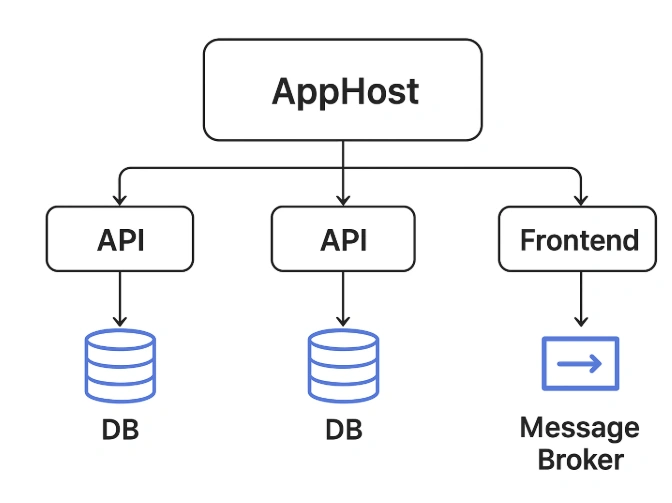
The AppHost is the brain orchestrating everything, automatically linking services, resources, and dependencies.
Join the conversation! Your thoughts help the community grow.