

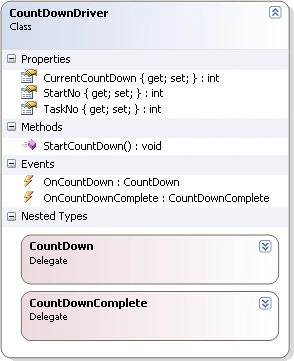
- #region Custom Event Delegates
- public delegate void CountDown(object o, EventArgs e);
- public delegate void CountDownComplete(object o, EventArgs e);
- #endregion
- #region Custom Events
- public event CountDown OnCountDown;
- public event CountDownComplete OnCountDownComplete;
- #endregion
The OnCountDown event is fired by Parallel Task after each count down. The OnCountDownComplete event is fired after the countdown is complete.
- public void StartCountDown()
- {
- for (int i = StartNo; i >= 0; i--)
- {
- System.Threading.Thread.Sleep(1000);
- if (i == 0)
- {
- if (OnCountDownComplete != null)
- {
- //Fire OnCountDownComplete event
- OnCountDownComplete(this, new EventArgs());
- }
- break;
- }
- if (OnCountDown != null)
- {
- this.CurrentCountDown = i;
- //Fire OnCountDown event
- OnCountDown(this, new EventArgs());
- }
- }
- }
When the Application launches the Tasks, these Events are mapped to Event Handlers in the Application.
- NoOfParallelTasks = int.Parse(tbNoOfParallelTasks.Text);
- for (int i = 0; i < NoOfParallelTasks; i++)
- {
- CountDownDriver countDown = new CountDownDriver { StartNo = int.Parse(tbStartNo.Text), TaskNo = i + 1 };
- countDown.OnCountDown += new CountDownDriver.CountDown(countDown_OnCountDown);
- countDown.OnCountDownComplete += new CountDownDriver.CountDownComplete(countDown_OnCountDownComplete);
- //Start Parallel Task
- System.Threading.Tasks.Task.Factory.StartNew(new Action(() => countDown.StartCountDown()));
- }
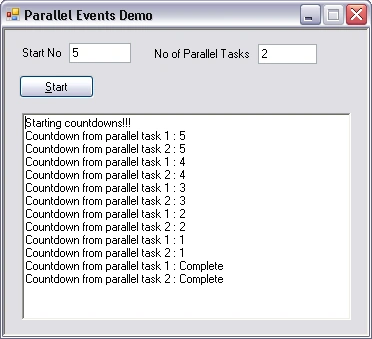
Thus, when these Events are fired inside the Parallel Tasks, the Application is notified and the Event Handler executes. The data from the Parallel Task is a parameter of the Event and can be accessed inside the Event Handler. In this demo, the code in the Event Handlers prints data from the Parallel Task to the UI.
- void countDown_OnCountDown(object o, EventArgs e) {
- lock(this) {
- CountDownDriver countDown = (CountDownDriver) o;
- rtbResult.Invoke(() => {
- this.rtbResult.Text = this.rtbResult.Text + "\n" +
- "Countdown from parallel task " +
- countDown.TaskNo.ToString() + " : " +
- countDown.CurrentCountDown.ToString();
- });
- }
- }
Note: Invoke has to be used to acquire the UI Thread first before writing to it. I have written an Invoke() Extension Method to Control which accepts an Action (Lambda Expression) parameter as shown below :
- public static void Invoke(this Control control, System.Action action)
- {
- if (control.InvokeRequired)
- {
- control.Invoke(action);
- }
- else
- {
- action();
- }
- }
Sam HobbsPosted Jan 12, 2011, 7:57 AM
I wonder what the advantage is of using a System.Threading.Tasks.Task instead of System.ComponentModel.BackgroundWorker when the UI is frequently updated from the thread as shown in this article.