

Definition
In very simple terms, we can say that "a regular expression is a group of characters that defines a pattern," and using that pattern we find out specific information that we require in our case.
Hence, regular expressions are nothing but a group of characters that have special meanings to the regular expression engine, which is already installed in the .NET framework and represented by System.Text.RegularExpressions.Regex.
Goal of Article
My goal in this article is to give you a basic understanding of regular expressions in a very short span of time. I will guide you so that you can create and use your own regular expressions in your .NET applications to meet your needs. After reading this article, you will be able to create your own regular expressions to match a standard phone number, social security number, Email address, postal code, etc.
Prerequisites
You must have a basic understanding of C# Language and some basic concepts of OOPS (object-oriented programming).
Let’s Jump into Regular Expressions
Before I start discussing the syntax and the regular expression engine, let me answer some questions that you might have in your mind.
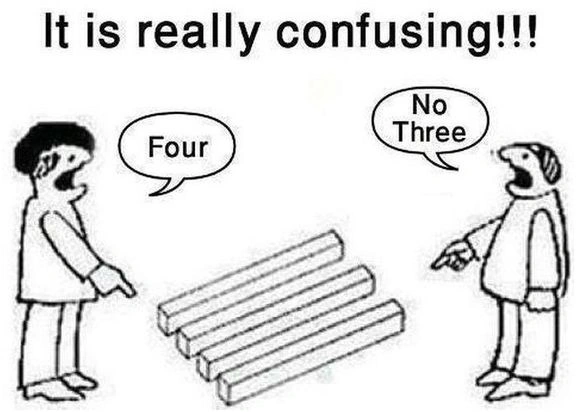 You might be confused like these guys
If you are confused and thinking regular expressions are hard to learn then trust me, regular expressions are not that bad, in fact, it's really very easy to learn and use them. Once you are up and running with the regular expressions, I believe you will be doing more cool and fun stuff with Regex and will be fully utilizing the power of the .NET regular expressions engine.
What Regular Expressions Are
As I told you earlier, regular expressions are nothing but a string of special characters that define a pattern, that further will be used in our C# program to extract out specific information from a large block of the text.
Why We Need Regular Expressions
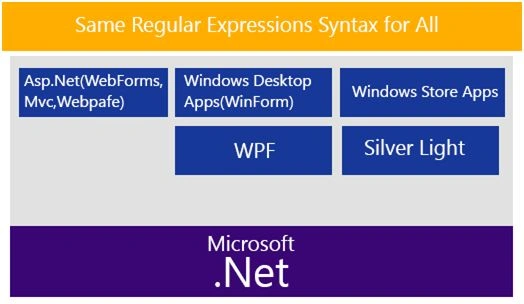
As a .NET developer, we work on different types of Applications like Web, mobile, or desktop apps. Now, one thing common in all types of applications is taking input from the users. The users might intentionally or unintentionally put in the wrong input. Now, it’s our duty as a developer to validate that input, before we process the information and store that into the database. The wrong input might crash our applications. Hence, we need regular expressions to validate that input. This was only one reason, but they're so many reasons why we use regular expressions. It's because after all, regular expressions provide us with a powerful and fast way to manipulate and parse the text. There is a plus point for us because the regular expression syntax is the same for all types of .NET applications.
You might be confused like these guys
If you are confused and thinking regular expressions are hard to learn then trust me, regular expressions are not that bad, in fact, it's really very easy to learn and use them. Once you are up and running with the regular expressions, I believe you will be doing more cool and fun stuff with Regex and will be fully utilizing the power of the .NET regular expressions engine.
What Regular Expressions Are
As I told you earlier, regular expressions are nothing but a string of special characters that define a pattern, that further will be used in our C# program to extract out specific information from a large block of the text.
Why We Need Regular Expressions
As a .NET developer, we work on different types of Applications like Web, mobile, or desktop apps. Now, one thing common in all types of applications is taking input from the users. The users might intentionally or unintentionally put in the wrong input. Now, it’s our duty as a developer to validate that input, before we process the information and store that into the database. The wrong input might crash our applications. Hence, we need regular expressions to validate that input. This was only one reason, but they're so many reasons why we use regular expressions. It's because after all, regular expressions provide us with a powerful and fast way to manipulate and parse the text. There is a plus point for us because the regular expression syntax is the same for all types of .NET applications.
 Uses of Regular Expressions
There are many practical uses of regular expressions, but let me tell you some common ones, which are:
Uses of Regular Expressions
There are many practical uses of regular expressions, but let me tell you some common ones, which are:
- The regular expressions can be used to manipulate and validate user inputs.
- The regular expressions can be used to replace, remove, and pull out the values from the text input.
- You can use the regular expressions to parse HTML documents to take out some specific data to store in the database.
- The regular expressions might be used to find out specific words or sentences in a large document, instead of reading the whole document.
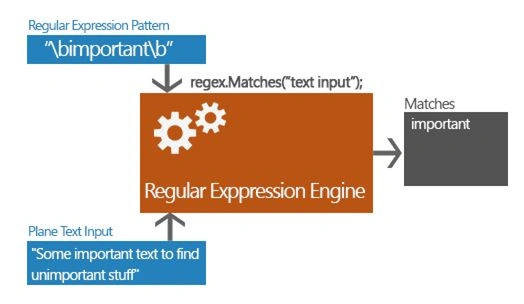
The following example will give you a basic visual understanding of regular expressions. This actually happens when your Regex exactly returns what you want.
 Now Let’s Start Learning and Practicing
The best way to learn anything in the world is to start practicing and getting your hands dirty with it before you completely learn it, and in the end, there is always something more to learn.
How Regular Expressions Work
Regular expressions are used to process text-based data on the regular expression engine, i.e. already installed in .NET Framework, and are represented by System.Text.RegularExpressions.Regex.
The regular expression engine needs only two things to process the text.
Now Let’s Start Learning and Practicing
The best way to learn anything in the world is to start practicing and getting your hands dirty with it before you completely learn it, and in the end, there is always something more to learn.
How Regular Expressions Work
Regular expressions are used to process text-based data on the regular expression engine, i.e. already installed in .NET Framework, and are represented by System.Text.RegularExpressions.Regex.
The regular expression engine needs only two things to process the text.
- The regular expression pattern that you defined to find text. (Don’t worry, later in this article, we will learn the syntax of the regular expression).
- The second thing is the input text that we need to parse.
Basic Syntax
Now, it’s time to learn the basic syntax of .NET regular expressions, so that we can create and use them in our C# programs.
Special Characters
As I told you earlier, regular expressions are a group of special characters with special meanings.
There are some mostly used special characters listed below in the table that I referenced from MSDN.
| Special Characters | |
| \b | Represents the position at the beginning and end of the word. |
| \d | Represents any digit character. |
| \t | Represents a backspace character. |
| \n | Represent new line character. |
| \s | Represents any white space character. |
| . | Represents every character on the same line. |
| \w | Represents any non-digit alphanumeric character. |
| ^ | Matches position at beginning of the whole string. |
| $ | Represents position at the end of the whole string. |
Before we see some more special characters, let me explain some simple examples where we will use the above characters so that you can feel more comfortable. Before proceeding, you need a basic understanding of the Regex class and its methods.
Basic Understanding of Regex Class
Regex is a standard C# .NET class, i.e. used to represent the regular expressions in .NET. We can easily say that Regex is used to represent an immutable regular expression. It’s because later we will see that Regex actually accepts a regular expression value in form of a string. String class is an immutable class in .NET. Immutable means once we set a value to string the object, later, we can’t change that value. To learn more about the string class and its immutable nature, you can click here.
Now, we know the Regex class represents a regular expression, and to use that class in our program, we need to create an instance of it so that we can find the matches and to do more crazy stuff with our text inputs. To create an instance of the Regex class, we will use one of its Constructors, which will take the regular expression pattern string as an argument.
Methods of Regex
Here, I will explain some of the most commonly used Regex class methods.
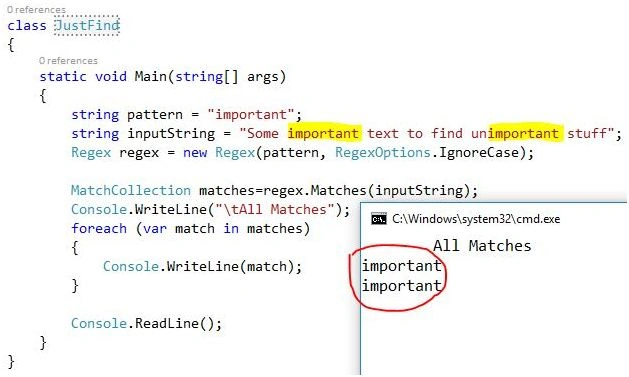
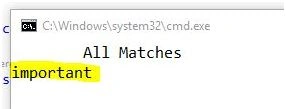
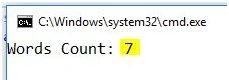
- Regex regex = new Regex(@"\bimportant\b");

Pankajkumar PatelPosted Aug 19, 2019, 12:33 AM
Nice article
Divyanshi PandeyPosted Aug 19, 2019, 12:20 AM
Excellent article well explained ....thanks
Hussain PatelPosted Nov 2, 2016, 9:44 AM
Nicely written and nice artilce
Kishor KumarPosted Sep 21, 2016, 1:54 PM
Nice Article Mobeen Rashid!!
Vignesh ManiPosted Jun 30, 2016, 5:47 PM
Nice
Abhishek AroraPosted Jun 30, 2016, 8:23 AM
Thanks for sharing an useful article.
Debasis SahaPosted Jun 30, 2016, 7:24 AM
Nice one..
kalu singh raoPosted Jun 30, 2016, 1:35 AM
Nice...
Santhakumar MunuswamyPosted Jun 30, 2016, 12:43 AM
Thank you for nice article
RajaPosted Jun 30, 2016, 12:27 AM
Nice Article....
Bhavik PatelPosted Jun 29, 2016, 10:24 PM
Nice
Manish Kumar ChoudharyPosted Jun 29, 2016, 2:23 PM
Nice explanation