

Microsoft SQL Server 2012 Release Candidate 0 has announced 3 new builtin conversion functions.
Those new functions are listed below.
- Conversion functions
- Parse
- Try_Parse
- Try_convert
Conversion Function
There are 3 new conversion functions and for those who have already worked in the .Net framework, they will easily figure out what the functions will do when I say parse, tryparse.
PARSE
This function will parse the value and return the result. If it is not able to parse then it will throw an error. You can use this function to convert strings or datetime data to datetime or numeric values. Please trust me, this function has performance issues compared to CAST/CONVERT. The syntax is:
PARSE ( string_value AS data_type [ USING culture ] )
This function expects the 3 parameters:
- String_value - The expression to be parsed
- Data_type - The data type we are converting to
- CULTURE - The culture i.e language such as gb-en or us-en. This is an optional parameter.
Let us see some examples to learn how it works.
SELECT PARSE('08-04-2012' AS datetime USING 'en-US') AS Date
select cast('08-04-2012' AS datetime) as Date
Now the output is:
So many people can wonder why we have to use Parse when it produces the same output as the CAST function.
Suppose you are not using the "en-US" culture and instead you are working in Paris and your server date settings is native to 'fr-FR' and you display the date in DD/MM/YYYY format, then what will happen if you use the CAST function?
See the following queries:
SELECT PARSE('08-04-2012' AS datetime USING 'fr-fr') AS Date
select cast('08-04-2012' AS datetime) as Date
Now the output will be:
So now you might understand the real use of Parse I guess. And this is not the only one.
In my database I save an inserted date as varchar and in the format "14-Aug-2012" like this. Then how will you convert it into a normal datetime? That's where the Parse function is relevant.
Consider my following queries and see the outputs.
SELECT PARSE('14-Aug-2012' AS datetime USING 'en-us') AS Date
SELECT PARSE('August 14,2012' AS datetime USING 'en-us') AS Date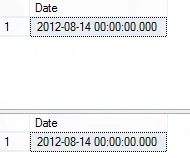
Isn't it good?? Saves developer's time.
We have seen for datetime, now what about numeric? Ok let us see another example.
In many countries, in decimals, instead of a '.' a comma ',' is used, especially in European countries.
125.00 is the same as 125,00 in France.
So in the database, I have a varchar column but save values in decimals and have records like:
125,00
134,00
456,00
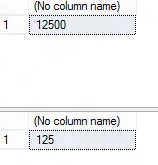
Now we have to go for culture options in the parse function.
select parse('125,00' as decimal using 'en-US')
select parse('125,00' as decimal USING 'fr-FR')






SubashPosted Aug 30, 2016, 12:31 PM
Nice article
Santhosh Kumar JayaramanPosted Aug 19, 2012, 2:55 AM
If you see in all the functions, they take input in string format. So if you want to convert decimal to int using these functions, then you need to convert to varchar first. But instead of that you can directly cast it to int from decimal
Vipendra VermaPosted Aug 19, 2012, 2:52 AM
nice article but I want to know can we convert any decimal value to integer value using function...