

Introduction
In my previous article I told you about "ngDirty in AngularJS".
In this article I will tell you about "ngInvalid" in AngularJS.
ng-dirty in AngularJs helps to identify whether any changes are made by the user at run time or not. If you are making changes from the code section then it's Ok for ng-dirty and it will not provide any type of error but if you are making changes at run time then it will show an error or display the text according to the CSS defined in the ng-dirty class.
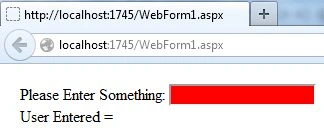
ng-invalid helps to identify whether some invalid data is entered by the user or can also help to identify whether the user has entered something or not.
Like ng-dirty, it is also defined in CSS as a class, then it is applied to the design section.
Now I will create a simple application and will show how to use ng-dirty in your application.
Step 1
First of all you need to add an external Angular.js file to your application, "angular.min.js".
For this you can go to the AngularJS official site or can download my source code and then fetch it or you can click on this link and download it: ANGULARJS.
After downloading the external file you need to add this file to the Head section of your application.
<head runat="server">
<title></title>
<script src="angular.min.js"></script>
</head>
Step 2
Now after adding the external JS file the first thing you need to do is to add ng-app in the <HTML> Tag otherwise your application will not run.
<html ng-app xmlns="http://www.w3.org/1999/xhtml">
Now I will work on the JavaScript section for this application.
Write this code in the head section:
<script>
var mod = angular.module('mod', []);
function x($scope) {
$scope.UserEnter = 'Anu';
}
</script>
Here I created a variable in which the angular.module is defined.
After this a function is created named "x", in this function a variable is used whose value is set to "Anu".
Step 3
Now I will work on the CSS that will use the ng-invalid property of Angular.
Write this code just below the JavaScript that was provided in the step above.
<style>
body { padding: 12px; }
.ng-invalid { background-color: red; }
</style>
Here I apply the background-color property to the ng-invalid class, this means that the background color of that div will become red whereever ng-app is applied, if ng-app is applied in the head section then the entire background will become red.
Step 4
Now I will work on the Body section, so write this code in the body:
<div ng-app>
<form name="myForm" ng-controller="x">
Please Enter Something:
<input name="input" ng-model="UserEnter" required>
<span class="error" ng-show="myForm.input.$error.required">Required</span><br>
User Entered = {{UserEnter}}
<br>
</form>
</div>
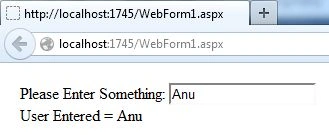
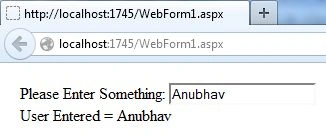
Join the conversation! Your thoughts help the community grow.